How to Program Garage Opener in Jeep Grand Cherokee: Easy Steps Guide
If you own a Jeep Grand Cherokee, you know how convenient it is to open your garage door without stepping out of your car. But what if your garage opener isn’t programmed yet?
Don’t worry—programming your garage opener is easier than you think. In this guide, you’ll learn step-by-step how to set up your Jeep’s built-in garage opener quickly and hassle-free. Imagine the ease of pulling into your driveway and having your garage door open automatically.
Keep reading, and you’ll have it working like a pro in no time.
Credit: www.jeepgarage.org
Prepare Your Garage Opener And Vehicle
Start by checking your garage door opener’s manual and ensuring your Jeep Grand Cherokee is parked close to the garage. Keep the vehicle’s ignition on and have the remote handy for easy programming.
Gather Required Tools And Materials
Start by gathering everything needed to program your garage opener. Most Jeep Grand Cherokees require no special tools. You only need your vehicle’s key fob and the remote control for your garage door. Keep the car turned off but with the ignition in the “On” position. Have your garage door opener’s manual nearby for reference. This helps if you need to reset or troubleshoot any step.
Locate The Garage Opener Buttons In Jeep
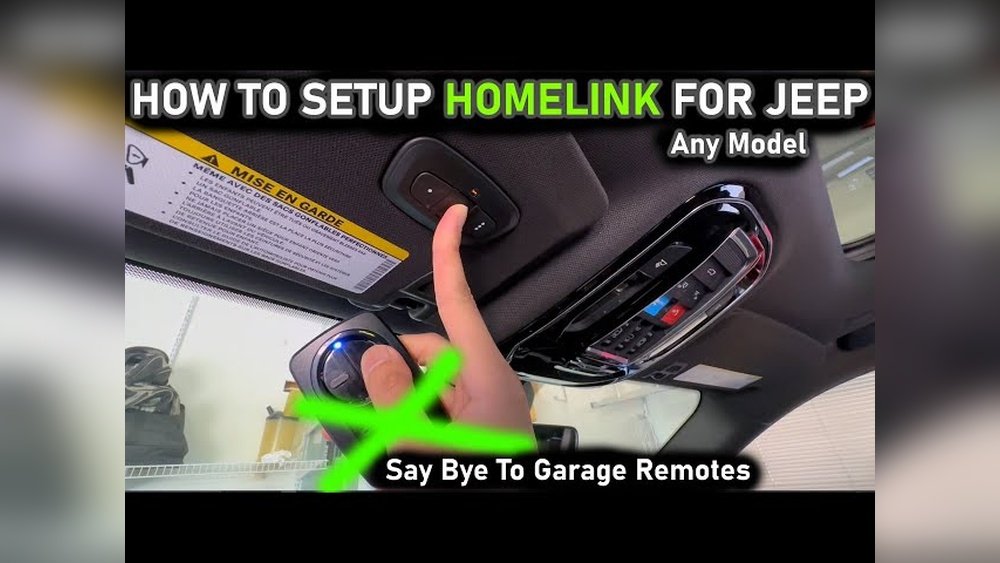
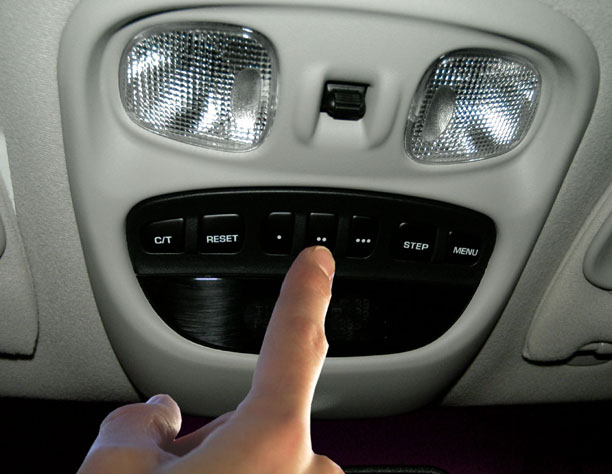
Inside your Jeep Grand Cherokee, find the built-in garage opener buttons. These are usually on the rearview mirror or overhead console. They often appear as three small buttons or a single button with LED lights. Identifying these buttons is key to programming your garage opener. Make sure the buttons are clean and not stuck. This ensures smooth programming and later use.
Clear Previous Programming
Clearing previous programming is a key step before setting up your Jeep Grand Cherokee’s garage opener. This ensures no old codes interfere with the new ones. A fresh start makes programming smooth and reliable.
Old codes can cause confusion. They might stop the opener from working correctly. Clearing these codes helps avoid any mix-ups. It resets the system to factory settings.
Resetting The Garage Opener Buttons
Begin by turning your vehicle’s ignition to the “on” position. Hold down the two outer buttons on the garage opener for about 20 seconds. Watch for the indicator light to flash rapidly. This signal shows the buttons have been reset. Release the buttons once the light changes. The opener buttons are now cleared of previous codes.
Ensuring A Fresh Programming Start
After resetting, wait for a few seconds before programming. This pause helps the system clear any lingering signals. Test the buttons to confirm they do not activate the garage door. If the door moves, repeat the reset process. Only proceed once the buttons are fully cleared. This step guarantees a clean slate for new programming.
Sync Jeep With Garage Door Opener
Syncing your Jeep Grand Cherokee with a garage door opener makes daily parking easier. This process connects your vehicle’s built-in remote to your garage system. You can open and close the garage door using buttons inside your Jeep. The setup is quick and does not need extra tools. Follow these clear steps to sync your Jeep with the garage door opener.
Enter Programming Mode In Vehicle
Start by sitting in your Jeep with the engine on. Locate the garage door opener buttons on the rearview mirror or overhead console. Press and hold the two outside buttons for about 20 seconds. Release the buttons when the indicator light starts flashing. This means the system is ready to learn your garage door signal. Your Jeep is now in programming mode.
Press Garage Opener Remote Buttons
Take your garage door remote in hand. Hold it close to the vehicle’s built-in buttons. Press and hold the button on the remote and the button in your Jeep at the same time. Keep holding until the indicator light on your Jeep flashes rapidly. This confirms the signal has been learned. Test by pressing the Jeep’s button to open the garage door.
Credit: www.youtube.com
Test The Garage Door Operation
Testing the garage door operation is the final step after programming the garage opener in your Jeep Grand Cherokee. This step ensures the system works correctly and safely. You want to confirm the door opens and closes smoothly. Any issues should be identified and fixed early. This avoids trouble later.
Verify Door Opens And Closes
Press the programmed button inside your Jeep. Watch the garage door carefully. It should start opening without delay. Check if it opens fully without stopping. Next, press the button again to close the door. The door should move down smoothly and close completely. If the door stops or reverses, it means the system needs adjustment. Repeat the test a few times to be sure. Consistent operation means the programming was successful.
Troubleshoot Common Issues
If the garage door does not respond, check the Jeep’s battery. A weak battery can cause poor signal. Make sure the button is fully programmed. Try reprogramming if needed. Sometimes, the door sensor blocks the operation. Clear any objects near the sensors. Also, check if the garage door opener unit is plugged in and powered. If the door moves partially, adjust the travel limits on the opener. These simple checks fix most problems quickly. Call a technician if issues continue.
Program Multiple Garage Doors
Programming multiple garage doors in your Jeep Grand Cherokee is simple and saves time. You can control up to three different garage doors using the built-in HomeLink system. This feature lets you open or close any door with just one click from your vehicle.
Each garage door can be set to a separate button inside your Jeep. This setup helps you manage multiple doors without confusion. Follow these steps to program each door clearly and easily.
Repeat Steps For Additional Doors
Start by programming the first garage door using the HomeLink button. After successful programming, move to the next button. Repeat the same process for each door you want to add. Make sure to stand near the garage door opener while programming. This ensures the signal transfers properly to your Jeep’s system.
Each button stores a different garage door code. Program them one by one for easy access. Test each button after programming to confirm the door responds correctly.
Manage Multiple Button Settings
You can customize the buttons to match your preferences. Label each button if your system allows it. This helps avoid pressing the wrong button by accident. Keep track of which button controls which door. Use simple names like “Garage 1” or “Back Door” for clarity.
Reset or reprogram buttons anytime if your garage door opener changes. Clear old codes to keep the system secure. Managing buttons this way keeps your garage access organized and safe.
Credit: jeepspecs.com
Frequently Asked Questions
How Do I Program The Garage Opener In A Jeep Grand Cherokee?
Start by turning your Jeep’s ignition to the “On” position. Hold the garage remote close to the built-in opener buttons. Press and hold both the remote button and the desired built-in button until the light blinks.
Can I Program Multiple Garage Door Openers In My Jeep?
Yes, you can program up to three different garage door openers. Repeat the programming steps for each remote using separate buttons. This lets you control multiple garage doors from one vehicle.
What If The Jeep Garage Opener Won’t Program Properly?
Make sure your remote battery is fresh and working well. Check your garage door opener’s compatibility with the Jeep system. Try holding the buttons longer during programming if it fails.
How Do I Erase All Programmed Garage Openers In My Jeep?
Press and hold the two outside buttons on the built-in opener for about 20 seconds. The indicator light will flash, showing that all codes are cleared. This resets the system for new programming.
Conclusion
Programming your Jeep Grand Cherokee’s garage opener is simple and fast. Follow the steps carefully to avoid errors. Keep your remote and vehicle close during the process. Test the opener after programming to ensure it works well. Repeat the steps if needed for a perfect setup.
Enjoy the convenience of opening your garage with a button inside your car. This small task saves time and adds comfort to your daily routine. Don’t worry if it takes a couple of tries; patience helps. Now you can easily control your garage door from your Jeep.