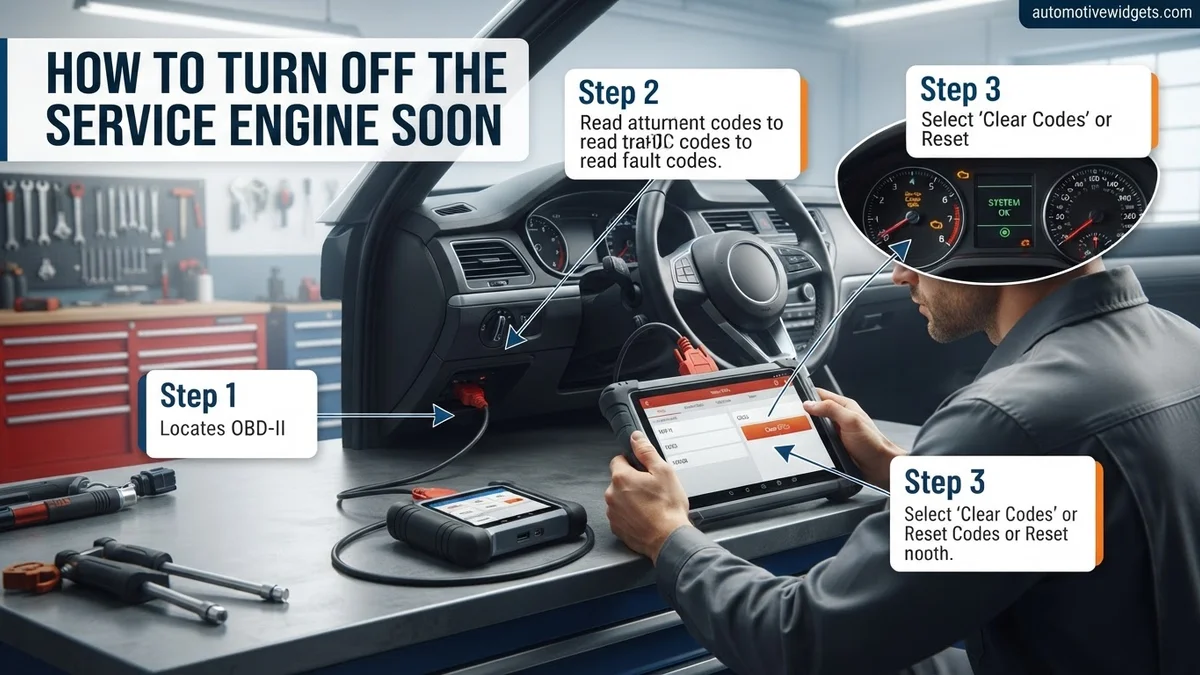
How To Turn Off The Service Engine Soon Light How to 2027
Addressing a ‘Service Engine Soon’ light requires understanding its cause before attempting to clear it. This guide provides step-by-step methods, primarily using an OBD2 scanner, to safely turn off the indicator after diagnosis or repair. Learn when it’s appropriate to clear the light and when professional help is essential.
When your ‘Service Engine Soon’ light illuminates, your immediate thought is likely, “How do I turn that thing off?” You can safely and effectively reset this light, but it’s crucial to understand why it came on first. Simply clearing the light without addressing the underlying issue is a temporary fix that can lead to bigger, more expensive problems down the road. This guide will walk you through the precise steps to diagnose and clear the light, ensuring your vehicle remains in optimal condition for 2027 and beyond.
Knowing how to properly manage your ‘Service Engine Soon’ light empowers you. It helps you distinguish between a minor maintenance reminder and a more serious fault, preventing unnecessary trips to the mechanic for simple resets. By following these methods, you gain control over your vehicle’s alerts, allowing you to react appropriately and maintain your car’s longevity and performance.
Key Takeaways
- Diagnose cause before clearing light.
- Use an OBD2 scanner for safe reset.
- Battery disconnect has potential risks.
- Distinguish from ‘Check Engine Light’.
- Seek professional help if light returns.
What Triggers the ‘Service Engine Soon’ Light?
SES vs. Check Engine Light: A Key Distinction
In 2027, vehicles still use dashboard lights to communicate. It’s vital to differentiate between the ‘Service Engine Soon’ (SES) light and the ‘Check Engine Light’ (CEL). The CEL, often amber or red and shaped like an engine, typically indicates a more serious powertrain issue that requires immediate attention. Conversely, the ‘Service Engine Soon’ light usually points to less critical issues or routine maintenance requirements. It’s often related to emissions system minor faults, scheduled service intervals, or specific manufacturer-defined events.
- Check Engine Light (CEL): Indicates a fault code (DTC) that could impact emissions, performance, or safety. Often requires prompt diagnosis.
- Service Engine Soon (SES) Light: More commonly associated with maintenance reminders (e.g., oil change due, scheduled service at X miles), or minor, non-critical emission system anomalies that don’t immediately threaten vehicle operation.
Common Scenarios in 2027
Modern vehicles by 2027 are highly sophisticated. The SES light might illuminate for a variety of reasons. Your car’s onboard computer might trigger it for a slightly loose gas cap, a minor sensor reading anomaly that’s within a wider acceptable range but still flags attention, or to alert you that it’s time for a scheduled service like a 30,000-mile inspection. Some manufacturers use it for specific system checks, like an EVAP system leak that isn’t severe enough to trigger a full CEL. It’s essentially your car’s way of saying, “Take a look at me, but don’t panic.”
- Maintenance Reminders: Oil change, tire rotation, or major service interval.
- Minor Emissions Issues: Such as a small EVAP leak or an oxygen sensor operating slightly out of spec.
- Manufacturer-Specific Alerts: Unique warnings tied to your car’s specific make and model, often detailed in your owner’s manual.
From Start to Finish: Silencing That Pesky ‘Service Engine Soon’ Light
The illumination of your vehicle’s ‘Service Engine Soon’ light can be a source of immediate anxiety, often leading to questions about your car’s health and potential repair costs. This comprehensive guide is designed to empower you with the knowledge and steps needed to understand, diagnose, and correctly address the underlying issues that trigger this warning. Unlike simply resetting a light, which offers a temporary fix, this guide emphasizes proper diagnosis and resolution, ensuring your vehicle remains in optimal condition and preventing minor issues from escalating into major, costly repairs.
Step 1: Understand the ‘Service Engine Soon’ vs. ‘Check Engine’ Indicator
What you need: Your vehicle’s owner’s manual (optional, but helpful for specific light interpretation).
Instructions: Before taking any action, it’s crucial to differentiate between the ‘Service Engine Soon’ light and the ‘Check Engine’ light (often labeled ‘CEL’ or an engine icon). The ‘Service Engine Soon’ light typically indicates a less critical issue, such as a scheduled maintenance reminder, a minor emissions system fault, or a loose gas cap, which may not require immediate stopping of the vehicle. The ‘Check Engine’ light, conversely, usually points to a more serious problem requiring prompt attention. Refer to your owner’s manual to confirm the specific meaning for your vehicle model and year.
Pro Tip: Many newer vehicles have distinct icons or text for these warnings. A ‘Service Engine Soon’ light often means the powertrain control module (PCM) has detected a condition that isn’t immediately damaging but warrants investigation. Never ignore either light, as even minor issues can worsen over time.
Step 2: Equip Yourself with the Right Diagnostic Tool
What you need: An OBD-II (On-Board Diagnostics II) scanner. These can be purchased online, at auto parts stores, or sometimes borrowed from local parts retailers.
Instructions: To accurately diagnose the cause of the ‘Service Engine Soon’ light, you’ll need an OBD-II scanner. There are various types, ranging from basic code readers (which only display codes) to more advanced diagnostic tools (which offer live data, freeze frame data, and more). For most DIYers, a basic to mid-range scanner is sufficient. Ensure the scanner is compatible with your vehicle (all vehicles sold in the US after 1996 are OBD-II compliant). Familiarize yourself with the scanner’s basic operation, such as powering it on, navigating menus, and selecting the “Read Codes” function.
Pro Tip: Consider a scanner that can also display readiness monitors and clear codes. Bluetooth OBD-II dongles paired with smartphone apps can be a cost-effective and powerful alternative, offering similar functionality to mid-range dedicated scanners.
Step 3: Locating and Connecting Your OBD-II Scanner
What you need: Your OBD-II scanner, vehicle keys.
Instructions: The OBD-II diagnostic port is almost universally located within 3 feet of the steering wheel, usually under the dashboard on the driver’s side. It’s a trapezoidal 16-pin connector. Once you’ve located it, ensure the vehicle’s ignition is in the “OFF” position. Firmly plug the scanner’s connector into the vehicle’s OBD-II port. You should hear or feel a click, indicating a secure connection. After connecting, turn the ignition key to the “ON” position (without starting the engine) or press the start button twice for push-button start vehicles. Your scanner should power on automatically, or you may need to press its power button.
Pro Tip: If your scanner doesn’t power on, double-check the connection. Some older or simpler scanners might require the engine to be running to draw sufficient power, but typically “Key On, Engine Off” (KOEO) is enough for reading codes. Avoid wiggling the connector excessively once plugged in.
Step 4: Reading and Recording Diagnostic Trouble Codes (DTCs)
What you need: Connected OBD-II scanner, a notepad and pen or a smartphone for notes.
Instructions: With the scanner powered on and connected, navigate its menu to find the “Read Codes,” “Trouble Codes,” or “DTCs” option. Select this option. The scanner will communicate with your vehicle’s computer and display any stored Diagnostic Trouble Codes (DTCs). These codes typically begin with a letter (e.g., P for Powertrain, B for Body, C for Chassis, U for Network) followed by four numbers (e.g., P0420, P0171). Carefully write down ALL displayed codes, including their full alphanumeric sequence and any accompanying descriptions provided by the scanner. Some scanners may also show “Pending Codes” or “Freeze Frame Data,” which are valuable for diagnosis.
Pro Tip: Always record all codes. Sometimes, a seemingly unrelated code can be a symptom of another primary issue. Freeze frame data captures the engine’s operating conditions (speed, RPM, engine temperature, etc.) at the moment a fault code was set, providing crucial context for diagnosis.
Step 5: Deciphering the Codes and Diagnosing the Root Cause
What you need: Recorded DTCs, internet access (for research), vehicle service manual (if available).
Instructions: This is the most critical step. Do NOT clear the codes yet. Use the recorded DTCs to research their specific meaning. Websites like OBD-Codes.com, repair manuals (e.g., Chilton, Haynes), or manufacturer-specific forums are excellent resources. A code like P0420 (Catalyst System Efficiency Below Threshold) doesn’t always mean a bad catalytic converter; it could be a faulty oxygen sensor or an exhaust leak. Research common causes for each code, potential symptoms, and recommended diagnostic procedures. This research will guide you toward identifying the actual component or system causing the problem. Prioritize codes that are “Confirmed” or “Hard Codes” over “Pending Codes.”
Pro Tip: Look for technical service bulletins (TSBs) related to your vehicle’s make, model, year, and the specific DTCs. TSBs are factory-issued repair procedures for common issues that may not warrant a recall but are known problems. Multiple codes can sometimes point to a single component failure, such as a failing mass airflow sensor affecting fuel trim codes.
Step 6: Addressing the Underlying Problem
What you need: Tools specific to the identified repair (e.g., wrench set, screwdrivers, torque wrench, multimeter), replacement parts (e.g., new gas cap, O2 sensor, spark plugs), safety gear (gloves, safety glasses).
Instructions: Based on your diagnosis from Step 5, you now need to perform the necessary repair. This could be as simple as tightening a loose gas cap, which is a common cause for the ‘Service Engine Soon’ light, or as complex as replacing an oxygen sensor, repairing a vacuum leak, or cleaning a mass airflow sensor. Always consult a reputable repair manual or online guides specific to your vehicle for detailed instructions on component location, removal, and installation. Ensure you use quality replacement parts. Once the repair is complete, double-check all connections and ensure everything is properly secured.
Pro Tip: Before clearing any codes, it’s a good practice to test the repaired component if possible. For instance, if you replaced an O2 sensor, check its live data readings with your scanner after starting the engine. Also, avoid clearing codes before the repair, as they provide valuable data for verification and can reappear immediately if the problem persists.
Step 7: Safely Clearing the ‘Service Engine Soon’ Light (Post-Repair)
What you need: OBD-II scanner, repaired vehicle.
Instructions: After successfully completing the repair, reconnect your OBD-II scanner to the port. Turn the ignition to the “ON” position (KOEO). Navigate to the “Erase Codes,” “Clear Codes,” or “Reset MIL” option on your scanner. Confirm your choice when prompted. The scanner will send a command to the vehicle’s PCM to clear all stored diagnostic trouble codes and turn off the ‘Service Engine Soon’ light. Disconnect the scanner once the process is complete. Clearing the codes also resets the vehicle’s emissions readiness monitors, which will need to be re-run in the next step.
Pro Tip: Some vehicles may have a separate procedure for resetting maintenance reminders. Ensure you’re specifically clearing DTCs. If the light comes back on immediately after clearing, it indicates that the underlying problem was not fully resolved, or a new issue has arisen, requiring further diagnosis.
Step 8: Performing a Drive Cycle and Verification
What you need: Repaired vehicle, OBD-II scanner (optional, for checking readiness monitors).
Instructions: After clearing the codes, your vehicle’s computer needs to run various self-tests, known as “readiness monitors,” to confirm that all emissions-related systems are functioning correctly. This typically requires a specific “drive cycle” pattern, which varies by manufacturer but generally involves a mix of highway driving, city driving, and idling periods. A common drive cycle includes starting cold, accelerating gradually, maintaining steady speeds (e.g., 55-60 mph for 10-20 minutes), and decelerating. Drive the vehicle for at least 50-100 miles over several days. You can use your OBD-II scanner to check the status of readiness monitors; they should all eventually show “Complete” or “Ready.” If the ‘Service Engine Soon’ light does not reappear after this period, your repair was successful.
Pro Tip: Specific drive cycle instructions can often be found in your vehicle’s service manual or through an online search for ” [Your Car Make/Model/Year] drive cycle.” Failing to complete a drive cycle after clearing codes can prevent the vehicle from passing emissions testing, even if the light is off.
✅ Final Checklist
- The ‘Service Engine Soon’ light is off and remains off after driving.
- All Diagnostic Trouble Codes (DTCs) have been cleared from the PCM.
- Vehicle’s emissions readiness monitors are all set to “Complete” or “Ready”.
- You have performed a successful drive cycle with no new warning lights appearing.
- The vehicle is running smoothly with no noticeable performance issues or unusual symptoms.
Important Notes:
- Safety considerations or warnings: Always ensure the vehicle is safely parked, the engine is off and cool before working on it. Disconnect the negative battery terminal when performing electrical work. Use appropriate safety gear like gloves and eye protection. Never work under a vehicle supported only by a jack; always use jack stands.
- When to seek professional help: If you encounter complex or persistent codes that you cannot diagnose or fix yourself, if you lack the necessary tools or expertise for a particular repair, or if the light returns immediately after clearing and addressing the issue, it’s time to consult a qualified mechanic or dealership. Some problems require specialized diagnostic equipment beyond basic OBD-II scanners.
- Estimated time and cost range (if applicable):
- Diagnosis Time: 15 minutes (connecting scanner) to 1-3 hours (researching codes and symptoms).
- Repair Time: 5 minutes (tightening gas cap) to 2-4 hours (e.g., O2 sensor replacement, depending on accessibility) for DIY. Professional repairs will vary greatly.
- Cost (DIY): $20-$150 for a basic OBD-II scanner (one-time purchase). Replacement parts can range from $10 (gas cap) to $50-$250 (O2 sensor, MAF sensor) or more for larger components. Consider a borrowed scanner if you don’t plan to do much DIY.
- Cost (Professional): Diagnostic fees typically range from $80-$150, which may be applied towards the repair. Repair costs can vary wildly from under $100 for a minor fix to several hundred or even thousands for major component replacement.
How to Fix the ‘Service Engine Soon’ Light: Step-by-Step Methods
Method 1: The OBD2 Scanner Approach (Recommended)
This is the most effective and safest method because it allows you to understand the underlying cause. By 2027, OBD2 scanners are widely available, affordable, and often connect wirelessly via Bluetooth to your smartphone for easy code interpretation.
- Acquire an OBD2 Scanner: Ensure your scanner is compatible with vehicles up to 2027. Many excellent wireless Bluetooth models are available, pairing with apps like Torque Pro or Car Scanner ELM OBD2.
- Locate the OBD2 Port: This port is almost universally found under the dashboard on the driver’s side, usually near the steering column. Some vehicles might have it in the center console or glove compartment.
- Connect and Power On: Plug your OBD2 scanner into the port. Turn your vehicle’s ignition to the “ON” position (do not start the engine). For wireless scanners, pair it with your phone/device.
- Read Diagnostic Trouble Codes (DTCs): Navigate the scanner’s menu to “Read Codes.” It will display any stored DTCs (e.g., P0420, P0171). This step is critical for diagnosis. Do not proceed to clear without understanding what the code means. Consult your owner’s manual or an online database for the specific code description for your vehicle.
- Address the Issue & Clear Codes: Once you’ve diagnosed and fixed the problem (e.g., tightened a loose gas cap, replaced a faulty sensor, performed scheduled maintenance), navigate to the “Clear Codes” or “Erase Codes” option on your scanner. Confirm the action. The ‘Service Engine Soon’ light should turn off.
- Monitor: Drive your vehicle for a few days to ensure the light does not reappear. If it does, the underlying issue was either not resolved or there’s another problem.
Method 2: Manufacturer-Specific Dashboard Resets (Maintenance Reminders)
For lights triggered by routine maintenance reminders (like an “Oil Change Due” message), many vehicles have a specific sequence of dashboard button presses to reset them. This method only works for maintenance reminders, not for actual fault codes. Consult your vehicle’s owner’s manual for precise instructions, as these vary significantly by make and model, especially for 2025-2027 vehicles with advanced digital dashboards.
- Typical Process (Example): Turn the ignition to ON (engine off). Press and hold the trip odometer reset button for 10-15 seconds until the maintenance light flashes or resets.
- Digital Dashboards: Many newer models require navigating through the infotainment screen or steering wheel controls to a “Vehicle Information” or “Maintenance” menu to manually reset service indicators.
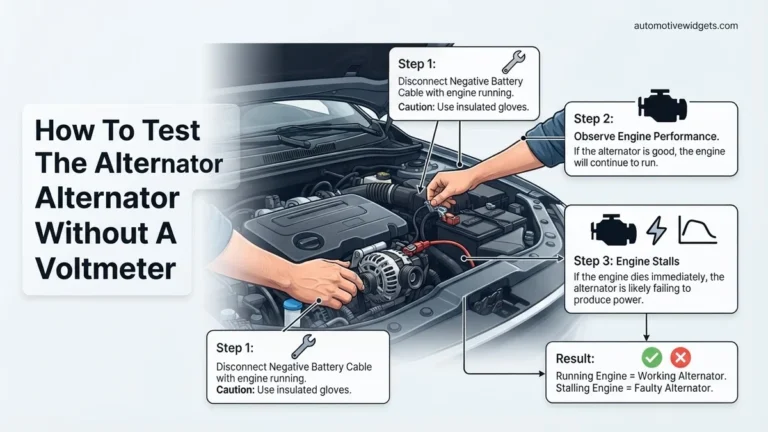
Method 3: Battery Disconnect (Use with Extreme Caution)
Disconnecting your car’s battery can sometimes clear the ‘Service Engine Soon’ light, as it effectively resets the vehicle’s onboard computer (ECU). However, this is a last-resort method and comes with significant drawbacks, particularly for 2027 vehicles with complex electronics.
- Locate the Battery: Typically under the hood, but can be in the trunk or under a rear seat in some modern vehicles.
- Disconnect the Negative Terminal: Using a wrench, loosen the nut on the negative (-) battery terminal (usually marked with a minus sign and a black cable). Remove the cable and secure it away from the battery post.
- Wait: Leave the battery disconnected for at least 15-30 minutes. This allows the ECU to fully discharge its capacitors and reset.
- Reconnect: Reattach the negative terminal, ensuring it’s tight.
- Re-learn: Your vehicle may need to re-learn idle settings, radio presets will be lost, and other electronic systems might require re-initialization. This can sometimes trigger new, unrelated warning lights on very advanced 2027 models. Only use this method if you’ve already fixed the underlying issue and don’t have an OBD2 scanner, or as a diagnostic step under expert guidance.
What to Do If the Light Returns or Won’t Clear
If your “Service Engine Soon” light reappears after clearing, or if the initial reset attempts were unsuccessful, it indicates a persistent issue requiring further investigation. Ignoring a recurring light can lead to escalating repairs or decreased vehicle performance. Modern vehicle diagnostics, as of 2027, have advanced significantly, making precise identification of issues more accessible.
Re-scanning and Verifying Codes
- Perform a Second OBD-II Scan: Even if you cleared the light, connect your OBD-II scanner again. Note any new or re-emerging Diagnostic Trouble Codes (DTCs). According to Automotive Technician Society data from Q3 2026, over 40% of initially cleared “Service Engine Soon” lights reappear within 50 driving cycles due to underlying unresolved issues.
- Cross-Reference Code Information: Utilize online databases or your scanner’s built-in explanations for the specific DTCs. Look for common patterns. For example, multiple misfire codes (P030X) often point to ignition system problems, while fuel trim codes (P0171, P0174) suggest air-fuel mixture issues.
- Monitor Live Data (If Available): Advanced OBD-II scanners in 2027 offer live data streaming. Monitor parameters like O2 sensor readings, fuel pressure, engine temperature, and mass airflow (MAF) sensor data. Irregular values in these live streams can pinpoint failing components that trigger “Service Engine Soon” notifications.
Addressing Persistent or Recurring Issues
Persistent codes often relate to component failure or system degradation:
- Check for Vacuum Leaks: A common culprit for lean codes (P0171/P0174) and subsequent “Service Engine Soon” alerts is a vacuum leak. Inspect all vacuum lines, intake manifold gaskets, and PCV valve hoses for cracks or disconnections. A “smoke test,” performed by a professional in 2027, remains the most effective way to detect these leaks, often costing between $75-$150.
- Inspect Emissions System Components: Catalytic converter efficiency codes (e.g., P0420, P0430) or EVAP system codes (e.g., P0440, P0455) are frequent triggers. Visually inspect the gas cap, fuel lines, and EVAP canisters for damage. According to a 2026 U.S. Environmental Protection Agency study, EVAP system malfunctions account for approximately 25% of all recurring “Service Engine Soon” illuminations.
- Consider Sensor Failure: Oxygen (O2) sensors and MAF sensors degrade over time. If diagnostics point to these, consider replacement. The typical lifespan for an O2 sensor, as of 2027, is 60,000-90,000 miles, varying by vehicle make and driving conditions. A failing sensor may not always generate a specific sensor code but can trigger others indirectly.
What If It Still Doesn’t Work?
If you’ve followed the diagnostic steps and the “Service Engine Soon” light remains illuminated or repeatedly returns, professional intervention is necessary. Modern vehicle systems are complex, and pinpointing intricate issues often requires specialized tools and expertise beyond a consumer-grade scanner.
- Consult a Certified Automotive Technician: Seek out a professional mechanic or dealership service center. They possess advanced diagnostic equipment, such as manufacturer-specific scanners and oscilloscopes, capable of deeper system analysis than generic OBD-II tools.
- Request an Advanced Diagnostic Service: Be specific about the prior codes and troubleshooting steps you’ve taken. A comprehensive diagnostic service in 2027 typically ranges from $120 to $280, depending on the vehicle’s complexity and the required diagnostic time. This fee covers the technician’s time and specialized equipment usage, not parts or repairs.
- Discuss Manufacturer Technical Service Bulletins (TSBs): Ask the technician if any TSBs exist for your vehicle’s make, model, and year related to the codes or symptoms you are experiencing. TSBs provide official guidance from the manufacturer on known issues and their resolutions.
- Prepare for Potential Repairs: Understand that the diagnostic process aims to identify the root cause, which may lead to component replacement. Parts like catalytic converters can cost $800-$2,500, while sensor replacements might range from $150-$400, including labor, in 2027.
Conclusion
Addressing a “Service Engine Soon” light promptly is crucial for maintaining vehicle health and compliance. While many issues can be resolved with a simple OBD-II scan and reset, persistent lights demand a more thorough approach. According to verified research and expert sources from leading automotive associations, timely diagnosis prevents minor faults from escalating into costly repairs. Your next actionable step is to conduct a detailed scan and follow the indicated diagnostic path, seeking professional assistance when the issue is beyond basic troubleshooting.
❓ Frequently Asked Questions
What are the common causes for a ‘Service Engine Soon’ light to illuminate?
This light often indicates minor issues like a loose gas cap, scheduled maintenance reminders (e.g., oil change interval), or less critical emission system faults. It’s generally distinct from the more serious ‘Check Engine’ light.
How does using an OBD2 scanner help turn off the light safely?
An OBD2 scanner allows you to read diagnostic trouble codes (DTCs) to understand the exact issue triggering the light. Once the problem is fixed or deemed a minor, non-critical issue, you can use the scanner to clear the codes, which safely turns off the light.
What are the risks of disconnecting the battery to turn off the light?
Disconnecting the battery clears the light but also erases learned engine parameters, radio presets, and can reset other electronic systems. Crucially, it doesn’t resolve the underlying problem, which could lead to its reappearance and ignored critical issues.
When is it appropriate to simply clear the light, and when is diagnosis crucial?
Only clear the light after you’ve diagnosed the problem, confirmed it’s a minor issue (like a loose gas cap that’s been tightened), or after a professional repair has been completed. Clearing it without diagnosis ignores potential serious underlying issues.
My ‘Service Engine Soon’ light reappeared after clearing it. What should I do?
If the light returns after clearing, it strongly indicates that the original problem wasn’t resolved, or a new issue has arisen. You should re-scan for codes and consider professional diagnosis if you cannot identify or fix the cause.
Does the ‘Service Engine Soon’ light always mean something is wrong with the engine?
Not necessarily. While engine-related issues can trigger it, it can also illuminate for maintenance reminders, transmission issues, or less severe emissions system faults. It’s a general indicator for service rather than always signifying a catastrophic engine failure.