How to Put Electronic Parking Brake in Service Mode: Easy Steps Guide
If you’ve ever needed to work on your car’s electronic parking brake, you know it’s not as simple as pulling a lever. Getting your electronic parking brake into service mode is a key step that makes maintenance safer and easier.
But how exactly do you do it? You’ll discover clear, step-by-step instructions to put your electronic parking brake into service mode quickly and without hassle. Whether you’re a DIY enthusiast or just want to understand the process better, this guide will give you the confidence to handle your brake system like a pro.
Keep reading—you’ll be surprised how straightforward it can be!
What Is Electronic Parking Brake Service Mode
The electronic parking brake (EPB) is a modern feature in many vehicles. It replaces the traditional handbrake lever with a button or switch. Service mode is a special setting for the EPB system.
This mode lets mechanics work on the brakes safely. It disables the automatic locking and releasing functions. This helps avoid damage during maintenance or repairs.
What Does Service Mode Do?
Service mode stops the electronic parking brake from activating. It holds the brake in a neutral state. This allows easy access to the brake components.
Technicians can remove or replace brake pads without the brake applying force. It prevents the EPB from closing the calipers during service. This keeps the system safe and functional.
When Is Service Mode Needed?
Service mode is used during brake repairs or replacements. It is essential for wheel or tire changes. Also needed when diagnosing brake system issues.
Without service mode, the EPB might engage unexpectedly. This can cause injury or damage. Service mode ensures a smooth and safe repair process.
How Does Service Mode Work?
Service mode is usually activated by a sequence of button presses or through a diagnostic tool. Some cars use the infotainment system or a special switch.
Once activated, the EPB will not lock or unlock automatically. The driver or mechanic can control the brake manually. This control helps complete the repair without interference.
When To Use Service Mode
Service mode helps you work safely with the electronic parking brake. It stops the brake from locking or unlocking by itself. This mode is important during repairs or maintenance.
Using service mode prevents damage to the brake system. It also protects you from unexpected brake movements. Knowing when to activate service mode keeps work smooth and safe.
During Brake Pad Replacement
Service mode stops the parking brake from applying pressure. It makes brake pad removal easier. Mechanics use this mode to avoid brake system damage.
While Servicing Brake Components
Working on brake parts requires the brake to stay still. Service mode holds the brake in a safe position. This prevents accidents and system errors.
When Resetting The Brake System
Resetting the brake system needs the brake to be inactive. Service mode allows safe resetting. It helps the system recalibrate correctly.
Before Towing The Vehicle
Towing with an active electronic parking brake can cause damage. Service mode releases the brake safely. This protects the brake system during towing.
Tools Needed For Service Mode Activation
Activating the electronic parking brake (EPB) service mode requires specific tools. These tools help ensure the process is safe and effective. Using the right equipment prevents damage to your vehicle’s braking system.
Below are the main tools needed for service mode activation. Each tool plays a vital role in completing the task properly.
Diagnostic Scan Tool
A diagnostic scan tool reads and clears fault codes. It connects to the car’s onboard computer. This tool accesses the EPB system to switch it into service mode. Without it, the process cannot start.
Vehicle Owner’s Manual
The owner’s manual provides specific instructions for your car model. It details the EPB system and service mode steps. Always check the manual before starting work. It helps avoid mistakes and ensures correct procedures.
Basic Hand Tools
Some hand tools like screwdrivers and pliers may be needed. These tools help remove panels or covers near the EPB system. They allow access to buttons or connectors required for service mode.
Battery Charger
A fully charged battery is essential during the process. The battery charger keeps the power stable. Low battery voltage can stop the activation or cause errors.

Credit: www.gioielleriafggrillo.com
Step-by-step Guide To Activate Service Mode
Activating the electronic parking brake (EPB) service mode helps with maintenance tasks. Service mode disables the parking brake to allow wheel or brake work. This guide shows clear steps to activate service mode safely.
Follow each step carefully to avoid damage or errors. Preparation is key for smooth activation. The process is simple and quick.
Step 1: Prepare Your Vehicle
Park the car on a flat surface. Turn off the engine and engage the regular brake. Make sure the ignition is in the ON position, but do not start the engine.
Step 2: Locate The Epb Switch
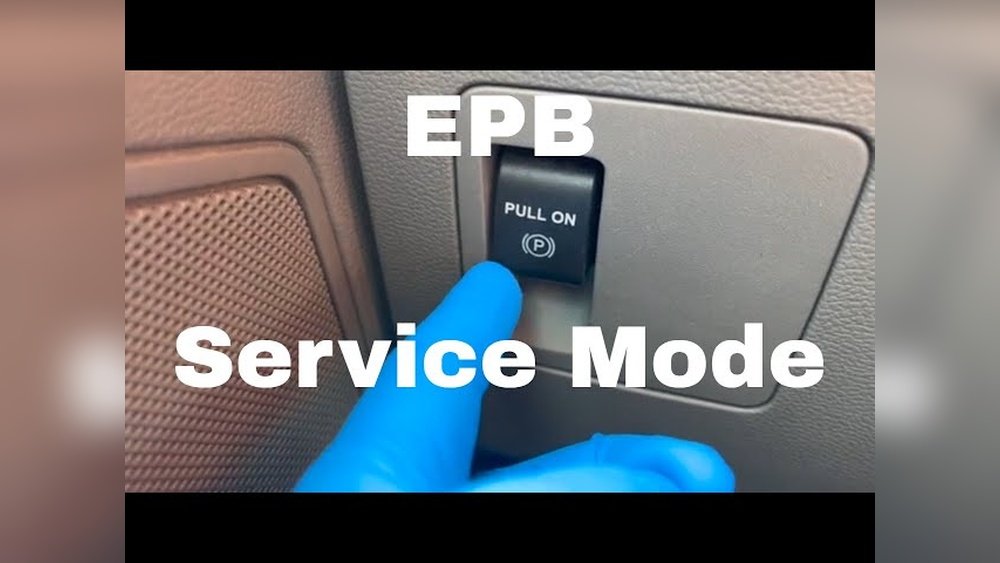
Find the electronic parking brake button or switch inside the vehicle. It usually sits near the center console or dashboard. Know its exact position before starting.
Step 3: Press And Hold The Epb Switch
Press and hold the EPB switch for about 10 seconds. Watch for a warning light or message on the dashboard. This signals that the service mode is active.
Step 4: Confirm Activation
Check the dashboard for the EPB service mode icon. It may look like a brake symbol or say “Service Mode.” This confirms the system is ready for maintenance.
Step 5: Perform Required Maintenance
With service mode active, you can safely remove wheels or brake parts. The electronic parking brake will not engage automatically. Complete your work without interference.
Step 6: Exit Service Mode
After finishing, press the EPB switch again. Hold it until the service mode warning disappears. Turn off the ignition and restart the car to reset the system.
Tips For Safe Use And Deactivation
Using the electronic parking brake in service mode requires care. Safety is the top priority during activation and deactivation. Follow key tips to avoid damage and ensure smooth operation.
Proper handling prevents accidents and costly repairs. Keep the vehicle stable before engaging service mode. Always check the brake system status to confirm readiness.
Check Vehicle Stability Before Activation
Park the vehicle on a flat surface. Use wheel chocks to stop movement. This prevents the vehicle from rolling during service mode.
Ensure the transmission is in neutral or park. This reduces strain on the brake system parts.
Follow Manufacturer Instructions Carefully
Read the vehicle manual for specific steps. Different models require different procedures. Use the exact sequence to engage or release the brake.
Do not rush the process. Pausing between steps allows the system to adjust safely.
Monitor Brake Warning Lights
Watch for any warning lights during service mode. Lights indicate if the system is working properly or if there is a fault.
Stop immediately if warning lights stay on. Check the system again or seek professional help.
Deactivate Service Mode Safely
Ensure all work on the brake system is complete. Remove any tools or wheel chocks before deactivation.
Follow the manual’s steps to exit service mode. Confirm the brake system returns to normal function before driving.
Test the parking brake gently after deactivation. Make sure it holds the vehicle firmly.

Credit: www.youtube.com

Credit: www.gioielleriafggrillo.com
Frequently Asked Questions
What Is Electronic Parking Brake Service Mode?
Service mode is a special setting that lets you work on the electronic parking brake. It allows safe maintenance and repairs without the brake activating. This mode stops the brake from holding the wheels.
Why Put The Electronic Parking Brake In Service Mode?
Service mode prevents the brake from locking during repairs. It helps avoid damage to the brake system. This makes maintenance easier and safer.
How To Activate Electronic Parking Brake Service Mode?
Usually, you press and hold the brake switch while turning the ignition on. Some cars need a scan tool to activate this mode. Always check your vehicle’s manual for exact steps.
Can I Drive With The Parking Brake In Service Mode?
No, service mode disables the parking brake function. Driving without a working parking brake is unsafe. Always exit service mode before driving.
Conclusion
Putting the electronic parking brake in service mode is simple to do. Follow the steps carefully to avoid any issues. Always ensure your vehicle is secure before starting. This mode helps with brake repairs and maintenance. Keep your owner’s manual handy for specific instructions.
Taking these precautions saves time and keeps you safe. Practice a few times to feel confident with the process. Now you know how to handle the electronic parking brake in service mode. Easy and useful for all drivers.