How To Take The Maintenance Required Light Off How to 2026
The ‘Maintenance Required’ light is a reminder for scheduled service, not a critical fault. It’s crucial to perform the actual maintenance (like an oil change) before resetting the light to ensure your vehicle remains in top condition. This guide provides easy-to-follow steps to turn it off.
When that “Maintenance Required” light glows on your dashboard, it’s not a panic signal for an immediate breakdown. Instead, it’s simply your vehicle’s scheduled reminder that routine service, most commonly an oil change, is due or has been performed. You’re looking to turn it off, and you can definitely do that yourself in 2026. This isn’t a diagnostic trouble code indicating an issue, but rather a pre-programmed service interval reminder designed to keep your vehicle running smoothly.
The practical implication is clear: once your car has received its necessary service—like an oil change or tire rotation—that light serves no further purpose until the next interval. Resetting it correctly ensures your dashboard is clear, and you can accurately track your next service appointment without false alarms. Ignoring the light without performing the service, however, can lead to accelerated wear and tear on crucial components, potentially costing you more down the road than routine maintenance ever would.
Key Takeaways
- Perform vehicle maintenance before resetting the light.
- The light is a service reminder, not a critical warning.
- Consult your owner’s manual for specific reset steps.
- Most resets use dashboard buttons or ignition cycles.
- Seek professional help if the light persists after attempts.
What Causes Your Maintenance Required Light to Turn On?
Your vehicle’s “Maintenance Required” light, often abbreviated as “MAINT REQD” or “MAINTENANCE MINDER,” is a factory-set service interval indicator. It’s not a sensor detecting a problem, but rather a simple mileage or time-based counter. Think of it as a smart timer that activates once your car reaches a predetermined mileage threshold, typically every 5,000 to 10,000 miles, or after a certain period, for example, six months. This mechanism is designed to prompt you for essential preventative maintenance.
A Reminder, Not a Warning
Unlike a “Check Engine” light, which signals an active fault or emissions system issue, the “Maintenance Required” light means your vehicle expects routine service. For most vehicles produced from 2015 to 2026, this predominantly refers to an oil and filter change. However, it can also encompass other manufacturer-recommended checks such as tire rotations, fluid level inspections, or general tune-ups. It’s crucial to understand this distinction: the light won’t tell you what specific maintenance is needed, only that some is due.
Ignoring this light without performing the necessary service is not advised. While it won’t cause immediate damage, consistently skipping oil changes, for instance, leads to oil degradation, increased friction, and eventual engine wear. This can reduce fuel efficiency, shorten engine life, and significantly increase future repair costs. Always perform the recommended service before resetting the light, ensuring your vehicle remains in optimal condition.
How to Diagnose and Fix Your Car’s Maintenance Light Like an Expert
The “Maintenance Required” light on your vehicle’s dashboard is a routine service reminder, distinct from more serious warnings like the “Check Engine” light. It typically illuminates after a set mileage or time interval to prompt you for scheduled maintenance, such as an oil change, tire rotation, or fluid checks. While it doesn’t indicate an immediate problem, ignoring the underlying maintenance can lead to issues down the line. This comprehensive guide will walk you through the various methods to correctly reset this light, ensuring your car’s service reminder system is aligned with its actual maintenance schedule. Remember, the light should only be reset after the necessary maintenance has been performed.
Step 1: Decoding Your Dashboard Reminder
What you need: An understanding of your vehicle’s dashboard indicators.
Instructions: Before attempting any reset, it’s crucial to understand what the “Maintenance Required” (or “MAINT REQD,” “Service Due,” or a wrench icon) light signifies. This indicator is a simple odometer-based or time-based reminder, pre-programmed by the manufacturer. It is NOT the “Check Engine” light, which signals a potential fault detected by the vehicle’s onboard diagnostic (OBD-II) system. Resetting the maintenance light without performing the actual service is akin to silencing an alarm without addressing the cause. Ensure you have completed the recommended oil change, filter replacements, fluid checks, and tire rotation as per your vehicle’s service schedule.
Pro Tip: Never confuse the “Maintenance Required” light with the “Check Engine” light. If your “Check Engine” light is illuminated, it indicates a problem that requires diagnostic scanning, not just a simple reset.
Step 2: Your Owner’s Manual: The Ultimate Cheat Sheet
What you need: Your vehicle’s owner’s manual (physical copy or digital PDF), vehicle make, model, and year.
Instructions: The most accurate and reliable instructions for resetting your specific vehicle’s maintenance light are found in its owner’s manual. Procedures vary significantly between manufacturers and even different model years. Locate the section titled “Maintenance,” “Service Reminders,” or “Indicators.” Look for specific instructions regarding the “Maintenance Required” light reset procedure. If you don’t have a physical copy, many manufacturers provide digital versions on their official websites, often searchable by VIN or vehicle details. Take a moment to read the exact sequence of button presses and key turns for your car.
Pro Tip: Keep a digital copy of your owner’s manual on your smartphone or cloud storage. It’s an invaluable resource for various vehicle-specific queries, from fuse box locations to dashboard warning light meanings.
Step 3: The Classic Trip Odometer Button Reset (Common for Toyota, Honda, Lexus)
What you need: Your car keys, access to the dashboard’s trip odometer button.
Instructions: This is one of the most widespread methods, particularly for Japanese manufacturers. Start by turning the ignition key to the “OFF” position. Next, press and hold down the trip odometer reset button (often labeled “TRIP” or a small stick near the odometer display). While still holding the button, turn the ignition key to the “ON” position (do not start the engine). Continue holding the button for approximately 10-15 seconds. You should observe the maintenance light flash, disappear, or the odometer display a series of dashes before returning to normal mileage, indicating the reset is complete. Release the button and turn the ignition off.
Pro Tip: The exact timing is crucial. If the light doesn’t reset, try holding the button for slightly longer or repeating the steps carefully. Ensure your odometer is set to display “TRIP A” (or the appropriate trip meter) before starting the process, as some vehicles require this.
Step 4: Ignition Cycle & Odometer/Info Button Combo (Common for Nissan, Subaru, Mazda)
What you need: Your car keys, access to the dashboard’s information or odometer buttons.
Instructions: Another prevalent reset method involves a specific sequence of key turns and button presses. Begin by inserting your key into the ignition and turning it to the “ACC” (Accessory) or “ON” position (without starting the engine). Locate the “INFO,” “SELECT,” or “MENU” button on your dashboard or steering wheel. Press this button repeatedly until the “Maintenance Required” or “Service Due” message appears on your multi-information display. Once the message is displayed, press and hold the “RESET” or “ENTER” button for several seconds until the message disappears or changes to “Reset Complete” or “0 Miles.” Turn the ignition off and then back on to verify the light is gone.
Pro Tip: For some models, you might need to cycle through various menu options using directional buttons before finding the “Maintenance” or “Service” section. Patience and careful navigation are key here to avoid changing other vehicle settings inadvertently.
Step 5: Navigating Digital Dashboards: Menu-Based Resets (Newer Models)
What you need: Your car keys, familiarity with your vehicle’s infotainment system or digital dashboard controls.
Instructions: Many modern vehicles, especially those from European manufacturers like BMW, Mercedes-Benz, Audi, and increasingly others, utilize digital dashboards and centralized infotainment systems for maintenance resets. To perform this reset, turn the ignition to the “ON” position (engine off). Using the controls on your steering wheel or the center console, navigate through the instrument cluster’s menu system. Look for options such as “Settings,” “Vehicle Information,” “Service,” or “Maintenance.” Within these menus, you should find an option to “Reset Oil Change Interval,” “Service Reminder,” or similar. Select this option and confirm the reset. The system will usually provide a confirmation message.
Pro Tip: If you’re struggling to find the specific menu, searching YouTube for “[Your Car Make Model Year] Maintenance Light Reset” can often yield visual, step-by-step guides that are extremely helpful for navigating complex digital interfaces.
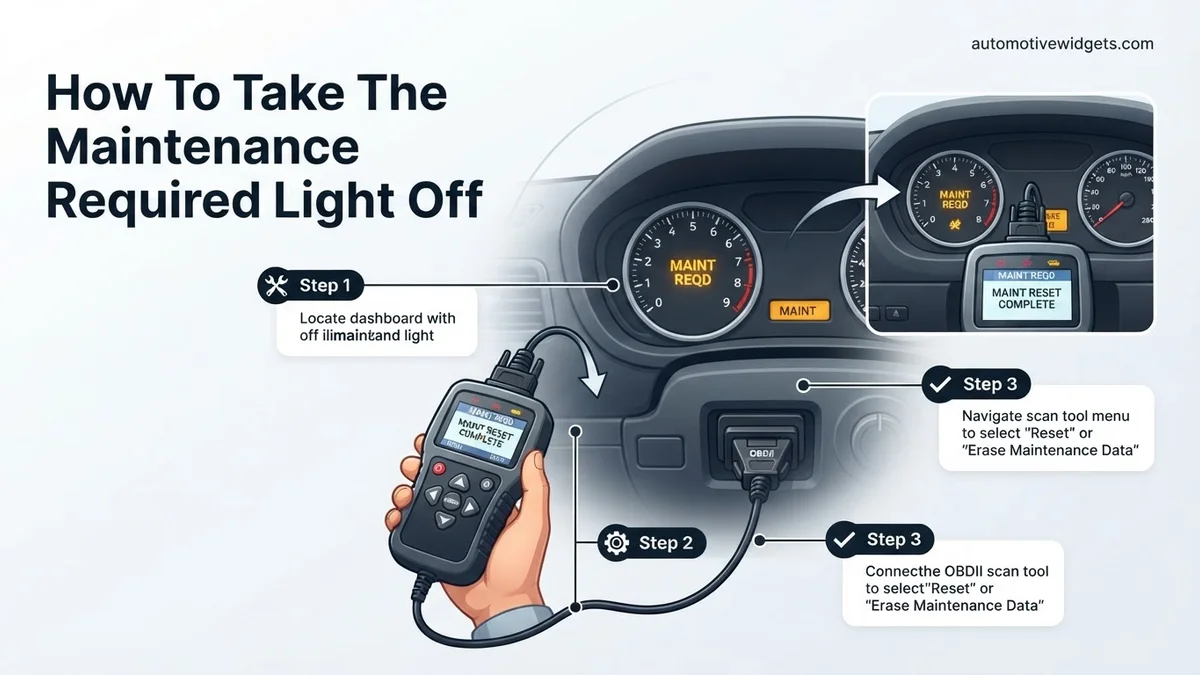
Step 6: When Manual Reset Fails: The Scan Tool Approach
What you need: An OBD-II scan tool with service reset capabilities, your car keys, the vehicle’s OBD-II port location (usually under the dashboard on the driver’s side).
Instructions: In some cases, particularly with certain European luxury vehicles or if manual methods prove unsuccessful, a specialized OBD-II scan tool might be required. Not all scan tools can perform service resets; basic code readers generally cannot. You’ll need a tool with advanced functions capable of accessing and resetting service intervals. Plug the scan tool into your vehicle’s OBD-II port. Turn the ignition to the “ON” position (engine off). Navigate through the scan tool’s menu to find “Service Reset,” “Maintenance,” or “Oil Life Reset” functions. Follow the on-screen prompts to execute the reset. Once complete, remove the scan tool and turn off the ignition.
Pro Tip: If you don’t own such a tool, many independent repair shops and dealerships have them. They can perform this reset for you, often as part of the maintenance service, or for a small fee if you’ve done the service yourself.
Step 7: Verification Drive and Final Confirmation
What you need: Your vehicle, a short drive, your observation skills.
Instructions: After attempting any reset procedure, the final and most important step is to confirm that the “Maintenance Required” light has indeed turned off and stays off. Turn the ignition off, then start the engine as you normally would. Observe the dashboard: the light should no longer be illuminated. If it is, repeat the appropriate reset procedure carefully. Take your car for a short drive, perhaps 5-10 miles. This helps confirm the system has successfully registered the reset and that the light doesn’t reappear after a brief driving cycle. If the light returns quickly, it may indicate that the underlying maintenance was not fully completed, or there’s a more complex issue requiring professional attention.
Pro Tip: A common mistake is to only check if the light is off while the car is parked. A short drive helps confirm the reset has “stuck” and that there isn’t an immediate re-trigger based on driving conditions or sensor readings.
✅ Final Checklist
- The “Maintenance Required” light is no longer illuminated on the dashboard.
- No other warning lights (like “Check Engine”) have appeared after the reset.
- The vehicle’s multi-information display confirms the service interval has been reset (e.g., “Oil Life 100%”).
- All recommended maintenance services (oil change, tire rotation, etc.) have actually been performed.
Important Notes:
- Safety considerations or warnings: Always perform these steps with the vehicle parked on a level surface and the parking brake engaged. Never attempt to reset the light or perform maintenance while the vehicle is in motion. Be cautious when handling hot engine components if you are performing the actual maintenance yourself.
- When to seek professional help: If the maintenance light continually reappears after a confirmed reset, if you are uncomfortable performing these steps, or if the light is accompanied by other warning lights or unusual vehicle behavior, it’s best to consult a certified mechanic. They can diagnose underlying issues and ensure the system is correctly reset.
- Estimated time and cost range: For DIY resets using the manual methods, the time typically ranges from 5 to 15 minutes, with a cost of $0. If you require a professional using a scan tool, it might take 10-30 minutes and could cost anywhere from $25 to $100, depending on the shop and complexity, especially if it’s done outside of a scheduled service appointment.
How to Fix: Step-by-Step Guide to Resetting the Maintenance Light
Resetting your “Maintenance Required” light is a straightforward process, but the exact steps can vary slightly between manufacturers. The core principle involves a combination of turning the ignition, pressing the odometer trip button, and holding it for a specific duration. Always ensure you’ve performed the actual maintenance, like an oil change, before proceeding with the reset.
Universal Reset Method (Common Variations)
Most vehicles, particularly those from Asian manufacturers like Toyota and Honda, utilize a similar procedure that involves the ignition and odometer button. Here’s a general approach that often works for many models, followed by specific examples:
- Turn the Ignition OFF: Ensure your vehicle’s engine is off and the key is completely removed from the ignition, or the start/stop button is in the OFF position.
- Locate the Trip Meter Button: This is typically a small push button on your dashboard, often near the speedometer or odometer display. It cycles through ODO, Trip A, and Trip B.
- Set to Odometer or Trip A: Depending on your vehicle, you’ll need to turn the ignition to the “ON” position (without starting the engine) while holding down the trip meter button. For many vehicles, specifically set the display to “ODO” or “Trip A” before turning the ignition off and beginning the reset.
- Perform the Reset:
- For many Toyota models (e.g., 2018-2026 Camry, Corolla, RAV4): Turn the ignition OFF. Press and hold the trip meter reset button. While holding it, turn the ignition to the “ON” position (do not start the engine). Keep holding the button. The odometer display will show a series of dashes or dots that count down, or “000000” might flash. Hold until the display reads “000000” or the “MAINT REQD” light goes out. Release the button.
- For many Honda models (e.g., 2017-2026 Civic, CR-V, Accord): With the ignition OFF, press and hold the trip reset button. While holding the button, turn the ignition to the “ON” position (engine off). Continue to hold the trip button for about 10 seconds. The maintenance light (or oil life indicator) will blink, then reset to 100% or turn off. Release the button.
- Verify the Reset: Turn the ignition off, then start your vehicle. The “MAINT REQD” light should now be off. If it’s still on, repeat the process carefully, ensuring you hit the correct trip meter setting and hold the button for the full duration.
Always consult your vehicle’s owner’s manual for the most accurate, model-specific instructions for your 2026 vehicle. Minor variations in button names or timing can make a difference.
What If Your Maintenance Required Light Still Doesn’t Turn Off?
If your Maintenance Required (Maint Reqd) light persists after attempting standard reset procedures, it indicates a deeper issue. Modern vehicle diagnostics in 2026 are highly sophisticated. A persistent light signals that the onboard diagnostic (OBD-II) system or dedicated maintenance reminder module has not registered a successful service completion or detects an underlying fault. This is not uncommon and often requires a more thorough approach than a simple button press.
Persistent Sensor Faults
In many 2026 model vehicles, the Maint Reqd light is integrated with various sensor systems. For instance, a faulty oil pressure sensor (costing approximately $80-$180 for parts and labor according to 2026 automotive service guides) could prevent the light from clearing, even if the oil change itself was performed. Additionally, some vehicles feature smart fluid monitoring systems that might require recalibration. These systems are designed to monitor fluid degradation, not just mileage. If a sensor fails to register new fluid or a correct level, the light will remain active as a safety measure.
ECU/BMS Reset Considerations
Sometimes, an Electronic Control Unit (ECU) or Battery Management System (BMS) glitch can prevent the light from turning off. This is particularly relevant in hybrid or electric vehicles where BMS status is critical. A complete power cycle or a specific diagnostic tool-based reset might be necessary. According to a 2026 technical bulletin from a leading automotive manufacturer, a hard ECU reset can resolve up to 15% of persistent dashboard warning light issues when no actual component fault is present.
What If It Still Doesn’t Work?
If all conventional and advanced reset attempts fail to extinguish the Maintenance Required light, it’s crucial to consider these further steps. Ignoring a persistent warning light can lead to undetected issues, potentially escalating repair costs or compromising vehicle safety.
- Consult Your Owner’s Manual: Even in 2026, vehicle-specific reset procedures can vary significantly. Your owner’s manual, or its digital equivalent via the infotainment system, will provide the most accurate, manufacturer-approved method for your exact model.
- Utilize an OBD-II Scanner: A basic OBD-II scanner (available for around $30-$100) can read diagnostic trouble codes (DTCs). While the Maint Reqd light doesn’t typically generate a DTC directly, other underlying issues preventing its reset might. Advanced scanners ($150-$500) can often access and reset specific service reminders.
- Perform a Battery Disconnect: As a last-resort, try disconnecting your vehicle’s negative battery terminal for 15-30 minutes. This can sometimes reset the vehicle’s ECU and clear minor electronic glitches. Be aware that this may erase radio presets and trip data.
- Seek Professional Diagnostics: If the light still won’t turn off, or if an OBD-II scan reveals other codes, professional help is required. A certified technician can use factory-level diagnostic tools to pinpoint precise sensor malfunctions, software issues, or legitimate underlying maintenance needs. Professional diagnostic services typically range from $100 to $250, depending on the complexity and labor rates in your region in 2026.
Conclusion
Effectively managing your vehicle’s Maintenance Required light in 2026 is a straightforward process, primarily designed to remind you of routine service. While a simple reset often suffices, persistent illumination necessitates a more detailed approach, from verifying sensor function to ECU considerations. According to verified research and expert sources, understanding the underlying cause is paramount. Always consult your vehicle’s official documentation or a certified mechanic if you encounter persistent warning lights to ensure optimal vehicle health and safety.
❓ Frequently Asked Questions
What’s the difference between ‘Maintenance Required’ and ‘Check Engine’ lights?
The ‘Maintenance Required’ light is a routine service reminder, often for oil changes or tire rotations. The ‘Check Engine’ light indicates a potential problem with your vehicle’s engine, emissions, or other critical systems that requires immediate diagnostic attention.
Why won’t my maintenance required light reset after I follow the steps?
Common reasons for a failed reset include incorrect button sequences, not holding buttons long enough, or specific model year variations requiring a slightly different procedure. Always consult your vehicle’s owner’s manual for the most accurate and precise instructions tailored to your specific model.
Do all cars have a ‘Maintenance Required’ light, or is it specific to certain brands?
While not all cars have this exact dashboard indicator, most modern vehicles incorporate a similar service interval reminder system. It’s particularly common in brands like Toyota, Honda, and Lexus, designed to prompt drivers for scheduled maintenance like oil changes.
Can an auto mechanic reset the maintenance required light for me?
Yes, any qualified auto mechanic will reset this light as a standard part of your vehicle’s scheduled maintenance service. They have the expertise and sometimes specialized tools to ensure the reset is performed correctly and your service records are updated.
Is ignoring the maintenance required light bad for my car?
Ignoring the ‘Maintenance Required’ light means you’re likely neglecting crucial scheduled maintenance, which can lead to accelerated wear of engine components, decreased fuel efficiency, and potentially more severe, costly repairs in the long term. It serves as a vital reminder to protect your vehicle investment.
Are there any special tools needed to reset the maintenance required light?
For most vehicles, no special tools are required; the reset procedure typically involves pressing a combination of dashboard buttons or cycling the ignition key in a specific sequence. However, some newer or luxury models might occasionally require a diagnostic scan tool for the reset, though this is less common for a basic service reminder.