You just had your brakes replaced, but that annoying squeak won’t go away. It’s frustrating, right?
You expect new brakes to be quiet and smooth, yet every time you stop, that high-pitched noise reminds you something’s still not right. Why do your brakes still squeak after replacing them? The answer isn’t always simple, but understanding the common causes can save you time, money, and headaches.
You’ll discover the main reasons behind brake squeaking after a replacement. From missing grease on key parts to how you use your brakes in the first few hundred miles, you’ll learn what might be triggering the noise. Plus, you’ll get practical tips on how to fix the problem before it turns into a bigger issue. Keep reading to get your brakes quiet and working like they should.

Credit: www.reddit.com
Common Causes Of Brake Squeak
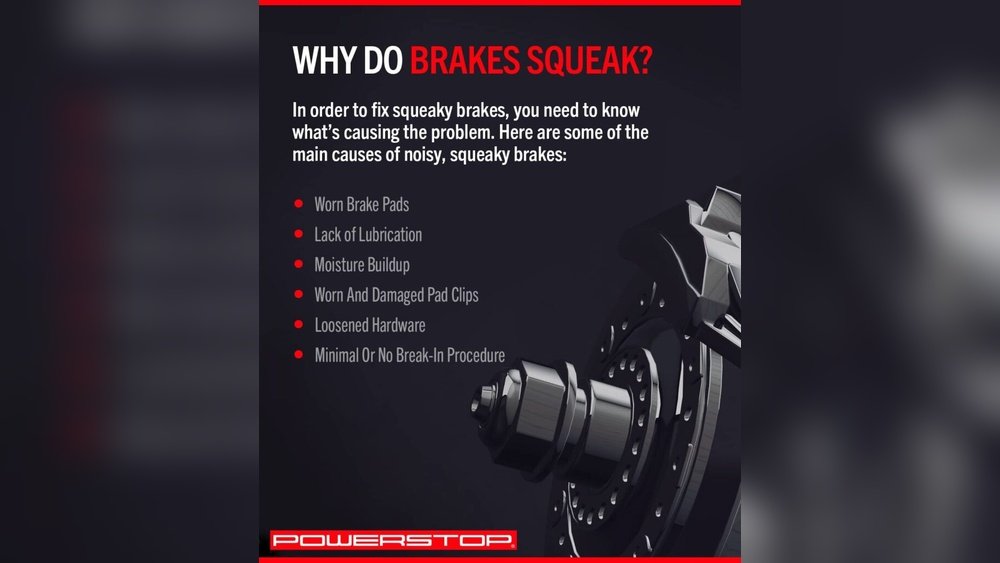
Brake squeaking after replacement is a common issue. New parts need time to settle and work together. The noise often comes from metal parts rubbing without enough lubrication. Sometimes, the pads get overheated and develop a glazed surface. These situations cause the brakes to squeak even after installing new components.
The causes usually fall into a few main categories. Identifying the right cause helps fix the problem quickly. Below are some common reasons why brakes still squeak after replacement.
Insufficient Lubrication On Metal Contact Points
Brake systems have many metal parts that move against each other. Caliper slide pins, shims, and brackets need special grease. Without this lubricant, metal parts rub and create noise. The brake pads vibrate and cause a high-pitched squeak.
The Fix: Remove the brake hardware. Apply high-temperature brake grease to the back of the pads, slide pins, and clips. Proper lubrication stops the vibrations and noise.
Glazed Brake Pads From Overheating
Hard braking or “riding” the brake pedal heats the pads too much. This heat changes the pad surface, making it smooth and shiny. Glazed pads lose grip and cause squeaking sounds. The problem is common during the first few hundred miles after replacement.
The Fix: Allow the brakes to cool down between stops. Avoid aggressive braking until the pads wear in properly. If glazing is severe, the pads may need replacing.
Improper Bedding-in Of New Pads And Rotors
New brake pads and rotors must “bed in” to work quietly. Bedding-in means the pads and rotors form a smooth mating surface. Without this process, uneven contact causes noise. Brake pads create small deposits on the rotor during bedding-in.
The Fix: Follow a proper bedding-in procedure. This involves several controlled stops from moderate speed. The process helps parts align and reduces squeaking.
Lack Of Lubrication On Metal Parts
One common reason brakes still squeak after replacement is lack of lubrication on metal parts. Metal components in the brake system move against each other. Without proper lubrication, they can create noise.
Brake systems include parts like caliper slide pins, shims, and metal brackets. These parts need a special high-temperature brake grease. Without it, metal parts rub and cause squeaking sounds.
Lack Of Brake Grease On Slide Pins
Slide pins help the brake caliper move smoothly. If they are dry or rusty, the caliper can bind. This causes uneven brake pad wear and noise. Applying brake grease keeps the pins sliding freely and quiet.
Missing Lubrication On Brake Pad Backs
The back of brake pads touches the caliper metal. Without lubricant, pads vibrate during braking. This vibration creates a high-pitched squeak. Brake grease or anti-squeal paste here reduces vibration and sound.
Dry Or Worn Anti-rattle Clips
Anti-rattle clips hold brake pads tightly in place. Over time, clips can dry out or lose their tension. Dry clips cause pads to move and squeak. Lubricating or replacing these clips stops unwanted noise.
Glazed Pads And Rotors
Glazed pads and rotors often cause brakes to squeak even after replacement. This happens when the brake pads or rotors develop a smooth, shiny surface. Heat builds up from heavy or repeated braking. The heat changes the pad material and rotor surface.
Glazing reduces the friction needed to stop the vehicle properly. The pads lose their ability to grip the rotors. This causes a high-pitched squealing noise during braking. It also lowers overall braking performance.
What Causes Glazing On Brake Pads And Rotors?
Brake pads can glaze from overheating. Hard braking or riding the brake pedal creates excess heat. This heat melts the pad’s surface and hardens it. Rotors can also glaze if they get too hot. A smooth, glassy rotor surface forms instead of a rough texture.
How Does Glazing Affect Brake Noise?
Glazed pads and rotors do not grip well. The pads slide over the rotor instead of gripping tightly. This slipping creates a squeaking or squealing sound. The noise happens more when brakes are applied gently. The smoother surfaces cause vibration and noise.
Steps To Fix Glazed Pads And Rotors
Remove the brake pads and inspect them closely. Look for shiny, glass-like areas on the surface. Sand the pads lightly with fine sandpaper to remove glazing. Check the rotors for similar shiny spots. Resurface or replace rotors if glazing is severe.
After sanding, clean all dust and debris from pads and rotors. Proper bedding-in of new pads helps prevent future glazing. Avoid hard braking during the first few hundred miles. This allows pads and rotors to wear evenly and form a proper surface.

Credit: www.wikihow.com
Brake Pad Material And Noise
Brake pad material affects noise because some types create more squeak. Harder pads and metal components can cause vibrations. Lack of proper lubrication or uneven rotor surfaces often leads to squeaking even after replacement.
Brake pads come in different materials, affecting noise levels. Some materials create more squeaking than others.
Semi-metallic pads often cause more noise. They contain metal fibers that can produce high-pitched sounds.
Ceramic pads usually run quieter. They have less metal and more smooth materials, reducing noise.
Organic pads are soft and quiet but wear faster. They can still squeak if they get dirty or worn out.
Why Semi-metallic Pads Squeak More
Metal fibers in semi-metallic pads can vibrate and cause noise. This happens especially when brakes are cold.
The metal can rub against the rotor unevenly. This friction creates a sharp squealing sound.
These pads work well for heavy braking but trade noise for performance.
Ceramic Pads And Noise Reduction
Ceramic pads have a smooth surface that reduces friction noise. They also handle heat better without glazing.
They do not wear down rotors as fast, which helps keep noise low.
Though quieter, ceramic pads can cost more upfront.
How Pad Material Affects Brake Bed-in
New pads need time to bed in with the rotor surface. Different materials bed in differently.
Semi-metallic pads may squeak more during this period. Ceramic pads usually settle quietly.
Improper bed-in can cause noise regardless of pad material.
Installation Mistakes And Vibrations
Brakes may still squeak after replacement due to installation mistakes and vibrations. Improper fitting or missing lubrication can cause parts to rub or vibrate. These vibrations create high-pitched noises during braking.
Understanding common installation errors helps in identifying and fixing squeaky brakes. Proper technique and attention to detail are essential for quiet brakes.
Incorrect Brake Pad Alignment
Brake pads must align perfectly with the rotor surface. Misaligned pads cause uneven contact and vibrations. These vibrations lead to squeaking sounds when braking.
Pads installed off-center or tilted increase friction noise. Checking alignment during installation prevents this problem.
Missing Or Insufficient Brake Lubricant
Metal parts in the brake system need high-temperature brake grease. Lack of lubricant on caliper pins or pad backs causes metal-to-metal contact. This contact produces vibrations and loud squeaks.
Applying brake grease reduces friction and stops noise. Skipping this step often leads to persistent squeaking.
Loose Or Improperly Secured Hardware
Brake components like clips, shims, and pins must be tight. Loose hardware allows parts to move and vibrate during braking. These movements create annoying squeaks.
Ensuring all hardware is secure prevents unnecessary vibrations and noise.
Rotor Surface Issues
Rotors should be smooth and clean before installing new pads. Warped or scored rotors cause uneven pad contact and vibrations. This causes brakes to squeak even after replacement.
Resurfacing or replacing damaged rotors helps eliminate these vibrations.

Credit: www.wikihow.com
Frequently Asked Questions
How Long Will It Take For My New Brakes To Stop Squeaking?
New brakes usually stop squeaking after 100 to 200 miles of proper bedding-in and lubricant application.
Can I Spray Wd-40 On My Brakes To Stop Squeaking?
Do not spray WD-40 on brakes; it reduces friction, causing unsafe braking and worsening squeaks. Use brake-specific lubricants instead.
How Do You Get New Brakes To Stop Squeaking?
Apply high-temperature brake grease on pads and hardware, bed in the brakes gently, and avoid aggressive stops to stop new brake squeaking.
Why Are My Brakes Squeaking But Pads And Rotors Are Good?
Brakes may squeak despite good pads and rotors due to lack of lubricant, pad glazing, or improper installation.
Why Do New Brakes Squeak After Replacement?
New brakes often squeak during the “bedding-in” period as pads and rotors adjust to each other. Lack of lubricant on metal parts can also cause noise. This squeaking usually stops after a short break-in time.
Conclusion
New brakes may squeak for several simple reasons. Sometimes, metal parts lack proper grease, causing vibration noises. Other times, pads need time to settle and bond with the rotors. Harsh braking early on can also create a glazed surface that squeaks.
Regular maintenance and correct installation can usually stop the noise. Paying attention to these details helps your brakes work quietly and safely. Don’t ignore persistent squeaks; they may signal a needed fix. Keep your brake system clean and well-lubricated for the best results.

Leave a Reply