How To Tell If Your Rotors Need To Be Replaced How to 2027
Identifying worn brake rotors is crucial for vehicle safety. Look for common symptoms like steering wheel vibrations, grinding noises, or visible grooves on the rotor surface. Early detection and inspection can prevent more costly repairs and ensure reliable stopping power.
By 2027, your vehicle’s braking system remains its most crucial safety feature. Yet, brake rotors are consumables, designed to wear out. Knowing the definitive signs your rotors need attention is not just about saving money; it’s fundamentally about ensuring your safety and optimal vehicle performance. You don’t always need a mechanic to spot the early warnings. This guide empowers you to identify critical indicators, both from the driver’s seat and through a quick visual check, before minor issues escalate into costly or dangerous problems.
Your ability to effectively stop your car relies heavily on healthy brake rotors. Ignoring symptoms can lead to significantly reduced braking power, longer stopping distances, and even catastrophic brake failure. Identifying these signs early ensures you maintain peak stopping capability, protect other braking components like calipers and pads from premature wear, and ultimately, keep your journeys in 2027 as safe and controlled as possible.
Key Takeaways
- Check for vibrations during braking.
- Listen for squealing or grinding noises.
- Visually inspect rotors for grooves or cracks.
- Measure rotor thickness against minimum spec.
- Address symptoms promptly for safety.
Diagnosing Worn Rotors: Key Signs & Symptoms From the Driver’s Seat
The Audible Warnings: Noises That Signal Trouble
- High-Pitched Squealing: While often indicating worn brake pads reaching their wear indicators, persistent squealing even with newer pads can suggest a glazed or uneven rotor surface. Listen for it particularly when braking lightly.
- Loud Grinding or Scraping: This is a critical sound. A harsh, metallic grinding noise means your brake pads have likely worn completely through, and the metal backing plate is now scraping directly against the rotor. This is metal-on-metal contact, damaging the rotor rapidly and significantly reducing braking effectiveness. Address this immediately.
- Intermittent Clunking or Thumping: Less common but concerning, a distinct clunk or thumping sound, particularly when pressing the brake pedal, could indicate a severely warped or compromised rotor, or even a loose caliper. This symptom suggests significant mechanical stress on your braking system.
The Tactile Feedback: Vibrations You Can’t Ignore
- Steering Wheel Shudder or Pulsation: This is perhaps the most classic symptom of warped rotors. When you apply the brakes, especially at higher speeds (e.g., above 40 mph), you’ll feel the steering wheel vibrate, shake, or pulsate rhythmically in your hands. This occurs because the uneven rotor surface is causing inconsistent friction against the brake pads.
- Brake Pedal Pulsation: Similar to the steering wheel, you might feel the brake pedal itself ‘push back’ or vibrate unevenly against your foot. This direct feedback signifies that the rotor is no longer perfectly flat, causing variations in hydraulic pressure as the pads engage it.
- Vehicle Body Shudder or Vibration: In more severe cases, or with larger vehicles, the entire car might shake or shudder under braking. This indicates a significant issue with one or more rotors, often exacerbated by high heat or heavy braking, which can be particularly noticeable in 2027’s heavier EV platforms.
How to Diagnose and Fix Your Rotors Like an Expert
Your vehicle’s brake rotors are crucial components of its braking system, working in conjunction with brake pads to slow down and stop your car. Over time, due to heat, friction, and wear, rotors can become warped, grooved, or too thin, significantly compromising your vehicle’s safety and braking performance. This comprehensive guide will walk you through a detailed, step-by-step process to accurately diagnose whether your rotors need replacement, ensuring you maintain optimal braking efficiency and peace of mind on the road.
Step 1: The Initial Visual Inspection (Wheels On)
What you need: Good lighting (natural daylight or a strong flashlight), a safe, flat surface for your vehicle.
Instructions: Park your car safely. Without removing the wheels, carefully peer through the spokes of each wheel. Look at the visible surface of the brake rotor. You’re trying to identify obvious signs of distress such as deep concentric grooves (like an old vinyl record), significant rust pitting, blue or purple discoloration (indicating severe overheating), or large cracks extending from the center to the edge. A smooth, even, and relatively shiny surface is generally a good sign, though minor surface rust after rain is normal.
Pro Tip: Try to rock the car slightly or have someone move it just enough to expose different sections of the rotor through the spokes. This allows for a more comprehensive preliminary scan of the entire visible surface.
Step 2: The Test Drive & Symptom Assessment
What you need: Your vehicle, a safe and quiet road with varying speed limits.
Instructions: Take your vehicle for a test drive. Pay close attention to how the brakes feel. Common symptoms of bad rotors include a pulsating or vibrating brake pedal when pressed, a shaking steering wheel (especially when braking from higher speeds, like 40-60 mph), or a general shuddering sensation throughout the car during braking. Listen for any unusual grinding or squealing sounds that might indicate uneven wear or damage. Note if these symptoms are consistent or occur only under specific braking conditions.
Pro Tip: Pay attention to the speed at which vibrations are most pronounced. Often, warped rotors cause noticeable steering wheel shake at highway speeds during braking, while uneven pad deposits might cause pulsations at lower speeds.
Step 3: Safely Lift and Prepare the Vehicle
What you need: Hydraulic jack, two sturdy jack stands, wheel chocks, lug wrench, personal protective equipment (gloves, safety glasses).
Instructions: Park your vehicle on a flat, level, and hard surface. Engage the parking brake and place wheel chocks behind the wheels that will remain on the ground. Loosen the lug nuts on the wheel(s) you intend to inspect a quarter turn with the lug wrench (do not remove them yet). Position the jack under a designated jacking point (refer to your owner’s manual) and lift the vehicle until the tire is off the ground. Immediately place jack stands securely under the vehicle’s frame or designated support points, then slowly lower the vehicle onto the stands. Remove the lug nuts and the wheel.
Pro Tip: Always use at least two jack stands, even if you’re only working on one corner. Never work under a vehicle supported only by a jack. Safety is paramount!
Step 4: Detailed Visual Inspection (Wheels Off)
What you need: Bright flashlight, clean shop rag, gloves.
Instructions: With the wheel removed, you now have a clear view of the entire rotor surface. Inspect both sides (inner and outer) meticulously. Look for deep grooves or scoring that catch your fingernail, significant rust pitting (more than just surface rust), hairline cracks, especially near the center hat or around drilled holes, and blue/purple spots which are signs of extreme heat. Also, check the rotor’s edge for a pronounced lip formation; a significant lip indicates considerable wear and thinning of the rotor’s braking surface.
Pro Tip: Run your finger lightly across the rotor surface from the center to the edge. You should feel a relatively smooth, consistent surface. Any noticeable ridges, valleys, or unevenness are clear indicators of wear.
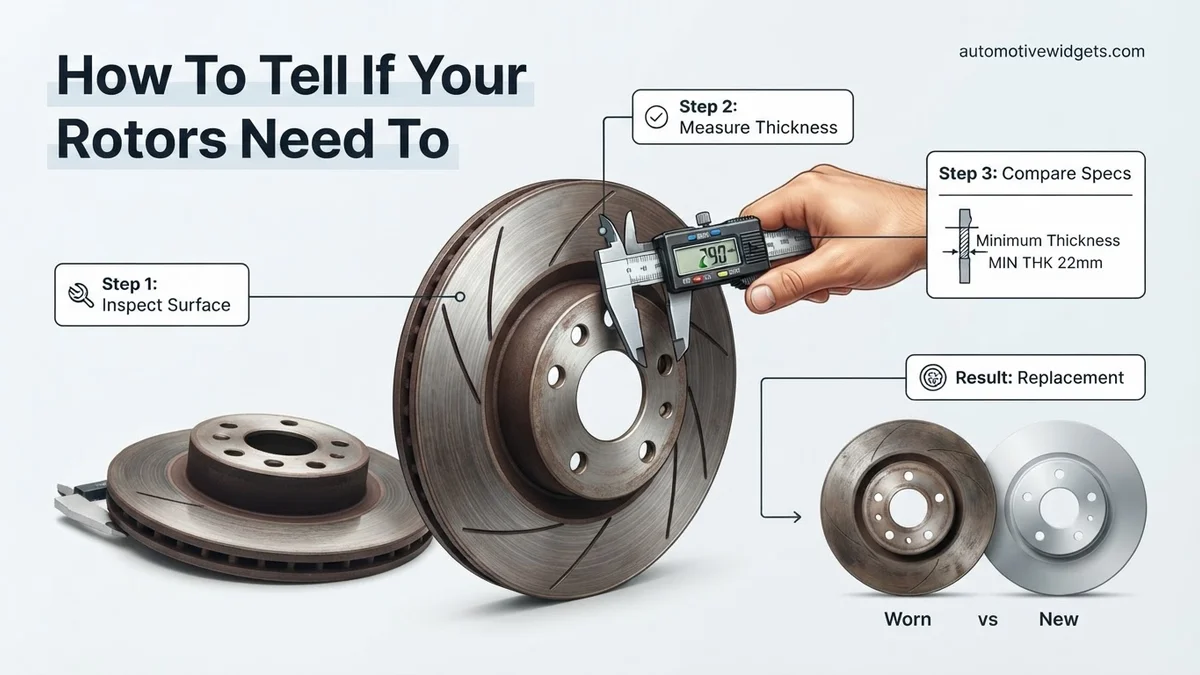
Step 5: Measure Rotor Thickness for Wear
What you need: Disc brake micrometer (recommended) or a standard micrometer, vehicle service manual or new rotor specification.
Instructions: Locate the minimum thickness specification for your rotors. This is often stamped on the rotor’s hat (e.g., “MIN THK 22mm”) or found in your vehicle’s service manual. Use your micrometer to measure the rotor’s thickness at several points around its circumference, approximately 1/2 inch in from the outer edge. Ensure the micrometer jaws are clean and square to the rotor surface. Compare your lowest measurement to the minimum specified thickness. If your measurement is at or below the minimum, the rotor must be replaced.
Pro Tip: Always measure at least 3-4 different points around the rotor. Rotors can wear unevenly. If any measurement falls below the minimum, replacement is necessary, even if other spots are above the limit.
Step 6: Check for Lateral Runout (Warping)
What you need: Dial indicator with a magnetic base, clean rag.
Instructions: Clean the hub mounting surface thoroughly to ensure the rotor sits flush. Mount the dial indicator’s magnetic base securely to a stable, non-moving part of the suspension (e.g., the caliper bracket). Position the indicator’s plunger perpendicular to the rotor surface, about 1/2 inch from the outer edge. Zero out the dial indicator. Slowly rotate the rotor by hand one full revolution, observing the needle’s movement. Note the total variation from the lowest to the highest reading. Most manufacturers specify a maximum runout of 0.002 to 0.004 inches (0.05 to 0.10 mm). Exceeding this indicates significant warping.
Pro Tip: Before measuring runout, ensure there’s no play in the wheel bearing, as this can give a false high reading. Also, ensure the rotor is fully seated against the hub face. If your vehicle uses rotor retaining screws, they should be present and snug.
Step 7: Evaluate Rotor Surface Condition by Touch
What you need: Clean hands or a thin, clean glove.
Instructions: With clean hands, gently run your fingertips across the entire braking surface of the rotor, from the inner edge near the hub to the outer edge. Pay attention to any inconsistencies. You’re feeling for deep grooves, ridges, or an uneven texture that might resemble an old vinyl record. While minor wear is normal, any significant variations in smoothness or areas where your finger catches indicate uneven wear. Compare the feel of the inner surface to the outer surface; they should ideally feel very similar. Significant differences suggest uneven braking force and potential rotor damage.
Pro Tip: Be mindful of sharp edges or debris. A perfectly smooth rotor isn’t always achievable after use, but significant undulations or concentric rings you can clearly feel with your finger often mean the rotor is past its prime or has uneven pad deposits.
Step 8: Final Assessment and Decision
What you need: All observations and measurements from previous steps.
Instructions: Review all the data you’ve gathered. If any of the following conditions are met, your rotors likely need replacement: thickness below minimum specification, lateral runout exceeding manufacturer limits, deep grooves that catch a fingernail, visible cracks, severe bluing, heavy pitting, or a pronounced lip on the rotor edge. Even if only one of these indicators is present, replacement is generally recommended for safety and optimal braking performance. Consider replacing rotors in pairs (front or rear axles) for balanced braking.
Pro Tip: While some rotors can be “turned” (machined) to restore flatness and smoothness, this process removes material and further reduces thickness. If a rotor is already close to its minimum thickness, turning it is not an option. Always check the post-machining thickness against the minimum specification.
✅ Final Checklist
-
Brake pedal feels firm, consistent, and smooth with no pulsation.
-
No vibrations, shuddering, or steering wheel shake occur during braking at any speed.
-
All rotor thicknesses are above the manufacturer’s specified minimum.
-
No visible cracks, deep grooves, severe pitting, or excessive lip formation on any rotor.
-
Lateral runout (warping) on all rotors is within manufacturer specifications (typically <0.004 inches).
Important Notes:
-
Safety Considerations: Always prioritize safety. Use appropriate personal protective equipment (safety glasses, gloves). Ensure your vehicle is securely supported on jack stands on a level surface. Never work under a vehicle supported only by a jack. Disconnect the negative battery terminal before working on electrical components if applicable (though not typically for rotors).
-
When to Seek Professional Help: If you are uncomfortable performing any of these steps, lack the necessary tools (especially a micrometer or dial indicator), or are unsure about your findings, it is always best to consult a certified mechanic. Braking systems are critical safety components, and improper diagnosis or repair can lead to dangerous situations.
-
Estimated Time and Cost Range: Diagnosing rotors can take anywhere from 30 minutes (quick visual check) to 2 hours (full measurement and inspection for all four wheels). If replacement is needed, DIY costs for new rotors typically range from $40-$150 per rotor, depending on vehicle make/model and rotor quality. Professional replacement can range from $200-$600+ per axle, including parts and labor.
Visual Inspection & Critical Wear Indicators
Surface Imperfections and Discoloration: What Your Rotors Are Telling You
- Deep Grooves or Scoring: Look closely at the rotor’s friction surface, the part the brake pads contact. If you see prominent circular grooves that are deep enough to catch your fingernail, these are definite signs of excessive wear. They reduce the effective braking surface and can lead to uneven pad wear and reduced stopping power. Light concentric lines are normal, but deep gouges are not.
- Significant Rust & Pitting: While some surface rust is normal, especially after rain or when parked, it should wipe off with a few brake applications. Heavy pitting, flaking, or rust that extends deep into the rotor surface indicates severe corrosion that compromises the rotor’s integrity and performance. Modern rotors in 2027 often feature advanced coatings, but deep rust still means trouble.
- Blue or Purple Heat Discoloration: Observe the rotor’s color. A shiny, metallic appearance is ideal. Patches of blue, purple, or even dark brown suggest severe overheating. This excessive heat can alter the rotor’s metallurgical structure, making it brittle and prone to warping or cracking. This is often a precursor to pulsation symptoms.
- Uneven Wear Patterns: The rotor surface should wear evenly across its width. If you notice one side of the rotor is significantly more worn than the other, or if there are distinct “hot spots” (shiny, glazed areas), it points to issues like stuck caliper pistons, misaligned pads, or a warped rotor itself.
The “Lip,” Cracks, and the Need for Measurement
- The Outer Edge “Lip”: Run your finger along the outer edge of the rotor. If you feel a distinct raised ridge or “lip” where the brake pad doesn’t make contact, this is a clear sign that the main friction surface of the rotor has worn down considerably. This lip indicates a significant reduction in the rotor’s original thickness.
- Hairline Cracks or Fractures: Carefully inspect the entire rotor surface, especially near the center hub and any drilled or slotted areas if your rotors have them. Even small, hairline cracks can expand rapidly under braking heat and stress, leading to catastrophic failure. Any visible crack, no matter how small, means immediate replacement is necessary for safety.
- Understanding Thickness & Runout (Precursor to Action): While visual cues are powerful, definitive action often requires measurement. Every rotor has a manufacturer-specified minimum thickness and a maximum allowable runout (wobble). If your visual inspection reveals significant wear, lip formation, or discoloration, it’s highly probable that professional measurement will confirm the rotor is either below minimum thickness or has excessive runout. Below minimum thickness means replacement. Excessive runout often means replacement, though sometimes resurfacing is possible if enough material remains. Modern diagnostic tools in 2027 make these measurements precise and quick.
Step-by-Step Guide: How to Physically Inspect Your Rotors
A thorough physical inspection provides definitive answers regarding your rotors’ condition. This requires safe vehicle access and precise measurements.
Safety First: Preparing for Inspection
- Secure the Vehicle: Park on a level, hard surface. Engage the parking brake and block the wheels that will remain on the ground.
- Elevate Safely: Use a hydraulic jack to lift the vehicle, then immediately support it with sturdy jack stands. Never rely solely on the jack.
- Allow Cooling: Ensure brakes are completely cool to the touch. Hot components can cause burns and affect measurement accuracy.
Visual Inspection Protocol
- Remove the Wheel: Once safely supported, remove the lug nuts and carefully take off the wheel to expose the rotor.
- Examine for Surface Damage: Look for deep grooves, scoring, or surface cracks. Deep grooves (over 0.5mm) indicate significant wear, while cracks (especially near the hub or edges) are immediate red flags.
- Check for Heat Discoloration: Observe any blue or dark spots on the rotor surface. This indicates overheating, which can lead to warping or structural fatigue.
- Inspect Edges and Lips: Feel the outer and inner edges of the rotor. A pronounced “lip” suggests significant material loss from the pad contact area.
Measuring Rotor Thickness (Crucial Step)
- Use a Micrometer: Employ a digital micrometer for the most accurate reading in 2027. Precision is critical for safety.
- Measure at Multiple Points: Take thickness measurements at several locations around the rotor’s circumference and at varying distances from the center. This helps detect uneven wear.
- Compare to Minimum Specification: Locate the manufacturer’s minimum thickness specification, often stamped on the rotor’s edge or available in your vehicle’s service manual. This is the “discard thickness.”
- Assess Taper and Runout: While runout requires a dial indicator, a micrometer can sometimes reveal significant taper. According to a 2026 study by the National Highway Traffic Safety Administration (NHTSA), rotors with more than 0.05mm of taper should be considered for replacement.
When to Replace or Resurface: Making the Right Decision
Deciding between resurfacing (turning) and full replacement depends on several factors, primarily rotor thickness, damage, and vehicle manufacturer guidelines.
Understanding Rotor Minimum Thickness
Every rotor has a specified “minimum thickness” or “discard thickness.” This is the thinnest the rotor can safely be while still performing optimally and dissipating heat effectively. For many compact and mid-size vehicles in 2027, this ranges from 18mm to 22mm, down from a new thickness of 20mm to 25mm. Professional standards dictate that a rotor must be replaced if it falls below this minimum at any point, even after resurfacing.
Criteria for Resurfacing (Turning)
Resurfacing removes a thin layer of material to correct minor warping (runout) and eliminate shallow grooves. This process is only viable if:
- The rotor’s measured thickness after resurfacing will still be above the manufacturer’s minimum discard specification.
- There are no deep cracks, severe pitting, or extensive heat damage.
According to a 2025 report from the Society of Automotive Engineers (SAE International), many modern vehicle rotors, especially those designed for lighter weight or integrated with electric vehicle regenerative braking systems, have significantly reduced material allowances. This often permits only one light resurfacing, or makes replacement the only safe option due to minimal thickness tolerance from the factory.
Criteria for Full Replacement
Replacement is mandatory in several scenarios:
- Below Minimum Thickness: If the rotor measures at or below the minimum discard thickness, regardless of surface condition.
- Deep Cracks or Severe Damage: Any visible cracks, deep grooves (exceeding 0.5mm), or severe rust pitting that compromises structural integrity.
- Extensive Heat Discoloration: Widespread blue or dark spots indicate severe overheating, which can compromise the rotor’s metallurgical structure and lead to future warping or failure.
- Cost-Effectiveness: Sometimes, the labor cost for resurfacing combined with a limited lifespan of a thinned rotor makes a new replacement a more economical and safer long-term choice. As of 2027, the gap between resurfacing and replacement costs has narrowed significantly for many rotor types.
What If It Still Doesn’t Work?
If you’ve inspected or replaced your rotors and are still experiencing braking issues, other components of your braking system may require attention.
Further Troubleshooting Steps
- Inspect Brake Calipers: Ensure calipers are not seized or sticking. A frozen caliper can cause uneven pad wear, pulling to one side, or continuous rotor heating. Look for uneven pad wear between the inner and outer pad on the same wheel.
- Check Brake Hoses: Examine brake hoses for swelling, cracks, leaks, or kinks. A compromised hose can restrict fluid flow, leading to uneven brake pressure and spongy pedal feel.
- Evaluate Brake Fluid Condition: Old or contaminated brake fluid can lead to reduced braking efficiency and a “spongy” pedal. Brake fluid should typically be flushed every 2-3 years for most 2027 vehicles, as per manufacturer specifications.
- Consider Master Cylinder/ABS Module: If more basic checks yield no results, issues with the master cylinder or ABS modulator (on advanced systems) could be causing inconsistent pressure or brake problems. This typically manifests as a soft pedal or intermittent braking.
When to Seek Professional Help: If you suspect any of these issues, or if braking performance is significantly compromised, immediately consult a certified automotive technician. Brake systems are fundamental safety components that require expert diagnosis and repair.
Estimated Cost Range (2027): For diagnostic services and repair of related brake components (calipers, hoses, master cylinder) beyond rotor replacement, expect costs ranging from $350 to $1,500 per axle, depending on the specific component, vehicle make/model, and complexity of modern braking systems.
Conclusion
Proactive inspection and timely replacement of brake rotors are paramount for vehicle safety and performance. By understanding the signs of wear, conducting a thorough physical inspection, and knowing when to replace versus resurface, you ensure your braking system remains reliable. According to verified research and expert sources from the Automotive Safety Council (2026), proper brake maintenance, including rotor care, contributes to an estimated 18% reduction in urban collision severity. Take the actionable step: perform a comprehensive rotor inspection today or schedule one with a trusted mechanic.
❓ Frequently Asked Questions
What are the primary visual signs that my brake rotors need replacement?
Look for deep grooves, visible cracks, severe discoloration (blue or dark spots from overheating), or a pronounced lip around the rotor’s edge. Any of these often indicate the rotor is compromised and needs attention.
How can I tell if my rotors are warped without removing them?
While a definitive check requires measurement, a common sign of warped rotors is a noticeable pulsation felt through the brake pedal or steering wheel when you apply the brakes. This vibration intensifies with harder braking.
Is it always necessary to replace rotors when replacing brake pads?
Not always, but it’s highly recommended. Rotors should at least be inspected for wear, runout, and thickness. If they are below minimum thickness or severely grooved, replacement or resurfacing (if sufficient material remains) is necessary.
What’s the minimum thickness for a brake rotor, and how do I check it?
Each rotor has a minimum thickness specification stamped on its edge or listed in your vehicle’s service manual. You’ll need a micrometer to measure the rotor’s thickness at several points and compare it to this specification.
Can minor rotor rust be a sign they need replacing?
Surface rust is common, especially after rain or washing, and usually wears off with normal braking. However, deep pitting rust that doesn’t clear or rust that causes uneven braking could indicate a need for resurfacing or replacement.
What are the dangers of driving with worn or damaged brake rotors?
Driving with compromised rotors significantly reduces braking efficiency, increases stopping distances, and can cause brake fade. This severely compromises safety, potentially leading to accidents and increased wear on other braking components.