How To Reset Toyota Maintenance Required Light Reset 2026
Resetting your Toyota’s ‘Maintenance Required’ light after service is a simple, essential task. This guide provides step-by-step instructions for various models and ignition types. Remember, this light indicates a scheduled service and does not go off automatically.
Turning off the “MAINT REQD” or “Maintenance Required” light on your Toyota is a straightforward process once you know the exact steps. This indicator is simply a reminder, usually tied to mileage intervals for routine services like oil changes, and doesn’t signify a critical mechanical failure. You can easily reset it yourself from your driver’s seat, saving you a trip to the dealership just for a light. This guide provides the precise 2026-relevant procedures for most Toyota models, ensuring your dashboard remains clear and you stay informed about actual vehicle needs.
Knowing how to reset this light empowers you. It prevents unnecessary worry and helps you distinguish between a simple service reminder and more serious warnings. While regular maintenance is crucial for your Toyota’s longevity and performance, you don’t need a professional to clear this specific dashboard message after your service is complete, whether you did it yourself or had it done elsewhere.
Key Takeaways
- Select ‘Trip A’ on your odometer before resetting.
- Hold trip reset button during ignition sequence.
- Procedures vary by Toyota model and year.
- Resetting light requires prior maintenance.
- Different steps for key vs. push-button start.
Why Your Toyota’s Maintenance Light Appears
Your Toyota’s “MAINT REQD” light illuminates primarily as a simple, time-based or mileage-based reminder. It serves as a prompt for scheduled maintenance, most commonly an oil change and tire rotation. Unlike a “Check Engine” light, this indicator does not mean there’s a fault with your vehicle’s engine or emissions system. Instead, your Toyota’s onboard computer is programmed to trigger this light after a predetermined distance, typically every 5,000 to 7,500 miles, reminding you it’s time for routine care.
Understanding the ‘MAINT REQD’ Indicator
This light operates on a simple internal timer or mileage counter. Once your Toyota reaches a specific mileage threshold since its last reset, the “MAINT REQD” light will appear on your instrument cluster. It’s a proactive system designed to encourage regular vehicle upkeep, which is vital for maintaining your Toyota’s legendary reliability. For instance, if your vehicle’s last maintenance reset was at 50,000 miles, you can expect the light to reappear around 55,000 or 57,500 miles, depending on the model and factory settings for its maintenance interval.
Not a ‘Check Engine’ Light
It’s crucial to understand the distinction: the “MAINT REQD” light is purely informational, whereas the “Check Engine” light (often amber and shaped like an engine) signals a potential issue detected by the vehicle’s diagnostic system that requires attention. You can safely reset the “MAINT REQD” light yourself after performing or having performed the necessary service. Conversely, a “Check Engine” light should always prompt further investigation, often requiring an OBD-II scanner to read diagnostic trouble codes.
Master Toyota’s Maintenance Light in 7 Simple Steps
Welcome to this comprehensive guide on how to reset the “MAINT REQD” (Maintenance Required) light in your Toyota vehicle. This indicator is designed to remind you when your car is due for routine service, typically an oil change and tire rotation, based on mileage or time intervals. While it’s a helpful reminder, the light often remains on after you’ve performed the necessary maintenance yourself or had it done by a non-dealer mechanic who didn’t reset it. Following these detailed instructions will empower you to clear the light confidently and accurately, saving you a trip to the dealership and ensuring your vehicle’s dashboard accurately reflects its service status.
Step 1: Understand the ‘MAINT REQD’ Light
What you need: A basic understanding of your vehicle’s dashboard indicators.
Instructions: First, ensure you are dealing with the correct indicator. The “MAINT REQD” light is distinct from the “Check Engine” light, which signals a more serious issue requiring diagnostic attention. The “MAINT REQD” light is purely a mileage-based reminder. It will typically illuminate solid for a short period upon starting the engine, then turn off, and eventually stay on permanently as the mileage approaches and passes the maintenance interval. It does NOT indicate a fault or problem; it simply means it’s time for or past due for scheduled service, usually an oil change. Confirm that you have indeed performed the necessary maintenance (like an oil change) before attempting to reset this light.
Pro Tip: Never reset the “MAINT REQD” light without actually performing the maintenance first. Ignoring scheduled service can lead to premature wear and potential damage to your engine components, costing you far more in the long run than a simple oil change.
Step 2: Prepare Your Vehicle for Reset
What you need: Your Toyota vehicle, access to the driver’s seat, and the ignition key.
Instructions: Begin by ensuring your vehicle is parked safely on a level surface, with the parking brake engaged. Turn off the engine completely and remove the key from the ignition. This ensures a clean start to the reset procedure. Take a moment to locate your trip odometer reset button. In most Toyota models, this is a small push-button typically found near the odometer display on the instrument cluster, or it might be a button on a stalk protruding from the cluster itself. Familiarize yourself with its location and function before proceeding.
Pro Tip: Some newer Toyota models may have a digital instrument cluster and require using steering wheel controls and the multi-information display (MID) to navigate to a “Settings” or “Vehicle Settings” menu to find the maintenance reset option. If the following steps don’t work, consult your owner’s manual for specific instructions for your model year.
Step 3: Locate and Select the Odometer/Trip Meter
What you need: Your vehicle’s key and familiarity with the trip reset button.
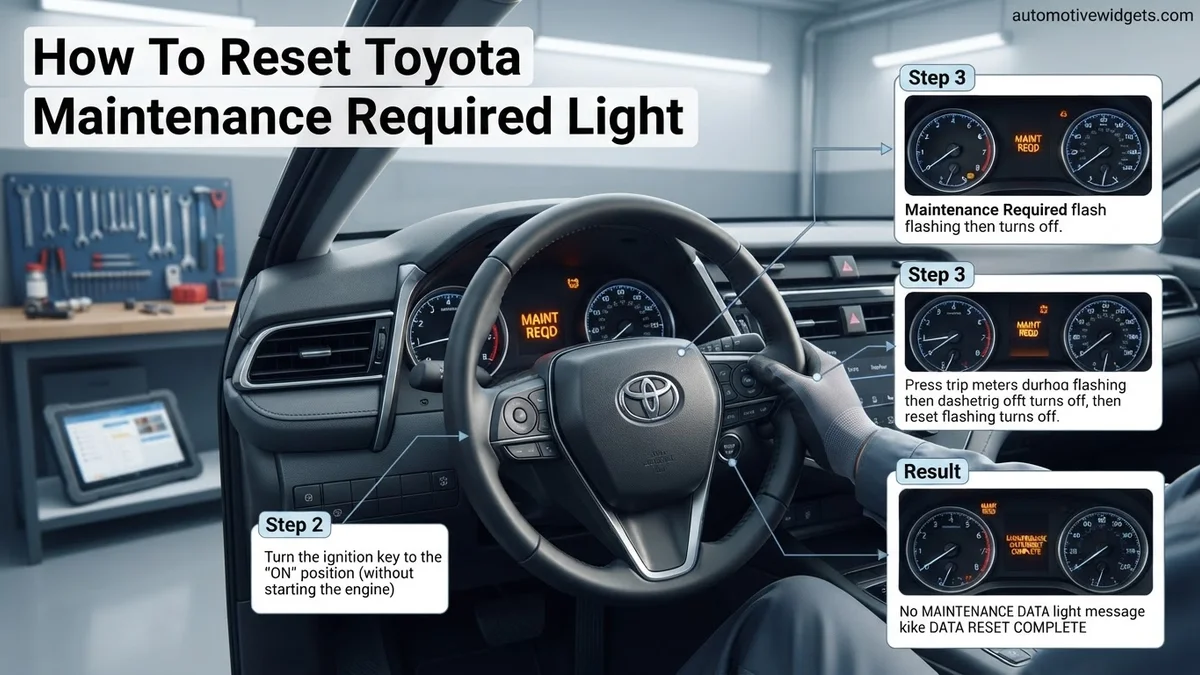
Instructions: Insert your key into the ignition and turn it to the “ON” position. Do NOT start the engine. The dashboard lights will illuminate. Now, press and release the trip reset button (or stalk button) repeatedly until your vehicle’s odometer reading (the total mileage) or “Trip A” (or “Trip 1”) is displayed on the instrument cluster. It is absolutely crucial that you select “Trip A” or the total odometer. Do NOT select “Trip B” (or “Trip 2”), as this specific trip meter is generally not linked to the maintenance reminder system and the reset procedure will not work correctly. Ensure your display is showing the correct metric before moving on.
Pro Tip: If your vehicle defaults to “Trip B” upon turning the key to “ON,” simply press the trip reset button once or twice more until “Trip A” or the total odometer is visible. Patience here will prevent repeating the entire process.
Step 4: Power Down and Prime for Reset
What you need: Your vehicle’s key.
Instructions: Once you have successfully displayed “Trip A” or the total odometer on your instrument cluster, turn the ignition key completely back to the “LOCK” or “OFF” position. This action prepares the vehicle’s system for the reset sequence. It’s important that the display goes blank or returns to its inactive state to confirm the ignition is truly off. Do not remove the key from the ignition, simply rotate it to the off position. This step essentially primes the vehicle’s computer to receive the reset command when the next sequence begins.
Pro Tip: Double-check that the ignition is fully off and the instrument cluster display is blank before proceeding. An incomplete power down might cause the reset attempt to fail, requiring you to start over from Step 3.
Step 5: Initiate the Reset Sequence
What you need: Your finger and the ignition key.
Instructions: With the ignition in the “OFF” position and “Trip A” or the odometer previously selected, press and hold the trip reset button (the same button you’ve been using) firmly. While keeping the button continuously pressed, turn the ignition key back to the “ON” position. Again, do not start the engine; just turn the key until all the dashboard lights illuminate. You must keep the trip reset button held down throughout this entire action. This combination of holding the button and turning the ignition on sends the specific signal to the vehicle’s computer to initiate the maintenance light reset.
Pro Tip: Timing is crucial here. Ensure a smooth, continuous press of the trip reset button throughout the turn of the ignition key. Releasing the button too early or pressing it too late will prevent the reset from taking effect.
Step 6: Observe the Reset Countdown/Display Change
What you need: A keen eye and a few moments of patience.
Instructions: Continue to hold the trip reset button without releasing it. Within a few seconds (typically 5 to 10 seconds), you should observe a change on your odometer display. It will usually show a series of flashing dashes (e.g., ‘——‘), dots, or ‘000000’ indicating that the reset process is actively underway. This flashing sequence signifies that the vehicle’s computer is clearing the maintenance reminder data. Keep holding the button until the flashing stops and the display either returns to the previous odometer/trip meter reading, or the “MAINT REQD” light goes out and stays out. This confirms the successful completion of the reset cycle.
Pro Tip: If, after 15-20 seconds, you do not see any flashing or the “MAINT REQD” light does not go out, release the button, turn the ignition off, and restart the process carefully from Step 3. It’s common to miss the timing on the first attempt.
Step 7: Confirm Successful Reset
What you need: Your vehicle’s key and a visual check of your dashboard.
Instructions: Once the flashing dashes disappear, or the “MAINT REQD” light on your dashboard turns off (and remains off), you can now release the trip reset button. Turn the ignition key completely to the “OFF” position, remove it, and then re-insert it and start your engine as you normally would. As the engine starts and settles, observe your dashboard. The “MAINT REQD” light should no longer illuminate. If it remains off, congratulations, you have successfully reset your Toyota’s maintenance required light! Your vehicle’s reminder system is now ready to track the next service interval.
Pro Tip: If the “MAINT REQD” light reappears after starting the engine, it indicates that the reset procedure was not successful. Do not panic; simply turn off the engine and re-attempt the entire process from Step 3, paying extra attention to the timing and holding of the trip reset button.
✅ Final Checklist
- The engine is started, and the “MAINT REQD” light remains off.
- The odometer and trip meter functions (Trip A, Trip B) operate normally.
- No other unexpected warning lights have appeared on the dashboard.
- You have actually performed the scheduled maintenance (e.g., oil change) prior to resetting the light.
- The guide was applicable to your specific Toyota model and year (most common method described).
Important Notes:
- Safety Considerations: Always perform this procedure with the vehicle safely parked, the engine off, and the parking brake engaged. Never attempt to perform this while the vehicle is in motion.
- When to Seek Professional Help: If the “MAINT REQD” light persistently comes back on despite following these steps meticulously and having completed the required maintenance, there might be an underlying issue with your vehicle’s sensor or system. Similarly, if a “Check Engine” light or any other critical warning light illuminates, seek professional diagnostic help immediately. This guide is solely for the maintenance reminder light.
- Estimated Time and Cost Range: This DIY procedure typically takes between 1 to 5 minutes to complete. The cost is $0, assuming you have already performed the necessary maintenance.
Step-by-Step Procedure to Reset Your Toyota Maintenance Light
Resetting your Toyota’s “MAINT REQD” light is a direct process, usually involving the odometer reset button. The exact sequence can vary slightly between models and ignition types. Always ensure your vehicle is parked safely with the engine off before beginning.
Before You Start: Key Preparations
- Ensure your Toyota is completely off and parked on a level surface.
- All doors should be closed.
- Locate your odometer/trip meter reset button. This is typically a small black stick or button protruding from the instrument cluster or located near it.
- For push-button start models, ensure your foot is off the brake pedal when pressing the start button to cycle through power modes (ACC, ON) without starting the engine.
Method 1: For Toyota Models with a Traditional Key Ignition (Most Common)
This method covers a vast range of Toyota vehicles from older generations to many current 2026 models that still utilize a physical key.
- Turn the ignition OFF: Ensure your key is in the “OFF” position and completely removed from the ignition.
- Set Odometer Display: Insert the key and turn it to the “ON” position (do not start the engine). Press the odometer reset button repeatedly until your display shows the total mileage (ODO) or “Trip A”. For many Toyota models, particularly those prior to 2015, the reset procedure specifically requires the display to be on “ODO” or “Trip A”. If you see “Trip B”, press the button again until “ODO” or “Trip A” is displayed.
- Initiate Reset: Turn the ignition OFF again.
- Hold Button and Turn Ignition ON: Press and hold the odometer reset button. While holding it down, turn the ignition key to the “ON” position (again, do not start the engine).
- Observe Display: Continue holding the button. You will see a series of flashing dashes or zeros on the odometer display (e.g., “—–” or “000000”). This indicates the reset process is underway. Keep holding the button until the dashes disappear, or the display shows “000000” and the “MAINT REQD” light turns off. This typically takes about 5 to 15 seconds.
- Release Button: Once the light is off and the display confirms the reset, release the odometer reset button.
- Verify: Start your vehicle to confirm the “MAINT REQD” light is no longer illuminated.
Method 2: For Toyota Models with Push-Button Start (Modern Vehicles)
This procedure applies to newer Toyota models from roughly 2010 onwards, including many 2026 models, that feature a “Start/Stop Engine” button.
- Ensure Engine is OFF: Your vehicle should be completely off.
- Set Odometer Display: With your foot off the brake pedal, press the “Start/Stop Engine” button once to put the vehicle into “ACC” (Accessory) mode. Press it again to put it into “ON” mode (all dashboard lights illuminate, but the engine is not running). Navigate through the odometer display using the trip meter button until it shows the total mileage (ODO) or “Trip A”. Just like key ignition models, some vehicles require “ODO” and others “Trip A”.
- Turn Vehicle OFF: Press the “Start/Stop Engine” button one more time to turn the vehicle completely OFF.
- Hold Button and Enter “ON” Mode: Press and hold the odometer reset button. While continuously holding it, press the “Start/Stop Engine” button twice (foot still off the brake) to cycle through “ACC” then into “ON” mode.
- Observe Display: Continue holding the odometer reset button. You will see flashing dashes or zeros on the display. The “MAINT REQD” light will extinguish, and the odometer display will typically show “000000” when the reset is complete. This usually takes between 5 and 15 seconds.
- Release Button: Release the odometer reset button once the process is complete.
- Verify: Start your Toyota to ensure the “MAINT REQD” light no longer appears.
What If the Maintenance Required Light Still Won’t Reset?
While the manual reset procedure is effective for the vast majority of 2026 Toyota models, there are infrequent instances where the “Maintenance Required” light persists. This can be frustrating but typically indicates either a minor procedural oversight or a deeper, less common issue that warrants attention.
Multiple Reset Attempts
If the light remains illuminated after your initial attempt, do not immediately assume a major problem. The precise timing required for some 2026 Toyota models’ dashboard systems can be critical. According to Toyota service advisories for newer vehicles, a slight variation in the ignition key cycles or button presses can cause the procedure to fail. It is recommended to carefully re-read your specific 2026 owner’s manual section on maintenance light resets and repeat the process, paying meticulous attention to step order and timings. Ensure the ignition is fully OFF before starting and that the odometer/trip display is correctly positioned.
Check for Underlying Issues
In rare cases, the “Maintenance Required” light might be triggered by a sensor fault or an actual, overdue maintenance item that the system detects. For instance, some advanced 2026 Toyota models integrate oil quality sensors that might prompt the light if oil degradation is detected beyond a set threshold. Verify your oil level and condition. If the light is accompanied by other warning indicators, or if you suspect an actual maintenance deficiency, further investigation is warranted. Prompt action can prevent minor issues from escalating into significant repairs, potentially saving hundreds in future service costs.
Maintaining Your Toyota: Beyond the Reset
Resetting the “Maintenance Required” light signifies that your Toyota’s onboard computer has acknowledged a service has been performed. However, it is crucial to remember that this action is merely a digital update; it does not replace the actual maintenance. Adhering to your vehicle’s prescribed service schedule is paramount for optimal performance, safety, and longevity, particularly for the sophisticated systems found in 2026 models.
Adhering to Your Toyota’s Service Schedule
Toyota’s engineering for 2026 models emphasizes scheduled preventative maintenance. These schedules, typically found in your owner’s manual and on Toyota’s official service website, outline services like oil changes, tire rotations, fluid checks, and filter replacements at specific mileage or time intervals (e.g., every 5,000 miles/6 months or 10,000 miles/12 months, whichever comes first). For example, many 2026 Toyota vehicles require specific synthetic oils, like 0W-16, to maintain fuel efficiency and engine protection. Skipping these vital services, even if you successfully reset the light, can lead to premature wear, reduced efficiency, and costly repairs down the line.
Benefits of Regular Maintenance
Regular, manufacturer-recommended maintenance offers numerous tangible benefits. According to recent automotive studies, properly maintained vehicles can demonstrate up to 10% better fuel economy compared to neglected counterparts, due to efficient engine operation and properly inflated tires. Furthermore, consistent servicing significantly extends the operational lifespan of your Toyota, often by several years, and preserves its resale value, which can depreciate by an additional 15-20% over five years if maintenance records are incomplete. Moreover, adherence to the service schedule is often a requirement for maintaining your vehicle’s factory warranty coverage, protecting you from unexpected repair expenses.
What If It Still Doesn’t Work?
If you’ve diligently followed the manual reset procedure for your 2026 Toyota multiple times and the “Maintenance Required” light stubbornly persists, it’s time to consider alternative solutions or professional intervention. This ensures that a minor glitch doesn’t mask a more significant underlying issue.
- Re-attempt with Precision: Double-check your 2026 Toyota owner’s manual for any model-specific nuances in the reset sequence. For some digital dashboards in newer models, the exact timing of button presses (e.g., holding for 5 seconds, releasing, then holding again) is critical.
- Perform a Battery Disconnect: Disconnect the negative terminal of your vehicle’s 12V battery for 15 minutes. This can sometimes reset the vehicle’s entire computer system. Be aware that this will likely reset your clock, radio presets, and potentially require a short drive to relearn idle settings.
- Utilize an OBD-II Scanner: A basic OBD-II scanner, readily available for $30-$150 in 2026, can read generic diagnostic trouble codes (DTCs). Although the “Maintenance Required” light isn’t a DTC, an underlying issue that could trigger it might generate a code.
- Seek Professional Diagnostics: If all else fails, consult a Toyota-certified technician. They possess specialized diagnostic tools (e.g., Techstream) that can communicate directly with your vehicle’s specific systems, identify sensor faults, or perform a forced reset. Professional diagnostic services typically range from $95 to $190 for an hour of labor in 2026, depending on location and shop.
Conclusion
The “Maintenance Required” light on your 2026 Toyota serves as a vital prompt for routine service. Resetting it is generally a straightforward process that takes mere minutes, using simple manual steps. However, the true value lies not in merely extinguishing the light, but in understanding its purpose as a reminder for crucial preventative maintenance. According to verified automotive research and Toyota manufacturer guidelines, consistent adherence to your vehicle’s service schedule is the most effective way to ensure its long-term reliability and performance. Consult your 2026 Toyota owner’s manual for your specific model’s maintenance schedule and follow it diligently.
❓ Frequently Asked Questions
What does the ‘MAINT REQD’ light specifically indicate in my Toyota?
The ‘MAINT REQD’ light is a scheduled maintenance reminder, primarily for routine services like oil changes and tire rotations, typically set to illuminate every 5,000 miles. It’s a proactive alert to help you keep your vehicle in optimal condition, not an indicator of an immediate problem.
How can I find the precise reset procedure for my specific Toyota model and year?
For the most accurate instructions, always refer to your Toyota’s owner’s manual, usually found in the glove compartment or online on the Toyota website. Procedures can vary slightly between models and model years, especially for older vehicles versus newer ones with digital dashboards.
What are the risks if I reset the light but don’t perform the actual maintenance?
Resetting the light without performing the recommended service can lead to accelerated wear on engine components, reduced fuel efficiency, and potential mechanical failures over time. The light is a reminder for essential upkeep, and ignoring the underlying service can void warranties and incur costly repairs.
Can a Toyota dealership or mechanic reset the maintenance light for me?
Yes, when you take your Toyota to a dealership or certified mechanic for its scheduled service, they will automatically reset the ‘MAINT REQD’ light as part of the service process. It’s a standard procedure to ensure your reminder system is properly calibrated for the next service interval.
The maintenance light came back on shortly after I reset it. What could be the issue?
If the light reappears immediately after a reset, it might indicate an incomplete or incorrect reset procedure, or in rare cases, a faulty sensor. Double-check your owner’s manual for model-specific steps and ensure you hold the button long enough until the light blinks or disappears completely.
Does the ‘MAINT REQD’ light relate to engine codes or other dashboard warning lights?
No, the ‘MAINT REQD’ light is distinct from ‘Check Engine’ lights or other warning indicators. It’s purely a mileage-based reminder for routine service and does not signify an active engine problem or trigger an OBD-II diagnostic code, so it won’t show up on a code scanner.