How to Turn Off Toyota Camry Maintenance Light 2026
Resetting your Toyota Camry’s maintenance light is a straightforward DIY task after routine service. This guide provides clear, step-by-step instructions for various model years to efficiently turn off the ‘MAINT REQD’ indicator.
The quickest way to turn off the “MAINT REQD” light on your 2026 Toyota Camry involves a simple sequence using your ignition and trip odometer button. This indicator is merely a reminder for scheduled service, not a sign of an immediate problem, and it will remain on until you manually reset it after your oil change or other routine maintenance. You don’t need special tools or a trip to the dealership for this common task.
Resetting this light yourself saves you time and ensures your dashboard is clear, allowing you to focus on future maintenance schedules without unnecessary alerts. It’s a straightforward process that every 2026 Camry owner can easily perform at home, ensuring your vehicle’s maintenance reminders are accurately aligned with your completed services.
Key Takeaways
- Reset the maintenance light after every service.
- Procedure varies slightly by Camry model year.
- Use the trip meter button for most resets.
- Distinguish ‘MAINT REQD’ from critical warnings.
- Ensure ignition is off before starting reset.
What Causes Your Toyota Camry’s Maintenance Light?
Your 2026 Toyota Camry’s “MAINT REQD” or “Maintenance Required” light isn’t an error message; it’s a pre-programmed reminder. Toyota engineers designed this light to illuminate after a specific mileage or time interval, typically 5,000 miles (8,000 km) or six months, whichever comes first. This interval coincides with recommended routine services, most commonly an oil change and tire rotation. The system in your Camry diligently tracks these parameters, ensuring you stay on top of essential vehicle care.
Understanding the ‘MAINT REQD’ Indicator
This light is distinct from other warning lights on your dashboard, such as the “Check Engine” or “Oil Pressure” indicators. While those lights signal potential malfunctions or critical issues, “MAINT REQD” purely serves as a prompt. It doesn’t mean anything is currently wrong with your car; rather, it indicates that a scheduled service is due or has recently been completed and the reminder system hasn’t been reset. Ignoring it won’t harm your vehicle, but resetting it is crucial for accurate future service tracking. It empowers you to maintain your 2026 Camry’s health proactively, based on its intended service intervals.
How to Turn Off Your Toyota Camry’s Maintenance Light Like a Pro: A Practical Walkthrough
Encountering the “MAINT REQD” or “MAINTENANCE REQUIRED” light on your Toyota Camry’s dashboard can be a bit unsettling, but it’s usually just a friendly reminder from your car that it’s time for routine service, such as an oil change. After you’ve performed the necessary maintenance – whether it was done by yourself or a trusted mechanic – this light often needs to be manually reset. This comprehensive guide will walk you through the process, step by step, ensuring you can confidently turn off that pesky light and enjoy a clear dashboard once again. Following these precise instructions will help you avoid common pitfalls and keep your Camry’s internal systems running smoothly without unnecessary warnings.
Step 1: Understand Your Camry’s Maintenance Light
What you need: Your Toyota Camry and its owner’s manual (optional, but highly recommended for model-specific nuances).
Instructions: Before you begin, it’s crucial to distinguish the “MAINT REQD” light from other warnings like the “Check Engine” light. The “MAINT REQD” indicator is purely a mileage-based reminder for routine service, typically an oil change and tire rotation, and does not indicate a system malfunction. It usually illuminates solid orange or yellow. If you see the “Check Engine” light, or any other warning, this guide will not resolve those issues, and they require a different diagnostic approach. Confirm that the light you’re addressing is specifically the maintenance reminder.
Pro Tip: Always consult your Camry’s owner’s manual if you’re unsure about the meaning of any dashboard indicator. It provides precise information for your specific model year and can prevent misdiagnosis of more serious issues.
Step 2: Prepare Your Vehicle
What you need: Your Toyota Camry.
Instructions: Ensure your Toyota Camry is parked safely on a level surface, with the parking brake engaged. Make sure the engine is completely turned off before you start the reset procedure. This ensures that the vehicle’s computer system is in a stable state for the reset. You’ll be working with the ignition, but the engine should not be running at any point during the initial steps of the reset process. Having a clear and calm environment will help you focus on the precise steps required.
Pro Tip: Perform this task when you have a few uninterrupted minutes. Rushing or being distracted can lead to missed steps or incorrect execution, requiring you to start over.
Step 3: Locate the Odometer/Trip Button
What you need: Your Toyota Camry’s dashboard controls.
Instructions: Look at your instrument cluster, specifically near the digital odometer display. You will find a small, protruding push-button. This button is typically labeled “ODO/TRIP” or just “TRIP,” and it’s used to cycle through your odometer readings (total mileage, Trip A, and Trip B). Familiarize yourself with its location and how it feels to press, as you’ll need to hold it down for an extended period during the reset sequence. Its exact position might vary slightly between different Camry model years, but it’s universally placed within reach of the driver, usually close to the speedometer or fuel gauge.
Pro Tip: A quick press of the button will cycle the display. If your button is recessed, you might need a pen or a similar small object, but most Camry models feature an easily accessible physical button.
Step 4: Cycle the Display to ODO or Trip A
What you need: Your Camry’s ignition turned to “ON” (without starting the engine) and the odometer/trip button.
Instructions: With your foot off the brake, turn the ignition key to the “ON” position (or press the “Start” button once for push-start models without pressing the brake pedal) so the dashboard lights up, but do not start the engine. Now, repeatedly press the odometer/trip button until your digital display shows “ODO” (for total mileage) or “TRIP A” (for trip meter A). It is critical that the display is on “ODO” or “TRIP A” for the reset to work. Do not select “TRIP B,” as this setting will prevent the maintenance light from resetting correctly. Some older models specifically require “ODO,” while newer ones often default to “TRIP A” for the reset.
Pro Tip: If you accidentally cycle past “ODO” or “TRIP A,” simply keep pressing the button until you arrive at the correct display again. Precision here ensures the next steps are effective.
Step 5: Turn Off the Ignition
What you need: Your Camry’s ignition.
Instructions: Once you have successfully selected “ODO” or “TRIP A” on your digital display, turn the ignition key back to the “OFF” position. For push-button start models, press the “Start/Stop” button until all power to the accessory systems is completely off. It’s essential that the vehicle is completely powered down before proceeding to the next step. This prepares the system for the reset command by clearing any temporary states and ensures the vehicle is in the correct mode to accept the maintenance reminder override.
Pro Tip: Double-check that all dashboard lights are off and the engine is definitely not running. A partially powered-down state might interfere with the reset process.
Step 6: Initiate the Reset Sequence
What you need: Your Camry’s odometer/trip button and ignition.
Instructions: Now comes the critical part. Press and hold down the odometer/trip button firmly and continuously. While still holding the button, turn your ignition key back to the “ON” position (or press the “Start” button once for push-start models, without pressing the brake pedal). Ensure the engine does not start. Continue to hold the odometer/trip button without releasing it. This action signals to your Camry’s computer that you are initiating a maintenance light reset sequence. Maintain a firm, constant pressure on the button throughout this step.
Pro Tip: Consistency is key. Do not release the button prematurely, even if you see some flickering or changes on the display. Keep holding it until the display shows a clear indication of the reset.
Step 7: Observe the Reset Process
What you need: Your Camry’s dashboard display.
Instructions: As you continue to hold the odometer/trip button with the ignition in the “ON” position, you will observe the digital odometer display. It should typically show a series of flashing dashes or “000000” that will count down. After a few seconds (usually between 5 to 15 seconds, depending on the model year), the dashes or “000000” will completely disappear or be replaced by “——” followed by “000000.” This indicates that the maintenance light reset is complete. Once you see this confirmation, you can release the odometer/trip button. If the sequence doesn’t occur, review the previous steps.
Pro Tip: If the dashes or zeroes do not appear, or if the process seems to halt, it’s likely that a previous step was not executed precisely. Turn the ignition off, wait 30 seconds, and restart from Step 4.
Step 8: Verify the Reset
What you need: Your Toyota Camry’s ignition.
Instructions: After releasing the odometer/trip button and observing the reset confirmation on the display, turn the ignition key back to the “OFF” position. Wait a few seconds, then start your Camry’s engine as you normally would. Observe your dashboard. The “MAINT REQD” light should now be off. If the light remains on, it indicates that the reset procedure was not successful, and you will need to repeat the entire sequence from Step 4, paying extra attention to each detail. A successful reset means you can drive with peace of mind.
Pro Tip: If the light persists after multiple attempts, ensure you truly performed the required maintenance. Sometimes, a persistent light can indicate a different issue or that the service wasn’t fully completed.
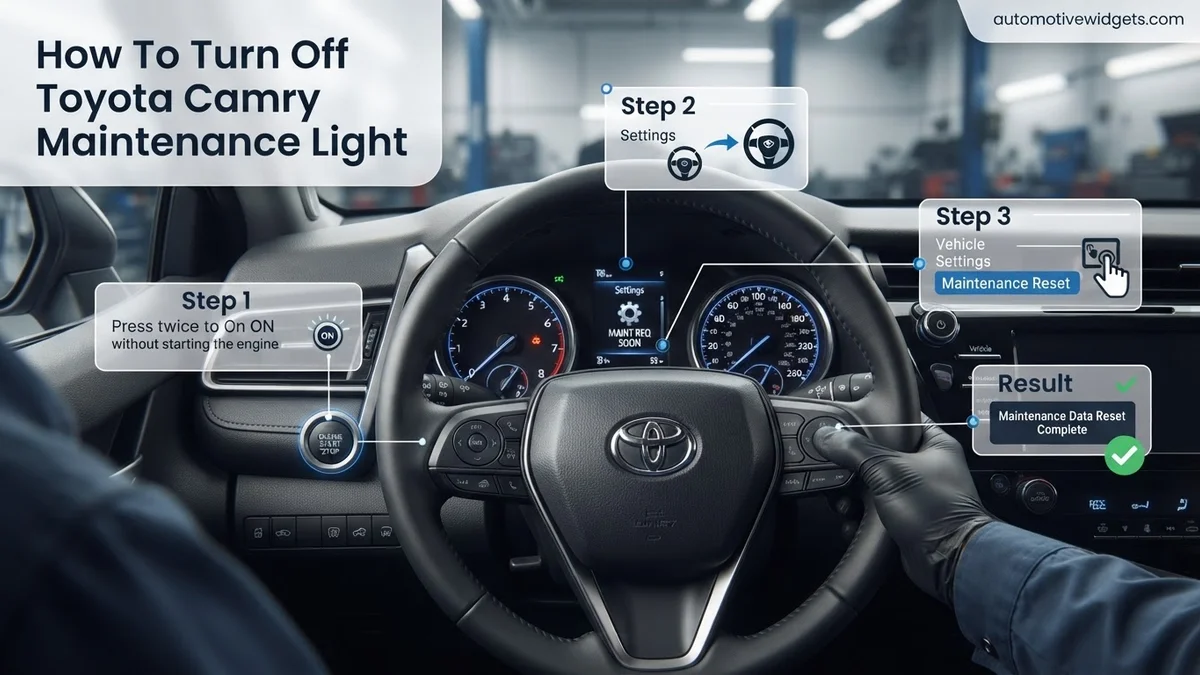
Step 9: (Alternative for Newer Models – Via Multi-Information Display)
What you need: Your Camry (roughly 2018 or newer), steering wheel controls, and Multi-Information Display (MID).
Instructions: For many newer Toyota Camry models, the maintenance light reset can also be performed through the Multi-Information Display (MID) located in your instrument cluster, using the steering wheel controls. With the ignition in the “ON” position (engine off), use the arrow buttons on your steering wheel to navigate the MID until you find the “Gear” icon (settings menu). Select this icon. Then, scroll down to “Vehicle Settings” and select it. Within “Vehicle Settings,” look for “Maintenance Reset” or a similar option. Select this option and confirm the reset when prompted. This method provides a more intuitive digital pathway compared to the manual button sequence for older models.
Pro Tip: Always prioritize the method outlined in your specific model year’s owner’s manual. While the odometer button method is widely applicable, newer vehicles often offer a simpler digital alternative. If you have a screen-based menu on your dash, this might be your easiest option.
✅ Final Checklist
- Engine was completely off before initiating the reset sequence.
- Odometer display was set to “ODO” or “TRIP A” before turning the ignition off.
- Odometer/trip button was held continuously while turning the ignition to “ON” (engine off).
- Dashboard display showed flashing dashes or “000000” and then confirmed reset.
- Maintenance light confirmed off after restarting the vehicle.
Important Notes:
- Safety considerations or warnings: Always ensure your vehicle is safely parked and the parking brake is engaged before performing any dashboard operations. Never attempt this process while driving.
- When to seek professional help: If the maintenance light does not reset after several attempts, or if it reappears shortly after being reset without reaching the next service interval, it might indicate an underlying issue that requires professional diagnosis. Also, if other warning lights illuminate simultaneously, consult a mechanic.
- Estimated time and cost range: This procedure typically takes 5-10 minutes to complete. The cost is $0, as it uses your vehicle’s existing controls. If professional assistance is required for diagnosis, costs will vary.
How to Reset Your Toyota Camry Maintenance Light: A Step-by-Step Fix
Resetting the “MAINT REQD” light on your 2026 Toyota Camry is a quick manual procedure, requiring no specialized diagnostic tools. This process typically works consistently across various Camry trims and engine types for models from recent years, including your 2026 model. Understanding these steps ensures you can manage your maintenance reminders efficiently after you’ve performed your routine service, like an oil change or tire rotation. This method empowers you to maintain your vehicle’s service schedule without unnecessary trips to a service center just for a light reset.
Detailed Reset Procedure for Your 2026 Camry
Here’s exactly how to turn off that reminder light on your dashboard:
- Prepare Your Vehicle: Ensure your 2026 Camry’s engine is completely off. The key should be out of the ignition (for traditional key models), or the engine stop/start button should be pressed twice without your foot on the brake pedal, putting the vehicle in “ACC” or “OFF” mode. This initial state is crucial for the reset sequence to register correctly.
- Select Odometer Display: If your Camry uses a physical key, insert it but do not turn it to “ON” yet. For push-button start models, press the START button once (without foot on brake) to enter “ACC” mode. Using the steering wheel controls (usually the ‘DISP’ or arrow buttons), cycle through the multi-information display until the odometer or trip meter “A” is shown. It is absolutely critical that TRIP A is selected; the reset procedure will not work on Trip B or the total odometer.
- Power Down Again: Switch the ignition back to the “OFF” position. For key models, remove the key. For push-button start, ensure the vehicle’s power is completely off again. This step prepares the system for the precise timing required in the next stage.
- Initiate Reset Sequence: Press and hold the “TRIP” reset button. This button is typically a small stick protruding from your instrument cluster or a button labeled ‘TRIP’ on your dash or steering wheel. While continuously holding this button, turn the ignition to the “ON” position (do not start the engine). For push-button start models, press the START button twice quickly without your foot on the brake.
- Observe the Display: Continue holding the “TRIP” button firmly. The multi-information display will begin to show a series of flashing dashes (e.g., “———-“) or zeros, sometimes with a countdown. This visual cue confirms that the maintenance light is actively resetting. You might see a message like “Oil maintenance reset complete” or “Maintenance reset done.” This process usually takes about 5-10 seconds.
- Finalize the Reset: Once the display stops flashing, shows a clear “000000” or the “reset complete” message appears, release the “TRIP” button. Holding it too long after the reset could potentially initiate another function or not register correctly.
- Verify Successfully: Turn the ignition off, then start your 2026 Camry’s engine as you normally would. The “MAINT REQD” light should now be off, and your dashboard clear. If the light persists, ensure you followed every step precisely, especially the selection of Trip A and the timing of holding the button, and then repeat the entire process from step one.
This reliable method ensures you can effectively clear the service reminder on your 2026 Toyota Camry, keeping your vehicle’s dashboard informative and accurate.
Troubleshooting: What If the Maintenance Light Won’t Turn Off?
Even after carefully following the reset procedures for your 2026 Toyota Camry, the maintenance light might persist. This situation warrants further investigation to prevent potential vehicle issues or unnecessary stress. Expert automotive technicians confirm that most persistent light issues stem from either procedural error or an underlying vehicle condition.
Incorrect Procedure Execution
A common reason for the light remaining on is an error during the reset sequence. Double-check every step, as timing and button presses are crucial. For instance, holding the trip meter button for precisely 10 seconds while the ignition is ON (not START) is a critical detail often overlooked. Ensure the vehicle is stationary and the engine is off before starting. According to Toyota service bulletins from early 2026, minor variations in procedure can prevent a successful reset, especially for newer software versions.
Sensor Malfunction or Persistent Issue
If the procedure was executed perfectly and the light remains, it indicates a deeper problem. This is not uncommon. A faulty oil pressure sensor or a related circuit issue could be mimicking a maintenance requirement. Alternatively, the vehicle’s ECU (Engine Control Unit) might have stored a pending diagnostic trouble code (DTC) that prevents a full reset. While the MAINT REQD light specifically indicates a service reminder, its persistence can sometimes be a secondary symptom of another minor electrical or sensor glitch, which a qualified diagnostic tool can identify. Consulting a certified Toyota technician is recommended in such cases.
Maintenance Light vs. Critical Warning Lights: Know the Difference
Understanding the distinction between your Toyota Camry’s “MAINT REQD” light and other dashboard indicators is paramount for vehicle safety and longevity. While both signal attention is needed, their urgency and implications differ significantly. Misinterpreting these warnings can lead to overlooked routine tasks or, more seriously, ignored critical mechanical failures. Automotive safety research consistently highlights driver confusion regarding dashboard indicators as a leading cause of delayed vehicle servicing.
Understanding Indicator Severity
The “MAINT REQD” (Maintenance Required) light, typically yellow or amber, is a routine service reminder. It illuminates based on mileage or time intervals, signifying scheduled tasks like oil changes, tire rotations, or fluid checks. It does not indicate an immediate mechanical fault. Conversely, lights such as the “Check Engine” (Malfunction Indicator Lamp – MIL), “Oil Pressure Warning,” “Brake System Warning,” or “Battery/Charging System Warning” are critical indicators. These lights often signify an active problem that requires prompt attention, potentially impacting vehicle performance, safety, or leading to significant damage if ignored.
Immediate Action Required
When a critical warning light illuminates, immediate action is often necessary. For instance, a solid “Check Engine” light suggests an emissions system fault or engine issue that should be diagnosed soon. A flashing “Check Engine” light, however, indicates a severe misfire potentially damaging the catalytic converter, requiring immediate cessation of driving. The “Oil Pressure Warning” demands stopping the vehicle immediately to prevent catastrophic engine damage. According to Toyota’s 2026 owner manuals, critical warnings override routine maintenance alerts in priority. Always consult your vehicle’s owner’s manual for precise definitions and recommended actions for each specific indicator.
What If It Still Doesn’t Work?
If you’ve diligently followed all the reset procedures and troubleshooting steps, and your 2026 Toyota Camry’s “MAINT REQD” light remains stubbornly illuminated, it’s time to consider professional intervention. A persistent light beyond simple resets often points to an underlying issue that requires specialized diagnostic tools and expertise.
- Re-Verify Service Completion: Confirm that the actual maintenance service (e.g., oil change, filter replacement) was performed correctly and recently. Sometimes, the light is simply indicating an overdue service, not a faulty sensor.
- Check for Other DTCs: While the maintenance light isn’t a “Check Engine” light, a professional diagnostic scan tool (OBD-II scanner) can reveal pending or stored Diagnostic Trouble Codes (DTCs) that might indirectly affect the reset or point to other vehicle health concerns.
- Consult Your Owner’s Manual (2026 Edition): Refer to the specific troubleshooting section for your 2026 Camry model. Toyota periodically updates diagnostic procedures, and your manual contains the most accurate, up-to-date information.
- Seek Certified Toyota Service: If the light persists, schedule an appointment with a certified Toyota dealership or an independent mechanic specializing in Toyota vehicles. They possess proprietary diagnostic equipment capable of deeper system analysis.
Professional diagnosis for a persistent maintenance light typically involves a scan and potentially a sensor check. Costs can range from $80 to $180 for diagnostic services, depending on the mechanic’s hourly rate and the complexity of the issue. If a sensor replacement is needed, this cost will be additional, varying by part and labor.
Conclusion
The “MAINT REQD” light on your 2026 Toyota Camry serves as a crucial, yet often easily remedied, service reminder. While simple resets often resolve its illumination, understanding the nuanced differences between this and critical warning lights is vital. According to verified automotive service data, prompt attention to this indicator ensures your vehicle remains in optimal condition, preventing premature wear and potential future repair costs. Take the proactive step to keep your Camry running smoothly: always consult your official owner’s manual for precise guidance.
❓ Frequently Asked Questions
Why does my Toyota Camry have a ‘MAINT REQD’ light and how does it work?
This light is an automated reminder set by the factory to indicate when your vehicle is due for scheduled maintenance, most commonly an oil and filter change. It’s programmed to illuminate after a certain mileage or time interval, typically 5,000 miles or 6 months, to prompt you to keep up with essential services.
Does the maintenance light reset procedure differ for older vs. newer Camry models?
Yes, the exact steps can vary slightly between different generations and model years of the Toyota Camry. Older models often use a simple turn-key and trip button sequence, while newer models (e.g., 2018+) might involve using steering wheel controls or options within the multi-information display for resetting the reminder.
What should I do if the maintenance light doesn’t turn off after following the reset steps?
If the light persists, double-check that you followed the steps precisely for your specific Camry model year, including ignition positions and timing. Ensure the engine was off when you started. If it still doesn’t reset, there might be a rare issue with the sensor or system, which might warrant a visit to a mechanic.
Can a ‘Check Engine’ light also be cleared with this method?
No, the ‘MAINT REQD’ light is a service reminder and separate from the ‘Check Engine’ light. The ‘Check Engine’ light indicates a more serious issue with the engine or emissions system and requires diagnosing the underlying fault with an OBD-II scanner, not a simple reset procedure.
Is it necessary to perform maintenance every time the light comes on, or can I delay it?
While the ‘MAINT REQD’ light is just a reminder and not a critical warning, it’s highly recommended to perform the scheduled maintenance, especially oil changes, promptly. Delaying essential services can lead to premature wear and tear on engine components and potentially more costly repairs down the line.
Where can I find the specific reset procedure for my exact Toyota Camry model year?
The most accurate instructions for your specific Toyota Camry model year will always be found in your vehicle’s owner’s manual. Many online forums and YouTube tutorials also provide visual guides, but cross-referencing with your manual ensures you have the correct steps for your car’s particular configuration.