How to Reset Maintenance Light on 2013 Toyota Camry: Quick Guide
Is your 2013 Toyota Camry’s maintenance light on, and you’re not sure how to turn it off? You’re not alone.
That little warning can be confusing and even a bit frustrating. But don’t worry—resetting the maintenance light is easier than you think. You’ll learn simple, step-by-step instructions to reset the light quickly and get your dashboard looking normal again. Keep reading, and you’ll have your Camry’s maintenance light reset in no time.

Credit: www.reddit.com
Locate The Maintenance Light
Finding the maintenance light on your 2013 Toyota Camry is the first step to resetting it. This light tells you when the car needs service. Knowing where it is helps you keep your car in good shape.
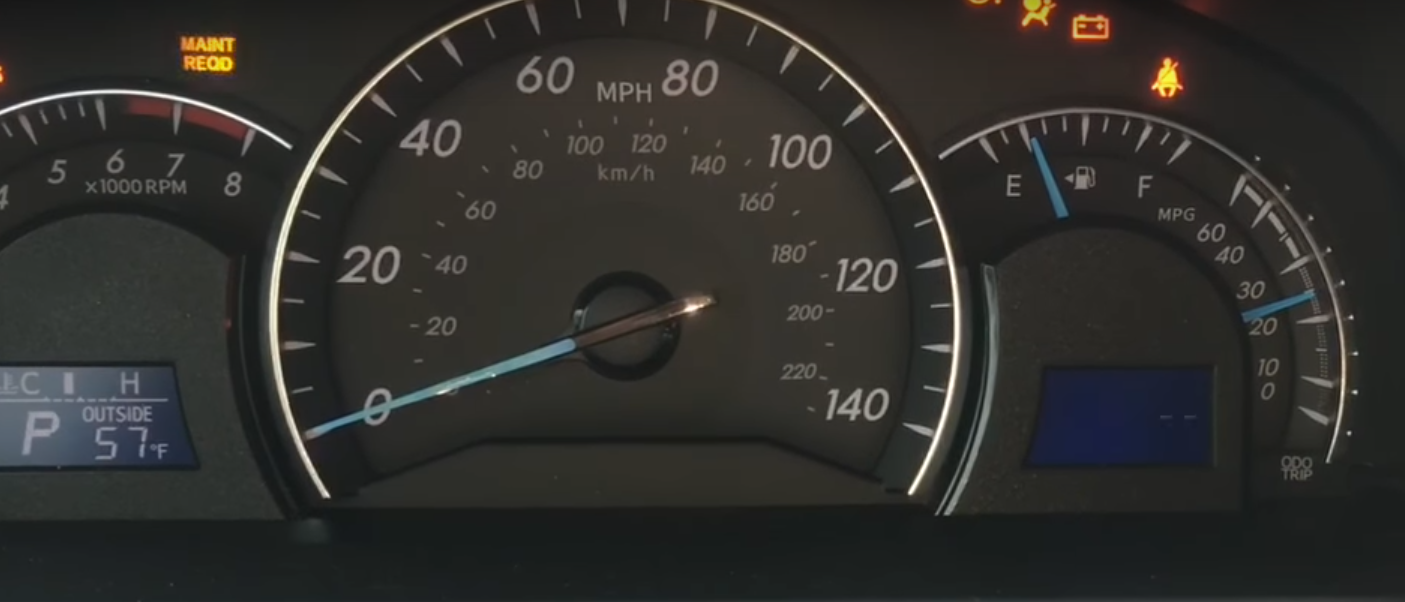
The maintenance light usually appears on the dashboard. It looks like a small wrench or a message saying “MAINT REQD.” This light turns on after a set number of miles or months, reminding you to check your car.
Dashboard Location
The maintenance light is on the instrument panel behind the steering wheel. This panel shows speed, fuel, and other important info. The light is near the speedometer or odometer. It is easy to spot because it glows when active.
Instrument Cluster Display
The instrument cluster includes digital and analog displays. The maintenance light may appear as a small icon or text. It comes on with other warning lights during startup. Watch for it to confirm it is working.
Checking The Odometer Section
The odometer shows your car’s mileage. The maintenance light often appears close to it. Sometimes, you must press buttons near the odometer to view or reset the light. This area is key to managing service reminders.
Credit: www.howtoautomotive.com
Prepare Your Toyota Camry
Preparing your 2013 Toyota Camry is the first step to reset the maintenance light. This step ensures the process goes smoothly. It also helps avoid errors during the reset.
Start by parking your car in a safe, flat area. Turn off the engine and set the parking brake. The car should be completely still for the reset to work.
Check The Ignition
Make sure the ignition is in the off position. The key should be out or in the accessory position. Do not start the engine yet. This helps the car’s computer prepare for the reset.
Turn On The Dashboard
Press the brake pedal and turn the ignition to the “ON” position. Do not start the engine. You will see the dashboard lights come on. This step activates the electrical system needed for the reset.
Locate The Odometer Button
Find the odometer or trip meter button on the dashboard. It is usually near the speedometer. This button helps you access the maintenance light reset menu.
Ensure All Doors Are Closed
Close all doors and the trunk tightly. Open doors can interrupt the reset process. The car must sense that everything is secure before the reset can happen.
Step-by-step Reset Process
Resetting the maintenance light on a 2013 Toyota Camry is simple. Follow these clear steps to turn off the light after your car service. This process saves trips to the mechanic for a light reset. It takes only a few minutes and needs no tools.
Prepare to reset the maintenance light by sitting inside your car. Make sure the engine is off and the key is out of the ignition. Then follow the steps below carefully.
Turn The Ignition To The On Position
Insert the key into the ignition. Turn the key to the “On” position without starting the engine. The dashboard lights will turn on. Watch for the maintenance light to appear.
Press And Hold The Odometer Reset Button
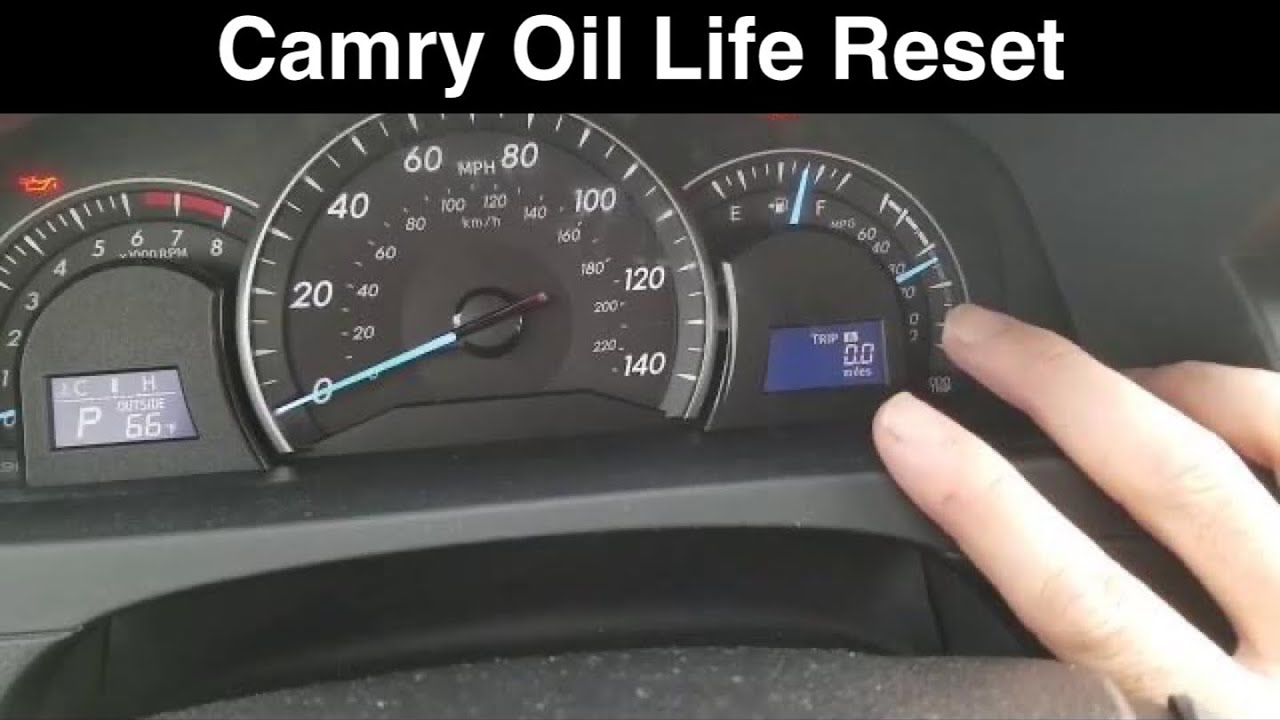
Find the odometer reset button on the dashboard. Press and hold this button. Keep it pressed during the next step. This action prepares the system for the reset.
Turn The Ignition Off And On
While holding the odometer button, turn the ignition off. Then, turn it back to the “On” position again. Do not start the engine. Hold the button until the maintenance light blinks or goes off.
Release The Button And Check The Light
Release the odometer reset button. The maintenance light should turn off. If it stays on, repeat the steps. This confirms the reset was successful.
Start The Engine And Verify
Start the engine to ensure the maintenance light is off. The dashboard should no longer show the maintenance alert. Your reset process is complete and your Camry is ready.
Credit: www.youtube.com
Confirm The Reset
Confirming the reset of the maintenance light on your 2013 Toyota Camry is a key step. It ensures the light has turned off and your car’s system is updated. This step helps avoid confusion about when the next service is due.
After completing the reset procedure, check the dashboard carefully. The maintenance light should no longer be visible. If the light stays on, the reset process might need to be repeated.
Check The Dashboard Display
Turn the ignition to the ON position without starting the engine. Look at the dashboard for the maintenance light. The light should be off after the reset.
If the light remains on, repeat the reset steps. Make sure you follow the procedure exactly to clear the light.
Drive The Car Briefly
Start the engine and drive the car slowly for a short distance. This action helps the car’s computer register the reset. Then, stop and turn off the engine.
Turn the ignition back on to check if the maintenance light stays off. This confirms the reset worked correctly.
Use The Odometer Display
The odometer can show if the maintenance light reset is successful. Check if the maintenance message or indicator is gone from the display. This means the system has reset the reminder.
If the message still appears, try the reset process again. Do this carefully to avoid errors.
Troubleshooting Common Issues
Troubleshooting common issues helps solve problems with the maintenance light. This light shows when your Camry needs service. Sometimes, the light stays on even after resetting. Other times, it may not reset at all. Knowing these problems saves time and effort.
Maintenance Light Does Not Reset
Check if you followed the reset steps correctly. The engine should be off when starting. Press the trip meter button until the odometer shows “ODO.” Turn the key to “ON” without starting the engine. Hold the trip button until the light blinks and goes off. If it stays on, try again. If it still does not reset, a system problem might exist.
Light Comes Back Soon After Reset
The maintenance light may return quickly if the service is overdue. The car tracks mileage and time for oil changes. Make sure you actually changed the oil or performed the required service. If the service is incomplete, the light will turn on again. Visit a mechanic to check the service status if unsure.
Trip Meter Button Not Working
The reset method uses the trip meter button. If this button is faulty, resetting is hard. Try pressing the button several times or clean around it. If the button still does not respond, it may need repair. A visit to a Toyota service center can fix this issue.
Battery Or Electrical Issues Affect Reset
A weak car battery can cause problems with the maintenance light. Low voltage may stop the light from resetting properly. Check the battery health and connections. Replace or fix the battery if needed. Electrical system faults also affect the light. A mechanic can diagnose these problems accurately.
Frequently Asked Questions
How Do I Reset The Maintenance Light On A 2013 Toyota Camry?
Turn the ignition to the “ON” position without starting the engine. Press and hold the trip meter reset button until the maintenance light blinks and turns off.
How Often Should I Reset The Maintenance Light On My Camry?
Reset the light after each scheduled oil change or maintenance service. This keeps your car’s reminders accurate and helps you track service intervals.
What Does The Maintenance Light On A 2013 Toyota Camry Mean?
The light signals it’s time for regular maintenance like an oil change. It helps keep your vehicle running smoothly and avoids bigger problems.
Can I Reset The Maintenance Light Without Tools On My Camry?
Yes, the reset can be done using the trip meter button only. No special tools or devices are needed for this process.
Conclusion
Resetting the maintenance light on your 2013 Toyota Camry is simple and quick. Follow the steps carefully to avoid confusion. This small task helps keep your car running smoothly. Regular resets remind you to take care of your vehicle. Stay on top of your car’s health with this easy fix.
Now, you can handle the maintenance light without stress. Keep your Camry in good shape by resetting the light when needed. It saves you time and keeps your car’s system updated.