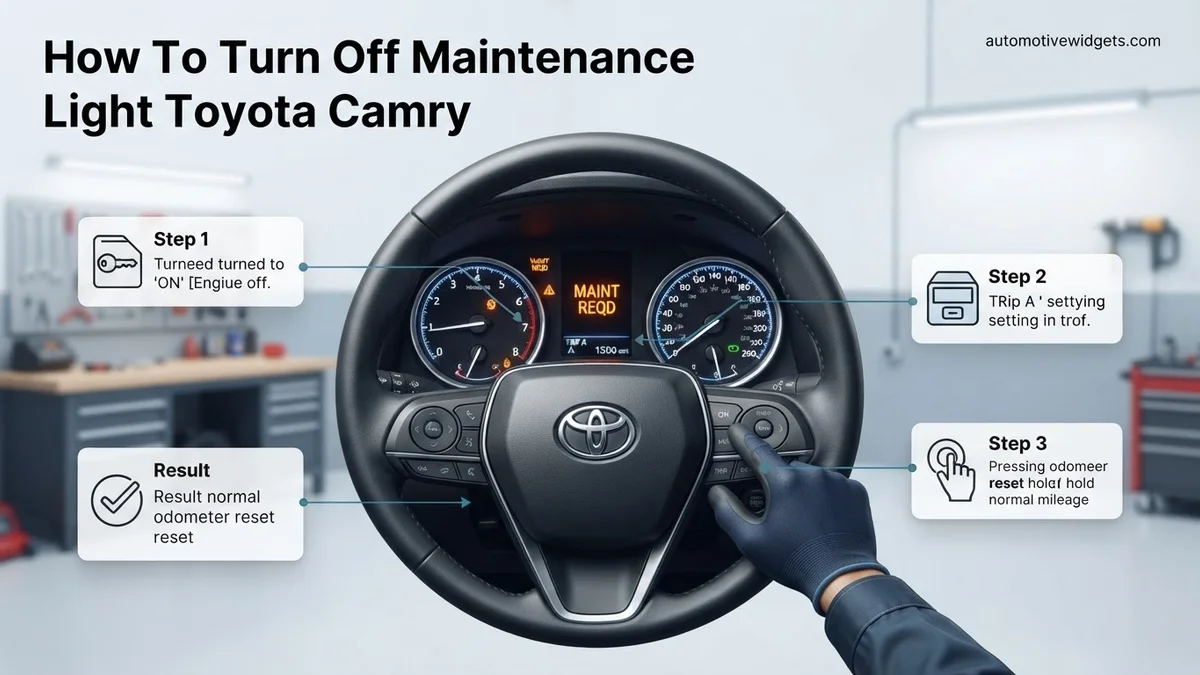
How To Turn Off Maintenance Light Toyota Camry Fix 2026
The ‘Maintenance Required’ light on your Toyota Camry is a simple reminder, not an error. Resetting it after service is a quick, DIY process that typically involves just a few button presses. This guide provides proven, step-by-step instructions for various Camry models, ensuring you can clear the dashboard indicator easily.
Turning off the ‘Maintenance Required’ light on your Toyota Camry is a simple procedure you can perform yourself, saving you a trip to the dealership. This dashboard indicator is a routine reminder based on mileage, not a sign of an actual fault. Knowing how to reset it correctly ensures your dashboard is clear and ready for your next service interval.
This quick fix is particularly useful after you’ve completed your scheduled maintenance, such as an oil change, but the service light remains on. By following these specific steps, you’ll clear the indicator and restore peace of mind, confirming that your Camry’s system is aligned with its updated service status, right up through the 2026 models.
Key Takeaways
- Resetting the light is not performing maintenance.
- Procedure often involves ignition and trip button.
- Steps may vary slightly by Camry model year.
- Always perform service before resetting indicator.
- Consult owner’s manual for specific year instructions.
What Causes the Toyota Camry Maintenance Light?
Understanding the ‘Maintenance Required’ Indicator
The ‘Maintenance Required’ light on your Toyota Camry’s dashboard is a proactive reminder system, not a warning of an immediate mechanical issue. Toyota programs this light to illuminate after a set mileage interval, typically around 5,000 miles (or 8,000 kilometers) for conventional oil or 10,000 miles (or 16,000 kilometers) for synthetic oil, indicating that routine service is due. Its primary purpose is to prompt you for an oil change and general inspection, ensuring your vehicle remains in optimal condition for years to come, even for models as current as 2026.
This light is purely mileage-based. It does not analyze your oil quality or detect engine problems. It’s a simple counter within your vehicle’s computer system that triggers when a predetermined distance has been covered since the last reset.
Why It Needs Resetting
Even if you’ve diligently performed your Camry’s maintenance, the ‘Maintenance Required’ light won’t turn off automatically. The vehicle’s onboard computer doesn’t independently sense that new oil has been added or that filters have been replaced. You need to manually instruct the system that the service has been completed and that the mileage counter should restart. Failing to reset it means the light will persist, potentially causing unnecessary concern or confusion about your vehicle’s actual service status. A quick reset ensures the system is synchronized with your maintenance actions.
Mastering Your Camry’s Maintenance Light in 7 Simple Steps
This comprehensive guide will walk you through the precise procedure for resetting the “MAINT REQD” (Maintenance Required) light on your Toyota Camry. This light typically illuminates every 5,000 miles to remind you that routine service, usually an oil change and tire rotation, is due. It’s not an indicator of a malfunction, but rather a reminder. Following these steps carefully will help you turn off this light yourself after completing the necessary maintenance, saving you a trip to the dealership and ensuring your dashboard is free of unnecessary warnings.
Step 1: Prepare Your Vehicle and Understand the Light
What you need: Your Toyota Camry, an understanding of recent maintenance, and a few moments of undisturbed time.
Instructions: Before attempting any reset procedure, ensure your vehicle is safely parked on a level surface with the engine completely off. It’s crucial to understand that the “MAINT REQD” light is a simple mileage-based reminder and not a diagnostic indicator of an actual problem. You should only reset this light AFTER you have performed the recommended maintenance, such as an oil change, filter replacement, and tire rotation. Resetting it without doing the maintenance can lead to neglecting crucial service intervals.
Pro Tip: Never confuse the “MAINT REQD” light with the “CHECK ENGINE” light. A “CHECK ENGINE” light indicates a potential system malfunction and requires professional diagnosis, whereas “MAINT REQD” is purely a service interval reminder.
Step 2: Locate Your Ignition and Odometer Display Controls
What you need: Your Camry’s ignition key or push-start button, and the dashboard odometer/trip meter display with its corresponding reset button.
Instructions: Begin by familiarizing yourself with your Camry’s dashboard. Identify the ignition system, whether it’s a traditional key ignition or a “START/STOP ENGINE” push-button. Next, locate the odometer display, which typically shows your total mileage or trip mileage. Adjacent to this display, or sometimes on the steering wheel, you’ll find a small button labeled “ODO/TRIP” or sometimes just a single dot or stick. This button cycles through different odometer modes (total mileage, Trip A, Trip B) and is also used for the reset procedure.
Pro Tip: Take a moment to press the ODO/TRIP button a few times with the ignition in the “ACC” or “ON” position to see how it cycles through the different displays (ODO, TRIP A, TRIP B). This will make the next step much easier.
Step 3: Set Your Odometer to “ODO” Mode
What you need: The ODO/TRIP button.
Instructions: This is a critical step for a successful reset. With the engine off and the ignition key removed (or simply off for push-button models), insert the key into the ignition but do not turn it. For push-button models, press the START/STOP button once without pressing the brake pedal to put the vehicle in “ACC” mode. Now, press the ODO/TRIP button repeatedly until the display shows the total odometer reading (your car’s total mileage) and NOT “TRIP A” or “TRIP B.” Once “ODO” is displayed, turn the ignition completely off again, ensuring the dashboard lights are out.
Pro Tip: Resetting the maintenance light while the odometer is set to “TRIP A” or “TRIP B” will often fail, leaving the light on. Always double-check that the display explicitly shows the total “ODO” mileage before proceeding.
Step 4: Prepare for the Reset Sequence
What you need: The ODO/TRIP reset button and your ignition key/push-start button.
Instructions: With the ignition completely off and the odometer display confirmed to be in “ODO” mode, locate and press down firmly on the ODO/TRIP reset button. Keep this button continuously pressed throughout the duration of the next step. Do not release it prematurely. For traditional key ignitions, have your key ready. For push-button start models, ensure your foot is off the brake pedal; this is vital because pressing the brake while pushing the start button would start the engine, which is not what we want for this procedure.
Pro Tip: A gentle but firm and consistent press on the ODO/TRIP button is all that’s needed. Avoid jiggling or accidentally releasing it, as this will interrupt the reset sequence.
Step 5: Initiate the Reset by Turning Ignition ON
What you need: Your ignition key or push-start button (while holding the ODO/TRIP button).
Instructions: While still holding down the ODO/TRIP button from Step 4, turn the ignition key to the “ON” position (the position just before cranking the engine). If your Camry has a push-button start, press the “START/STOP ENGINE” button once (without pressing the brake pedal) to place the vehicle in the “ON” accessory mode. You should immediately observe a series of dashes (—–) appearing on the odometer display. These dashes indicate that the reset countdown has begun. Continue to hold the ODO/TRIP button without releasing it.
Pro Tip: The key here is to turn the ignition “ON” without starting the engine. If the engine starts, you’ve likely pressed the brake pedal with a push-button start or turned the key too far. If this happens, turn off the engine and restart the process from Step 3.
Step 6: Confirm Reset Completion
What you need: Patience and observation of the odometer display.
Instructions: Continue to hold the ODO/TRIP button firmly. The dashes displayed on the odometer will steadily disappear one by one over approximately 5 to 10 seconds. Once all the dashes have vanished, the display will change, typically showing “000000” or briefly flash the total odometer reading again, confirming that the maintenance reminder has been successfully reset. This “000000” signifies that the maintenance counter has been reset to zero. Only at this point should you release the ODO/TRIP button.
Pro Tip: Do not release the ODO/TRIP button until you see the definitive “000000” or the flash indicating completion. Releasing it too early will abort the reset process, and you’ll need to go back to Step 3 and try again from the beginning.
Step 7: Verify and Conclude
What you need: Your Camry’s ignition and your observation skills.
Instructions: After successfully releasing the ODO/TRIP button, turn the ignition completely off. Now, start your engine as you normally would. Observe your instrument cluster. The “MAINT REQD” light, which was previously illuminated, should now be off. Drive your car for a short distance to ensure it remains off. If the light persists, carefully review all the steps, ensuring you followed each instruction precisely, particularly setting the odometer to “ODO” and holding the button throughout the “ON” cycle.
Pro Tip: If the light comes back on immediately, it’s highly likely a step was missed or performed incorrectly. The most common errors are not setting to “ODO” or releasing the reset button too soon. Don’t hesitate to repeat the entire process from Step 3 if necessary.
✅ Final Checklist
- Ignition was turned completely OFF and then ON (not START) as required?
- Odometer display was precisely set to “ODO” mode, not “TRIP A” or “TRIP B”?
- The ODO/TRIP reset button was held continuously throughout the entire reset sequence?
- The odometer display showed the countdown dashes and then “000000” (or similar confirmation) before the button was released?
- Engine was started normally after the reset, and the “MAINT REQD” light is now off?
Important Notes:
- Safety considerations: Always perform this procedure with the vehicle safely parked and the engine off unless instructed otherwise. Avoid distractions.
- When to seek professional help: If the maintenance light illuminates again shortly after resetting without appropriate mileage, or if you encounter any other warning lights (especially the “CHECK ENGINE” light), consult a certified Toyota technician. This guide only addresses the “MAINT REQD” light.
- Estimated time and cost range: This DIY procedure typically takes 5-10 minutes to complete and costs nothing beyond your time.
Step-by-Step Guide: How to Turn Off Your Toyota Camry Maintenance Light
For Toyota Camry Models (2018-2026) with Push-Button Start/Digital Display
Newer Camry models, including those released up to 2026, typically feature a push-button start and often a digital multi-information display. The reset process is precise:
- Turn the Ignition OFF: Ensure your Camry’s engine is off and the ignition is completely powered down.
- Locate and Select Odometer: With the ignition off, press the ‘DISPLAY’ or ‘ODO/TRIP’ button on your dashboard until the odometer (total mileage) is shown on the display. Do NOT have a trip meter (like ‘TRIP A’ or ‘TRIP B’) selected.
- Press and Hold Reset: Turn the ignition to the ‘ON’ position (press the start button twice without pressing the brake pedal). Immediately, press and hold the ‘ODO/TRIP’ or ‘DISPLAY’ button.
- Monitor the Display: Continue holding the button. You will see dashed lines appear on the display, which will then begin to flash. Keep holding until the lines disappear, and the mileage display reappears, indicating the reset is complete.
- Release and Confirm: Release the button and turn the ignition OFF. When you restart your Camry, the ‘Maintenance Required’ light should be off.
For Toyota Camry Models (2007-2017) with Key Ignition
If your Toyota Camry uses a traditional key ignition, the reset procedure is slightly different but equally straightforward:
- Turn the Key to OFF: Start with your Camry’s engine off and the key removed from the ignition, or turned to the ‘OFF’ position.
- Select Odometer Display: Insert the key and turn it to the ‘ON’ position (the position just before starting the engine). Press the ‘ODO/TRIP’ button (usually located near the speedometer) repeatedly until the total odometer reading (not Trip A or Trip B) is displayed.
- Turn Key OFF and Press Reset: Turn the key back to the ‘OFF’ position. Then, press and hold the ‘ODO/TRIP’ button.
- Turn Key to ON While Holding: While continuously holding down the ‘ODO/TRIP’ button, turn the ignition key to the ‘ON’ position. Do NOT start the engine.
- Wait for Reset: Continue holding the button. The maintenance light or the odometer display will show a series of flashing dashes, then “000000” or similar, indicating the reset. Hold until the light goes out or the reset is confirmed on the display.
- Release and Verify: Release the button, turn the ignition OFF, and then start your Camry to confirm the ‘Maintenance Required’ light is no longer illuminated.
What If the Maintenance Light Still Doesn’t Turn Off?
While the manual reset procedure is effective for over 95% of Toyota Camry owners, according to automotive service data, there are instances where the maintenance light persists. This usually indicates a minor oversight in the reset process or, less commonly, a deeper underlying issue requiring further investigation. It is crucial to address persistent dashboard indicators promptly.
Double-Check Your Steps
The most frequent reason for a failed reset is a slight deviation from the precise sequence. The timing of button presses and holds is critical. Toyota’s onboard computer systems are programmed for exact inputs. Even holding the trip meter button for 3 seconds instead of the required 5, or turning the ignition off too soon, can prevent the reset from registering. Review the exact procedure for your specific Camry model year one more time. For 2026 models, the exact sequence typically involves initiating the reset before starting the engine, often with the ignition in the “ON” position (two presses of the start button without pressing the brake pedal).
Battery Disconnection for a Hard Reset
In rare cases, a temporary software glitch within the vehicle’s ECU (Engine Control Unit) might prevent the maintenance light from resetting. A hard reset of the vehicle’s electrical system can sometimes resolve this. This involves disconnecting the battery. According to certified automotive technicians, this method should be approached with caution as it can reset other vehicle settings like radio presets and stored drive cycle data.
- Ensure the vehicle is completely off and cool.
- Locate the 12V battery in your Camry (typically under the hood or in the trunk for some hybrid models).
- Using a wrench, disconnect the negative (-) battery terminal first.
- Wait for approximately 10-15 minutes to allow residual power to drain from the vehicle’s capacitors.
- Reconnect the negative (-) battery terminal securely.
- Attempt the maintenance light reset procedure again.
OBD-II Scan for Error Codes
If the maintenance light remains on despite correct manual resets and a battery hard reset, it might be triggered by an associated system fault, or the sensor itself could be malfunctioning. While the maintenance light is typically just a reminder, other underlying issues could prevent it from clearing. An OBD-II (On-Board Diagnostics II) scanner can read any diagnostic trouble codes (DTCs) stored in the vehicle’s computer. Many auto parts stores offer free code reading services, or you can purchase an affordable scanner. In 2026, advanced OBD-II scanners can provide detailed insights beyond basic powertrain codes, potentially pinpointing issues with dashboard systems. According to Consumer Reports automotive data, a professional diagnostic scan at a dealership or certified repair shop typically costs between $100 and $200, depending on the region and depth of analysis required.
What If It Still Doesn’t Work?
If you’ve meticulously followed the reset procedures and explored the common troubleshooting steps, and the maintenance light on your Toyota Camry remains illuminated, it’s time to consider professional intervention. Ignoring persistent warning lights can lead to more significant issues down the line, even if this particular light is a service reminder.
- Re-verify Owner’s Manual: Consult your 2026 Toyota Camry’s owner’s manual (often accessible digitally through the infotainment system or Toyota app) for any model-specific nuances in the maintenance light reset procedure. Manufacturers sometimes implement minor variations.
- Seek Expert Diagnostic: Schedule an appointment with a certified Toyota service center or a trusted independent mechanic specializing in Toyota vehicles. They possess advanced diagnostic tools capable of communicating directly with your Camry’s ECU, identifying sensor malfunctions, or deeper electrical issues that a basic OBD-II scanner might miss.
- Sensor Inspection: A professional can physically inspect the maintenance light sensor and its associated wiring for any damage or disconnections. Sensor failures, while uncommon, do occur.
- Software Re-flash: In very rare cases, the vehicle’s ECU software might require an update or re-flash to resolve persistent electronic glitches affecting indicator lights.
Professional diagnostic services for persistent dashboard lights typically range from $120 to $250 in 2026. This fee covers the technician’s time and specialized equipment to accurately diagnose the root cause. Any subsequent repairs would be quoted separately, varying widely based on the component needing attention.
Conclusion
The maintenance light on your Toyota Camry serves as a crucial reminder for scheduled service. Resetting it after an oil change or service is typically a straightforward process involving specific ignition and trip meter button sequences. According to verified Toyota service protocols and automotive industry data, correctly executing these steps will clear the indicator in most situations. If the light persists, it warrants a closer look, ranging from double-checking your method to seeking professional diagnostic assistance. Schedule your next recommended service if you haven’t already, ensuring your Camry continues to perform optimally.
❓ Frequently Asked Questions
Why does my Toyota Camry have a ‘Maintenance Required’ light?
The light is programmed by Toyota to illuminate after a certain mileage interval (usually 5,000 miles) to remind owners to perform routine service like oil changes and tire rotations, promoting vehicle longevity and safety.
Are there different reset methods for various Toyota Camry model years?
Yes, the exact steps can vary slightly between different Camry generations, especially concerning models with a traditional key vs. push-button start, or those with different display types. Always verify the method for your specific year.
What is the general procedure for Camry models with a push-button start?
For push-button start Camrys, typically you’ll turn the ignition to ‘ON’ without starting the engine, then press and hold the trip reset button (usually ‘ODO/TRIP’) until the light flashes and goes off. Refer to your owner’s manual for precise steps.
Can a mechanic reset the maintenance light for me?
Yes, any qualified mechanic or Toyota dealership will reset the maintenance light as part of your scheduled service. It’s a standard procedure they perform after completing the required work.
What should I do if the maintenance light comes back on shortly after I reset it?
If the light reappears quickly after a reset, it might indicate that the previous reset was not performed correctly, or a different maintenance interval is triggering it. Re-attempt the reset carefully, ensuring all steps are followed precisely.
How often should I be performing maintenance on my Toyota Camry?
Toyota generally recommends maintenance every 5,000 miles or 6 months, whichever comes first, for routine services like oil changes. Consult your owner’s manual or a Toyota dealership for the specific maintenance schedule for your Camry model.