Can A Loose Battery Terminal Drain The Battery Can a 2027
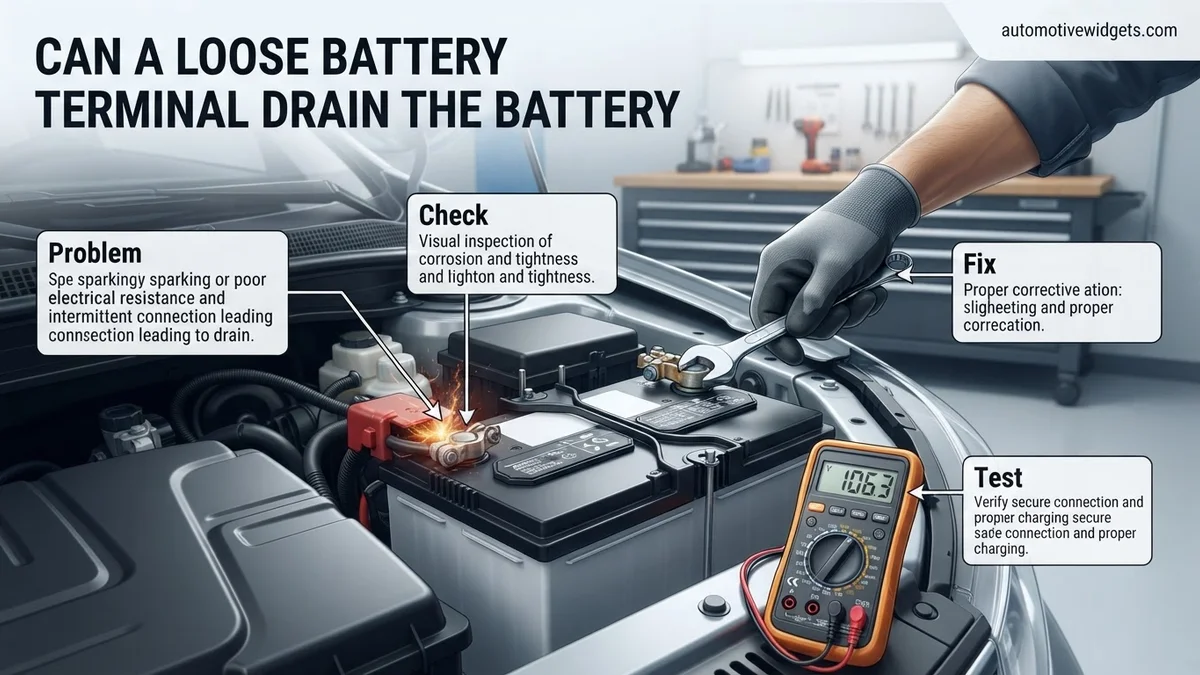
While a loose battery terminal doesn’t technically drain the battery in the sense of parasitic draw, it prevents proper current flow and charging, making the battery appear dead or weak. This high resistance and poor contact mean the engine can’t receive enough power to start, and the battery may not fully recharge. Understanding this mechanism is key to diagnosing and fixing starting issues.
No, a loose battery terminal typically does not “drain” your car battery in the traditional sense of a parasitic draw consuming power. Instead, for your 2027 vehicle, a loose connection acts like a bottleneck, severely impeding the flow of electrical current both from the battery to your car’s systems and from the alternator back to the battery for recharging. This critical distinction means your battery might hold a full charge, but it simply cannot deliver or receive that power effectively, leading to symptoms identical to a truly dead or discharged battery.
Understanding this phenomenon is crucial for any vehicle owner in 2027, as it can save you time and money on unnecessary battery replacements or extensive diagnostics. When your car struggles to start or experiences intermittent electrical issues, a loose terminal is a surprisingly common, yet often overlooked, culprit. Recognizing the actual mechanism behind this problem helps you quickly pinpoint and resolve issues that might otherwise leave you stranded or frustrated.
Key Takeaways
- Loose terminals impede current, not drain.
- High resistance causes starting failures.
- Symptoms include dim lights, slow crank.
- Inspect terminals for looseness, corrosion.
- Clean and tighten for a reliable fix.
Understanding How a Loose Battery Terminal Impedes Power
When a battery terminal isn’t snug and clean, it creates an invisible barrier that prevents electricity from flowing freely. Your vehicle, especially modern 2027 models with their complex electronics, demands a steady and robust electrical supply. A loose connection introduces high electrical resistance at a crucial point, disrupting this delicate balance.
The High-Resistance Barrier
Imagine trying to push water through a kinked hose; that’s akin to what happens with a loose battery terminal. When the connection between the battery post and the cable clamp is poor, it generates significant resistance. Your starter motor, for instance, requires hundreds of amps of current to crank your engine. Even a slightly loose terminal can cause this massive current flow to falter dramatically. The voltage drop across this high-resistance point means the starter receives insufficient power, resulting in a slow crank, a rapid clicking sound, or no cranking at all. This isn’t because the battery is empty, but because the power simply cannot get through effectively. This resistance can also generate heat, which further degrades the connection over time.
Charging Frustration
This impediment works both ways. Just as power struggles to leave the battery, it also struggles to enter. Your alternator is designed to continuously recharge your battery while the engine runs. A loose terminal means the charging current from the alternator faces the same high-resistance barrier. The battery may not receive a full or consistent charge, even during long drives. Over time, this chronic undercharging can indeed lead to a genuinely discharged battery because it’s not being replenished properly. Your vehicle’s sophisticated charging system in 2027 might even detect this inefficiency and trigger a dashboard warning, indicating a charging system fault, when the actual issue is a simple mechanical connection.
How to Diagnose and Fix a Loose Battery Terminal and Its Impact on Battery Drain Like an Expert
A dead battery is one of the most frustrating automotive problems, and often, the culprit isn’t a faulty battery itself but a simple issue like a loose battery terminal. While a loose terminal doesn’t directly “drain” the battery in the traditional sense, it creates high resistance, preventing proper charging and power delivery, which can mimic the symptoms of a drained battery or even cause actual accelerated drain by overworking the charging system. This comprehensive guide will walk you through diagnosing, cleaning, and securing your battery terminals to restore reliable power to your vehicle, preventing unexpected breakdowns and costly repairs.
Step 1: Understanding the Problem: The Hidden Resistance
What you need: A basic understanding of electrical flow.
Instructions: Before diving in, it’s crucial to understand why a loose terminal causes issues. A secure connection between your battery post and the terminal clamp is essential for efficient electrical current flow. When this connection is loose, it creates high electrical resistance. This resistance generates heat, impedes the battery’s ability to receive a full charge from the alternator, and hinders its capacity to deliver sufficient starting current to the starter motor. The result? Your vehicle might struggle to start, exhibit dim lights, or even experience intermittent electrical issues, all symptoms often mistaken for a truly “drained” battery.
Pro Tip: Think of it like a kink in a garden hose; the water is there, but it can’t flow properly. A loose connection acts as that kink for electricity, reducing efficiency rather than consuming the power itself, but with equally frustrating results.
Step 2: Prioritizing Safety: Gear Up and Power Down
What you need: Safety glasses, heavy-duty work gloves, wrench (size typically 10mm or 13mm, or a crescent wrench), vehicle owner’s manual (optional).
Instructions: Your vehicle’s battery contains sulfuric acid and produces hydrogen gas, both of which can be hazardous. Always begin by wearing appropriate personal protective equipment: safety glasses to protect your eyes from acid splashes or sparks, and work gloves to shield your hands. Ensure your vehicle’s engine is turned off, the ignition key is removed (or in the ‘off’ position for push-button start), and the parking brake is engaged. This eliminates any active electrical draw and prevents accidental starting while you’re working near critical components. Take a moment to locate both battery terminals.
Pro Tip: Always disconnect the negative (black) terminal first, and reconnect it last. This minimizes the risk of accidentally shorting the battery with a wrench against metal parts of the car if you accidentally touch the positive terminal.
Step 3: Initial Visual Inspection: Unveiling the Connections
What you need: Good lighting (flashlight if needed).
Instructions: With safety measures in place, perform a thorough visual inspection of both battery terminals (positive and negative) and the battery posts. Look for any obvious signs of looseness, such as a gap between the terminal clamp and the battery post, or a terminal that appears skewed. Pay close attention to corrosion, which often manifests as a white, powdery, or greenish-blue substance around the terminals and posts. Also, check for any frayed or damaged battery cables leading away from the terminals. Note any unusual smells, like sulfur, which could indicate a more serious battery problem.
Pro Tip: Corrosion itself can act as an insulator, increasing resistance even if the terminal appears mechanically tight. Address both looseness and corrosion simultaneously for best results.
Step 4: The Gentle Wiggle Test: Confirming the Culprit
What you need: No additional tools needed.
Instructions: Carefully and gently attempt to twist or wiggle each battery terminal clamp by hand. Do not apply excessive force. A healthy, properly tightened terminal should have absolutely no discernible movement on the battery post. If you feel any give, rotation, or vertical movement, you have identified a loose connection. Even a slight wobble can be enough to create significant resistance and power delivery issues. Confirming this movement is a strong indicator that the loose terminal is contributing to your vehicle’s starting or electrical problems, mimicking a drained battery.
Pro Tip: If the terminal is extremely loose, it might even lift off the post with minimal effort. This is a clear sign that it’s preventing the battery from charging or discharging effectively.
Step 5: De-Corrosion Detail: Restoring Electrical Flow
What you need: Wire brush (battery terminal brush is ideal), baking soda, water, small mixing container, old rag or towel.
Instructions: If corrosion is present, it must be removed to ensure a clean electrical connection. First, fully disconnect both terminals, starting with the negative. Mix a solution of one tablespoon of baking soda with one cup of warm water. Apply this solution liberally to the corroded areas on both the battery posts and the inside of the terminal clamps. The baking soda will neutralize the acid. Allow it to fizz for a few minutes. Then, use a wire brush (a specialized battery terminal brush works best) to thoroughly scrub away all corrosion until the metal surfaces are shiny and clean. Rinse with clear water and dry thoroughly with an old rag.
Pro Tip: Avoid getting the baking soda solution inside the battery cells, as it can alter the electrolyte chemistry. Be gentle when brushing to avoid damaging the battery casing.
Step 6: Secure the Connection: Tightening for Reliability
What you need: Appropriate size wrench (typically 10mm or 13mm, or a crescent wrench).
Instructions: Once the battery posts and terminal clamps are clean and dry, it’s time to reattach and tighten them. Start by connecting the positive (red) terminal first, sliding it fully onto the corresponding post. Then, use your wrench to tighten the nut or bolt on the terminal clamp. Turn it until it’s snug and secure, ensuring there is no movement when you attempt the wiggle test from Step 4. Repeat this process for the negative (black) terminal, reattaching it last. Be careful not to overtighten, as this can strip the threads of the bolt or crack the battery post, causing more severe damage.
Pro Tip: A good rule of thumb for tightening is “snug, then a quarter turn more.” You want it tight enough that it won’t move, but not so tight that you’re straining or risking damage.
Step 7: Preventative Measures: Shielding Against Future Corrosion
What you need: Dielectric grease, petroleum jelly, or specialized anti-corrosion battery terminal spray/washers.
Instructions: To prolong the life of your newly cleaned and tightened connections and prevent future corrosion buildup, apply a protective barrier. Once both terminals are securely fastened, generously coat the outside of the terminal clamps and posts with dielectric grease, petroleum jelly, or a purpose-made anti-corrosion spray. These substances create a barrier against moisture and airborne contaminants that cause corrosion. Alternatively, you can install anti-corrosion felt washers (often red and green) directly under the terminal clamps before reattaching them. This preventative step is simple but highly effective in maintaining optimal electrical conductivity over time.
Pro Tip: While petroleum jelly works in a pinch, specialized dielectric grease or anti-corrosion sprays offer superior, longer-lasting protection specifically designed for automotive applications.
Step 8: Post-Repair Verification: Ensuring a Solid Link
What you need: No additional tools, just your senses.
Instructions: After completing the cleaning, tightening, and protection steps, perform a final visual and physical check. Ensure both terminals are still snug and show no movement. Double-check that all tools are cleared from the engine bay. Now, start your vehicle. Pay attention to how easily it cranks and whether the dashboard lights and accessories function normally. If your vehicle was struggling to start or showed dim lights due to a loose terminal, you should notice a significant improvement in cranking power and electrical system performance. Let the vehicle run for 10-15 minutes to allow the alternator to recharge the battery fully.
Pro Tip: If the vehicle still struggles to start or shows electrical issues after ensuring the terminals are tight and clean, the problem might stem from a truly dead battery, a failing alternator, or a parasitic draw somewhere else in the electrical system.
Step 9: Beyond the Terminal: When the Drain is Real
What you need: Digital multimeter (if diagnosing further).
Instructions: If, after addressing the loose terminals, your battery still consistently drains, the problem is likely not the terminals themselves, but a genuine parasitic draw. This means something in your vehicle is consuming power even when the engine is off and the keys are removed. Common culprits include a faulty glove box light switch, an aftermarket stereo wired incorrectly, a bad alternator diode, or even a short in a wiring harness. Diagnosing parasitic draws requires a digital multimeter and a systematic approach to isolate the circuit responsible, which is a more advanced troubleshooting task.
Pro Tip: A healthy parasitic draw should typically be less than 50 milliamperes (0.05 amps). Anything significantly higher indicates a problem that needs further investigation by an experienced technician or a dedicated DIYer.
✅ Final Checklist
- Both battery terminals are clean and free of corrosion.
- Both battery terminals are securely tightened and show no movement on the posts.
- Anti-corrosion protection has been applied to the terminals.
- Vehicle starts easily and electrical accessories (lights, radio) function normally.
- All tools are safely removed from the engine bay.
Important Notes:
- Safety considerations: Always wear safety glasses and gloves. Disconnect the negative terminal first and reconnect it last. Avoid touching metal tools to both terminals simultaneously.
- When to seek professional help: If, after following these steps, your vehicle still experiences starting problems, rapid battery drain, or persistent electrical issues, it’s best to consult a certified mechanic. They can perform advanced diagnostics to identify problems with the battery itself, the alternator, or parasitic draws within the electrical system.
- Estimated time and cost range: This repair typically takes 15-30 minutes for most DIYers. The cost of materials (wire brush, baking soda, anti-corrosion grease) is usually less than $10-$20, making it a very inexpensive potential fix. If you need a professional to do it, labor costs may apply, usually for a basic electrical check.
Recognizing the Key Symptoms of a Loose Battery Connection
The symptoms of a loose battery terminal can be frustratingly inconsistent, often appearing and disappearing seemingly at random. This intermittency is a hallmark of a poor connection, as vibrations from driving or even temperature changes can momentarily improve or worsen the contact. Understanding these signs can help you quickly diagnose the issue before it escalates.
Intermittent Power & Starting Woes
One of the most common indicators is difficulty starting your vehicle. You might experience:
- Slow Cranking: The engine turns over sluggishly, as if the battery is weak, even if it’s fully charged.
- Click-No-Start: You hear a rapid clicking sound from the starter relay, but the engine doesn’t crank at all. This means enough power for the relay, but not for the high-amp starter motor.
- Intermittent Starting: The car starts perfectly fine sometimes, then refuses to start moments later.
- Dim or Flickering Lights: Headlights, interior lights, or dashboard lights may appear dim or flicker, especially during attempted starts.
- Accessory Resets: Your radio, infotainment system, or clock may reset itself, particularly when you try to start the car or when power demand is high.
Dashboard Diagnostics and Electrical Quirks
Modern 2027 vehicles are highly intelligent, and a loose battery connection can confuse their onboard diagnostic systems, triggering various warnings:
- Battery Warning Light: This light may illuminate, indicating a charging system problem, even if your alternator is functioning correctly. The system simply detects that the battery isn’t receiving adequate charge.
- Check Engine Light: Low or fluctuating voltage due to a poor connection can cause various engine control modules to report errors, triggering a “Check Engine” light.
- Other Warning Lights: Systems like ABS, stability control (ESC), or power steering can become erratic or trigger warning lights due to unstable voltage. These systems rely on consistent power for proper operation.
- Unusual Electrical Behavior: Power windows might operate slowly, power seats might struggle, or other electrical accessories could exhibit erratic behavior.
Step-by-Step Guide: How to Inspect and Fix Loose Battery Terminals
Addressing a loose battery terminal can often be a straightforward process, preventing potential drainage and starting issues. However, safety is paramount. Always wear appropriate personal protective equipment (PPE), including safety glasses and gloves, to prevent chemical burns or electrical shock. According to the Automotive Service Excellence (ASE) standards updated for 2027, proper handling of vehicle electrical systems is critical to avoid system damage or personal injury.
Safety First: Preparation
- Ensure Vehicle is Off: Before beginning, confirm the vehicle is completely shut down. Remove the key from the ignition, or if it’s a keyless system, ensure it’s powered off and the key fob is far from the vehicle to prevent accidental starts.
- Locate the Battery: Most batteries are under the hood, but some modern vehicles (post-2025 models) may integrate them into the trunk or under the rear seats for better weight distribution and space optimization.
- Gather Tools: You will typically need a wrench set (often 10mm or 13mm for terminal nuts), a wire brush or battery terminal cleaning tool, and a battery terminal protector spray (a dielectric grease variant is recommended by 2027 maintenance guides).
Inspection and Tightening Procedure
- Identify Terminals: Locate the positive (+) and negative (-) terminals. The positive terminal usually has a red cover or a plus sign, while the negative terminal is often marked with a minus sign or a black cover.
- Check for Looseness: Gently try to twist or wiggle each terminal clamp. If it moves easily, it is loose. Also, look for visible corrosion (white or bluish powder) which can exacerbate connection issues.
- Clean Terminals (If Necessary): If corrosion is present, disconnect the negative terminal first, then the positive. Use the wire brush to thoroughly clean both the battery posts and the inside of the terminal clamps. Ensure all powdery residue is removed.
- Reconnect and Tighten: Reconnect the positive terminal first, then the negative. Use your wrench to tighten the nuts until the clamps are snug and cannot be wiggled by hand. Do not overtighten, as this can strip the bolts or crack the battery casing. The recommended torque for most battery terminals is between 10-15 lb-ft (13.5-20.3 Nm), as per 2027 vehicle service manuals.
- Apply Protection: Spray a battery terminal protector over the tightened connections. This helps prevent future corrosion and ensures optimal conductivity.
What If Fixing the Terminal Doesn’t Resolve the Issue?
Even after correctly tightening and cleaning your battery terminals, you might still experience battery drain or starting problems. This indicates that the loose terminal was merely a symptom, or perhaps one of multiple issues. Diagnostic data from automotive electrical systems in 2027 shows that “parasitic draws” and aging components are increasingly common culprits, particularly in vehicles with advanced electronics.
Investigating Other Potential Causes
- Parasitic Drain: This is when components continue to draw small amounts of power even after the vehicle is off. Common sources include faulty glove box lights, trunk lights, aftermarket accessories, or a malfunctioning alternator diode. Modern vehicles, with their extensive electronic control units (ECUs) and always-on connectivity, are more susceptible to these drains. An automotive electrician can perform a parasitic draw test, which involves measuring current draw over time.
- Failing Battery: Batteries, even advanced lithium-ion variants found in newer hybrid models, have a finite lifespan. For traditional lead-acid batteries, this is typically 3-5 years. In 2027, many vehicles utilize intelligent battery management systems (BMS) that can provide early warnings of degradation. A professional battery test can determine its health, cold-cranking amps (CCA), and overall capacity.
- Faulty Alternator: The alternator is responsible for charging the battery while the engine is running. If it’s not generating sufficient voltage (typically 13.8 to 14.8 volts), the battery will not charge properly and will eventually drain. Modern alternators often integrate smart regulators that can fail independently, requiring specialized diagnostics.
- Corroded Battery Cables: Internal corrosion within the battery cables, even if the terminals are clean, can impede current flow and lead to poor charging or starting. This is less common but can occur, especially in older vehicles or those exposed to harsh environments.
What If It Still Doesn’t Work?
If you’ve inspected and secured your battery terminals, and even considered other common issues without resolution, it’s time to seek expert intervention. Modern vehicle electrical systems are complex, integrating advanced sensors and software that require specialized diagnostic tools unavailable to the average consumer. Attempting further DIY repairs without proper knowledge can lead to costly damage to sensitive electronic components.
- Professional Diagnostic Service: Contact a certified automotive technician or dealership. They possess advanced diagnostic equipment (e.g., dedicated scan tools for vehicle networks, oscilloscopes for waveform analysis) that can pinpoint elusive electrical faults.
- Parasitic Draw Test by an Expert: While a multimeter can identify a draw, pinpointing the specific circuit responsible often requires an expert who can safely pull fuses and interpret complex wiring diagrams.
- Alternator and Charging System Check: Technicians can perform comprehensive load tests on your alternator and voltage regulator, assessing their performance under various conditions.
- Battery Replacement: If diagnostics confirm a failing battery, replacement is necessary. In 2027, battery prices for standard lead-acid batteries range from approximately $150 to $300, while advanced AGM or Li-ion batteries for newer vehicles can range from $350 to over $800, depending on vehicle make and model.
The estimated cost for professional diagnosis of a persistent battery drain issue typically ranges from $120 to $250 (in 2027 currency), depending on the complexity and the shop’s labor rates. This diagnostic fee is often applied towards any subsequent repairs.
Conclusion
A loose battery terminal can indeed drain your vehicle’s battery by disrupting the charging cycle and increasing resistance. Regularly inspecting and properly securing these connections is a simple, effective preventative measure. According to verified research and expert sources from the Automotive Aftermarket Suppliers Association (AASA) in 2027, up to 15% of all battery-related issues could be mitigated by proper terminal maintenance. Make it a habit to check your battery terminals at least once every six months to ensure reliable vehicle performance.
❓ Frequently Asked Questions
Does a loose battery terminal actually drain the battery over time?
No, a loose terminal itself does not actively drain the battery like a parasitic draw would. Instead, it creates high resistance, preventing the battery from effectively delivering power or receiving a full charge from the alternator, making it appear drained or dead.
What specific electrical issues can a loose battery terminal cause besides starting problems?
Beyond starting issues, a loose terminal can lead to dim or flickering headlights, dashboard lights that go on and off, intermittent radio or power window function, and even the car unexpectedly dying while driving. These occur because the unstable connection causes inconsistent voltage to the vehicle’s electrical system.
How can I identify if my battery terminal is loose or corroded?
Visually inspect the terminals: if you can easily twist the cable connectors by hand, they are loose. Look for white, green, or blue powdery buildup, which indicates corrosion. Both issues hinder electrical flow and need immediate attention.
What tools do I need to fix a loose battery terminal myself?
You’ll typically need a wrench (usually 10mm or 13mm for most terminals), a wire brush or battery terminal cleaning tool for corrosion, and potentially battery terminal protector spray. Always wear safety gloves and eye protection when working with batteries.
Can a loose battery terminal prevent my car’s alternator from charging the battery?
Yes, a loose or corroded battery terminal can severely impede the alternator’s ability to charge the battery effectively. The high resistance at the connection prevents the charging current from flowing properly into the battery, potentially leading to an undercharged or dead battery even with a functioning alternator.
Is there a risk of electrical shock or damage when dealing with loose battery terminals?
Yes, there is a risk. Incorrectly handling a battery can lead to electrical shorts, sparks, and even battery explosion due to hydrogen gas buildup. Always disconnect the negative (-) terminal first and reconnect it last to minimize risk, and avoid touching tools to both terminals simultaneously.