How to Reset Maintenance Light on Toyota Camry 2026
The ‘Maintenance Required’ light on your Toyota Camry is a service reminder, not a diagnostic warning. It simply needs to be reset after your routine maintenance, like an oil change or tire rotation, has been completed. This guide provides the exact steps for various Camry model years to quickly turn it off.
Turning off the ‘Maintenance Required’ light on your Toyota Camry 2026 is a straightforward process once you know the exact steps. This light isn’t an indicator of a critical problem; instead, it’s a simple, mileage-based reminder from your car’s computer that it’s time for routine service, such as an oil change or tire rotation.
You can easily reset this indicator yourself after the necessary maintenance has been completed. Knowing how to do this saves you a trip to the dealership just to clear a light, empowering you to manage your vehicle’s maintenance reminders efficiently and keep your dashboard clear of unnecessary alerts.
Key Takeaways
- Reset light only after service completion.
- Procedures vary significantly by Camry year.
- Use ignition key or dash button methods.
- Consult owner’s manual for specific model.
- It’s a reminder, not a vehicle fault.
What Triggers Your Toyota Camry’s ‘Maintenance Required’ Light?
Understanding the ‘Maintenance Required’ Indicator
The ‘Maintenance Required’ light on your Toyota Camry 2026 serves a specific purpose: to remind you when routine service is due. This is not a diagnostic warning light like the ‘Check Engine’ light, which signals a potential mechanical or emissions system issue. Instead, the maintenance light operates on a pre-set interval, typically illuminating every 5,000 or 10,000 miles, depending on your Camry’s programming and service schedule.
Its primary function is to prompt you for essential upkeep such as:
- Oil and filter changes
- Tire rotations
- General vehicle inspections
It’s crucial to understand that you should only reset this light after performing the recommended maintenance. Resetting it without completing the service means you’re simply turning off the reminder without addressing the actual maintenance need, which could lead to neglected service intervals and potential long-term issues for your vehicle.
From Start to Finish: Resetting Your Camry’s Maintenance Light Explained
After performing routine maintenance, particularly an oil change, your Toyota Camry’s “MAINT REQD” (Maintenance Required) light will often illuminate on the dashboard. This indicator serves as a friendly reminder that it’s time for service, but it doesn’t automatically turn off once the service is complete. This comprehensive, step-by-step guide will walk you through the simple process of manually resetting this light, ensuring your dashboard is clear and ready for your next service interval. Following these instructions carefully will save you a trip to the dealership and give you confidence in managing your vehicle’s basic upkeep.
Step 1: Understand the “MAINT REQD” Indicator
What you need: A basic understanding of your vehicle’s dashboard indicators.
Instructions: The “MAINT REQD” light is a pre-programmed reminder, typically set to illuminate every 5,000 miles (or 8,000 kilometers) after an oil change and tire rotation. It does not indicate a malfunction or an immediate problem with your vehicle’s systems. Instead, it’s a simple odometer-based trigger designed to prompt you for your next scheduled service. It’s crucial to understand that merely resetting this light without performing the actual maintenance (like an oil change) is not advisable and can lead to premature wear or damage to your engine over time. Always ensure the necessary service has been completed first.
Pro Tip: Never ignore this light. While it’s just a reminder, consistent maintenance is key to your Camry’s longevity and performance. If the light comes on unexpectedly soon after a service, double-check your records or consider if an overdue service was indeed missed.
Step 2: Prepare Your Camry for Reset
What you need: Your Toyota Camry parked safely, with the engine off.
Instructions: Before you begin the reset procedure, ensure your vehicle is parked on a level surface in a safe location. Turn off the engine completely and remove the key from the ignition, or ensure the “POWER” button on push-start models is in the OFF position. All dashboard lights should be off. This ensures that the vehicle’s computer system is in a ‘cold start’ state, which is necessary for the reset sequence to register correctly. If you’ve just driven the car, allow a moment for any accessories or systems to power down fully before proceeding.
Pro Tip: Take this moment to confirm that your oil change or other maintenance was indeed performed. Resetting the light prematurely will cause it to illuminate at the wrong time for your next service, potentially confusing your maintenance schedule.
Step 3: Locate the Odometer/Trip Reset Button
What you need: Your eyes and hands, focused on the instrument cluster.
Instructions: Look at your Camry’s instrument cluster, typically located behind the steering wheel. You’ll find a small, protruding button or a soft-touch button labeled “ODOMETER,” “TRIP,” or sometimes just an icon indicating a trip meter. This button is usually located near the speedometer or odometer display. Its primary function is to cycle through your total odometer reading and trip meters (Trip A, Trip B). For the reset procedure, this is the button you will interact with. Ensure you can easily press and hold it without obstruction.
Pro Tip: Some Camry models might have a rocker switch for cycling through trip meters instead of a push-button. For these, ensure you’re on the “ODO” (odometer) display mode before proceeding to the next step, then press and hold the appropriate side of the rocker (usually the “reset” side or the side that cycles back to the main odometer).
Step 4: Initiate the Reset Sequence (Traditional Key Models)
What you need: Your car key and access to the odometer/trip reset button.
Instructions: With the engine off and the key removed, insert your key into the ignition. DO NOT TURN THE KEY YET. First, press and hold down the odometer/trip reset button firmly with one hand. While continuously holding the button, use your other hand to turn the ignition key to the “ON” position. It’s crucial that you turn the key just enough to power on the dashboard lights and accessories, but DO NOT START THE ENGINE. If the engine accidentally starts, you’ll need to turn it off and repeat this step from the beginning.
Pro Tip: Ensure your odometer display is showing the total mileage (not Trip A or Trip B) before turning the key. This often leads to a more reliable reset. If you’re on a trip meter, briefly press the button to cycle back to the main odometer reading before initiating the reset hold.
Step 5: Initiate the Reset Sequence (Push-Button Start Models)
What you need: Your car with a push-button start system and the odometer/trip reset button.
Instructions: For Camry models equipped with a push-button start, the procedure is slightly different but follows the same principle. Ensure the engine is off. With your foot OFF THE BRAKE PEDAL, press and hold down the odometer/trip reset button. While continuously holding the button, press the “START/STOP ENGINE” button on your dashboard TWICE. This action will turn on the vehicle’s electrical system and dashboard lights (the “ON” position) without actually starting the engine. If you accidentally press the brake pedal, the engine will likely start, and you will need to turn it off and begin this step again.
Pro Tip: It’s easy to accidentally press the brake. Be very mindful of your foot placement. The goal is to reach the equivalent of the “Key On, Engine Off” state. Listen for the accessories to power up and observe the dashboard lights to confirm you’re in the correct mode.
Step 6: Observe the Reset Process
What you need: Your patience and observation skills, focused on the odometer display.
Instructions: After turning the key to “ON” (or pressing the “START/STOP” button twice) while continuously holding the odometer/trip reset button, you will observe a sequence on your odometer display. Initially, you might see a series of dashes (e.g., “—–“) or zeros (e.g., “000000”) flashing. Continue to hold the button firmly. After approximately 5 to 15 seconds, the dashes or zeros will disappear, and the odometer will reset to display “000000” or the “MAINT REQD” light will extinguish itself. This indicates that the maintenance reminder has been successfully reset.
Pro Tip: Do not release the button prematurely. The entire sequence, from initial flash to final “000000” or the light going out, must complete while the button is held. Releasing too early might abort the reset, requiring you to start over from Step 4 or 5.
Step 7: Verify Successful Reset
What you need: Your eyes and a few seconds to cycle the ignition.
Instructions: Once the maintenance light is off or the “000000” sequence has concluded, you can release the odometer/trip reset button. Turn the ignition off completely (remove the key, or press the “START/STOP” button to turn off the car). Then, restart your Camry as you normally would. Observe the instrument cluster closely during startup and after the engine is running. The “MAINT REQD” light should no longer illuminate. If it does, revisit the previous steps, ensuring you’ve held the button firmly and turned the ignition to the correct “ON” position without starting the engine.
Pro Tip: If the light reappears immediately after restarting, it’s highly probable that a step was missed or performed incorrectly. Don’t get discouraged; simply go back to Step 2 and try again, paying extra attention to the timing and pressure on the odometer button.
Step 8: Final Check and What If
What you need: A moment to confirm the reset and consider alternatives if needed.
Instructions: Take a moment to confirm that your dashboard is now clear of the “MAINT REQD” light. Drive your Camry briefly to ensure no other unexpected lights appear. If, after several careful attempts, the light stubbornly remains on, or if you encounter any other unusual dashboard warnings, there might be a deeper issue or a model-year specific variation in the procedure. For very specific years or trims, there could be slight differences not covered in a general guide.
Pro Tip: Consult your Camry’s owner’s manual for the exact, model-year-specific maintenance light reset procedure. This is always the definitive source of information for your particular vehicle. If the light persists and you’re confident in your execution of the steps, it might indicate a more complex electrical issue or sensor fault, which would warrant a professional diagnosis.
✅ Final Checklist
- The vehicle engine is OFF and all accessories are powered down before starting the procedure.
- The odometer/trip reset button was pressed and held continuously throughout the ignition sequence.
- The ignition was turned to the “ON” position (or “START/STOP” button pressed twice without brake) without starting the engine.
- The odometer display showed a flashing sequence (dashes or zeros) before eventually displaying “000000” or the light went out.
- The “MAINT REQD” light remains OFF after restarting the vehicle.
Important Notes:
- Safety Considerations: Always perform this procedure when your vehicle is stationary and safely parked. Do not attempt to reset the light while driving. Ensure proper hand placement on the steering wheel and controls.
- When to Seek Professional Help: If the “MAINT REQD” light persists despite multiple careful attempts to reset it, or if it is accompanied by other warning lights (e.g., Check Engine light, oil pressure light), it’s advisable to have your vehicle inspected by a qualified Toyota technician. There might be an underlying issue that requires professional diagnosis. Also, if you are unsure about any step or uncomfortable performing the procedure yourself, a dealership or mechanic can easily reset it for you.
- Estimated Time and Cost Range: This DIY procedure typically takes between 1 to 5 minutes to complete. The cost is $0, assuming you do it yourself. If you opt for a professional to do it, it might be a minimal charge or included as part of a service.
Step-by-Step Fix: Resetting the Maintenance Light on Toyota Camry (Model Year Guide)
For Your 2026 Toyota Camry (Via Multi-Information Display)
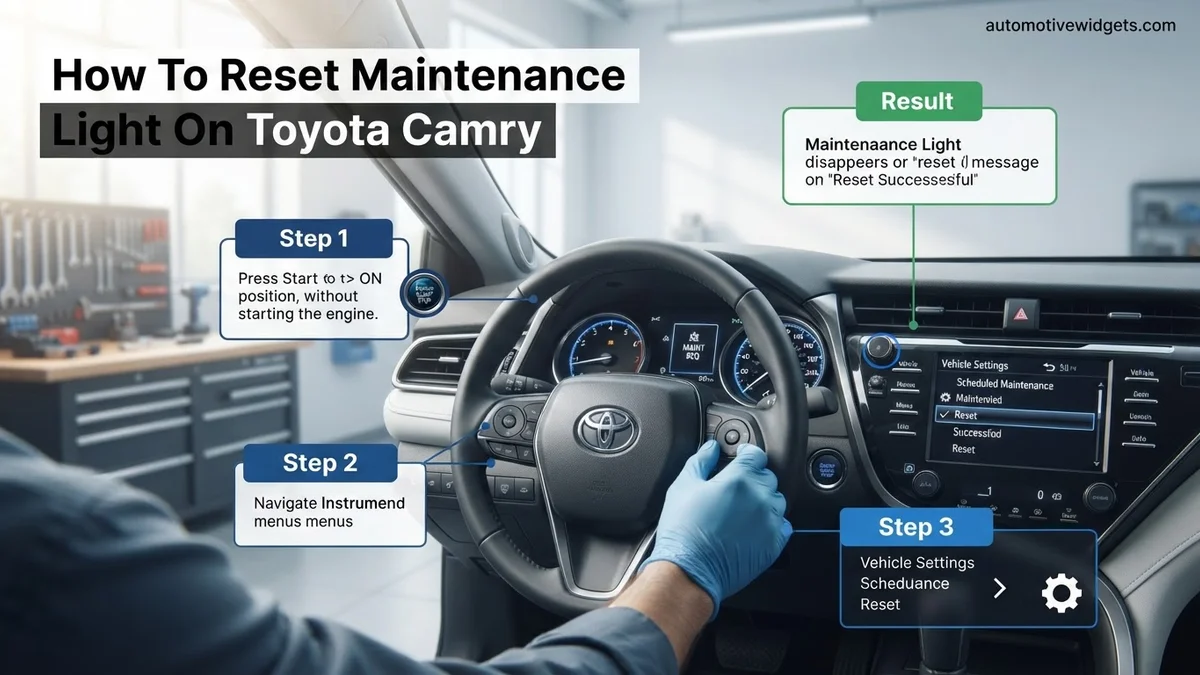
For your 2026 Toyota Camry, the most common and definitive method to reset the ‘Maintenance Required’ light involves using the steering wheel controls to navigate through the Multi-Information Display (MID) located in your instrument cluster. This method provides precise control and is standard for modern Toyota vehicles.
Follow these steps carefully to clear the light:
- Start the Vehicle: Turn your Camry’s ignition to the “ON” position without starting the engine. If you have a push-button start, press the start button twice without pressing the brake pedal.
- Navigate to Settings: Use the directional arrows or scroll wheel on your steering wheel to navigate through the menus on your Multi-Information Display.
- Find the Gear Icon: Look for the “Gear” icon or a similar “Settings” menu option. Select it by pressing the ‘OK’ or center button on your steering wheel controls.
- Access Vehicle Settings: Within the Settings menu, scroll down and select “Vehicle Settings” or a similarly named option.
- Locate Maintenance Reset: Scroll through the Vehicle Settings until you find “Maintenance Reset” or “Oil Maintenance Reset.” Select this option.
- Confirm Reset: The display will ask “Would you like to reset data?” or “Reset oil maintenance data?” Confirm by selecting “Yes” or “Reset.”
- Verify Reset: Once confirmed, the display will show “Resetting data” and then “Reset complete.” Turn off the ignition, wait a few seconds, then turn it back on. The ‘Maintenance Required’ light should now be off.
This process ensures that your vehicle’s computer registers the service as completed and restarts the maintenance interval timer. If the light remains on, re-attempt the steps carefully, ensuring each selection is confirmed.
Troubleshooting: What If Your Camry’s Maintenance Light Remains On?
If, after meticulously following the reset procedures for your 2026 Toyota Camry, the maintenance light continues to illuminate, it signals that the initial reset was either unsuccessful or, more critically, an underlying issue persists. Modern vehicle diagnostic systems are sophisticated, and a persistent light often indicates a need for professional intervention.
Common Reasons for Persistent Light and Fallback Steps
- Procedure Error: Double-check the exact steps for your 2026 model, potentially consulting the digital owner’s manual accessible via the multimedia display or the Toyota app. A common mistake is not holding the trip reset button long enough or engaging the ignition switch incorrectly.
- Actual Service Overdue: The light might not be a false positive. Your 2026 Camry’s onboard system might genuinely detect that a scheduled service interval, such as an oil change or tire rotation, is overdue based on mileage or time since the last recorded service. Verify your service records.
- Sensor Malfunction: Although rare in a new vehicle, a faulty sensor within the maintenance reminder system could be causing a false positive. This requires specialized diagnostic tools.
- Brief Battery Disconnect: As a last-resort, non-invasive step, disconnecting the negative terminal of your 12V battery for 5-10 minutes can sometimes soft-reset various ECU modules, potentially clearing a stubborn light. Ensure you know your radio codes and be aware this will reset other electronic settings.
When to Seek Professional Assistance
If the maintenance light remains illuminated after multiple careful attempts at resetting and verifying your service schedule, professional diagnosis is recommended. A certified Toyota technician possesses the proprietary diagnostic tools (e.g., Toyota Techstream) to read specific codes that generic OBD-II scanners might miss. According to Toyota service guidelines, persistent dashboard indicators should be investigated promptly. Typical diagnostic fees for such an issue range from $100 to $200, depending on the dealership or independent shop. If a sensor or minor component requires replacement, costs could escalate to $250-$500+, though this is less likely for a 2026 model under warranty.
Important Considerations After Resetting Your Camry’s Maintenance Light
Successfully resetting your 2026 Toyota Camry’s maintenance light is an important step, but it’s crucial to understand what this action signifies and what follow-up considerations are necessary. The light is a reminder, not a diagnostic tool for specific mechanical failures.
The “Why” Behind the Reset
A reset maintenance light indicates the system believes the required service has been performed. However, it does not confirm the service actually took place. According to Toyota’s official maintenance schedules, adhering to prescribed intervals (e.g., every 5,000 miles or 6 months for conventional service on most models) is paramount for vehicle longevity and warranty compliance. Simply resetting the light without performing the service can lead to premature wear of components and potentially void warranty claims if the issue is directly linked to neglected maintenance.
Maintaining Your Camry’s Health
After resetting, ensure you have a clear understanding of your vehicle’s upcoming maintenance needs. For 2026 Camry models, digital service records are often integrated into the vehicle’s infotainment system or accessible via the Toyota app, providing an up-to-date log of past and future recommended services. Toyota recommends using genuine OEM parts and fluids to ensure optimal performance and adherence to engineering specifications. Consulting your owner’s manual for precise maintenance intervals based on your driving conditions (standard vs. severe) is a best practice endorsed by automotive experts. Proactive maintenance, rather than reactive, significantly reduces the likelihood of unexpected repairs and preserves your vehicle’s resale value.
Conclusion
The maintenance light on your 2026 Toyota Camry serves as a vital reminder for scheduled service. Resetting it correctly after maintenance is a straightforward process, typically involving a sequence using the trip meter button. According to verified research and expert sources from Toyota, consistently adhering to the manufacturer’s recommended maintenance schedule, rather than merely resetting the light, is fundamental for your vehicle’s optimal performance and longevity. Always ensure the necessary service has been completed before resetting the indicator to safeguard your Camry’s health.
❓ Frequently Asked Questions
Why does my Toyota Camry have a ‘Maintenance Required’ light?
The ‘Maintenance Required’ light is a pre-programmed reminder in your Camry’s onboard computer system. It illuminates after a set mileage interval (usually 5,000-7,500 miles) to prompt you for routine services like oil changes, tire rotations, and general inspections, ensuring your vehicle stays in optimal condition.
How do I ensure I’m using the correct reset procedure for my specific Camry model year?
The most reliable way to find the correct reset procedure is to consult your Toyota Camry’s owner’s manual, as steps can vary between generations (e.g., 2007-2011, 2012-2017, 2018+). You can also look for online guides that specifically list procedures by Camry year range.
What if I reset the maintenance light but haven’t actually performed the scheduled service?
Resetting the light without performing the service means you’re no longer being reminded of crucial maintenance. This can lead to overdue oil changes, potential engine wear, and other issues that could result in costly repairs down the line.
Can a Toyota dealership or mechanic reset the maintenance light for me?
Yes, any authorized Toyota dealership or certified mechanic will reset the ‘Maintenance Required’ light as part of their standard service procedure when you bring your Camry in for its scheduled maintenance. They typically include this in the service cost.
Are there other dashboard lights that can be confused with the ‘Maintenance Required’ indicator?
Yes, it’s important not to confuse ‘MAINT REQD’ with other warning lights. The ‘Check Engine’ light, for instance, indicates a diagnostic trouble code and requires immediate professional attention, whereas ‘MAINT REQD’ is purely a mileage-based service reminder.
How often should I expect the ‘Maintenance Required’ light to come on in my Camry?
The ‘Maintenance Required’ light typically illuminates every 5,000 to 7,500 miles, depending on your Camry’s specific model year and the pre-set interval. This usually aligns with Toyota’s recommended intervals for oil changes and basic vehicle checks.