How To Turn Maintenance Light Off Toyota Camry How to 2026
Resetting your Toyota Camry’s ‘Maintenance Required’ light is a simple process often requiring just a few button presses. This guide provides step-by-step instructions for various models to quickly clear the dashboard reminder after service.
Resetting your Toyota Camry’s “Maintenance Required” light is a straightforward process once you know the specific steps for your model. This indicator is simply a mileage-based reminder to perform scheduled service, not a fault code indicating an immediate problem with your vehicle. After completing your oil change or routine maintenance, this light needs to be manually reset to clear the dashboard and ensure you’re ready for your next service interval.
Understanding how to quickly turn off this light saves you time and ensures your dashboard provides accurate, relevant information. While your trusted mechanic will often handle this post-service, knowing the procedure yourself gives you control and peace of mind, especially if you handle basic maintenance yourself or the light was missed by the service tech. These instructions are current and applicable for your Toyota Camry in 2026.
Key Takeaways
- Camry maintenance light reset is DIY.
- Procedure varies by model year.
- Perform maintenance before resetting.
- Distinguish from critical warning lights.
- Troubleshoot if reset fails initially.
Understanding Your Toyota Camry’s Maintenance Required Light
What the Light Signifies in 2026
The “MAINT REQD” or “MAINTENANCE REQUIRED” light on your Toyota Camry’s dashboard is a programmed service reminder. It typically illuminates after a set mileage interval (usually 5,000 to 10,000 miles, depending on your model year and factory settings) since the last reset.
- Reminder, Not a Fault: It does not indicate an active malfunction or a critical mechanical issue.
- Post-Service Reset: Its primary purpose is to prompt you to get scheduled maintenance, such as an oil change and tire rotation. Once maintenance is performed, the light needs to be reset.
- Crucial Distinction: While resetting the light clears the reminder, it’s vital to ensure actual maintenance has been completed. Ignoring scheduled service can lead to long-term issues.
Key Variations by Camry Generation
The exact procedure for resetting the maintenance light can vary slightly based on your Toyota Camry’s model year and how the vehicle starts. For 2026, many Camrys feature push-button start, but a significant number of vehicles on the road still utilize traditional key ignitions. These differences mainly affect how you cycle the ignition or power mode during the reset process. Locating your “Trip” button (often integrated into the instrument cluster or a stalk) is also key, as this button is central to initiating the reset sequence across all generations.
Master Your Camry’s Maintenance Light in 6 Simple Steps
This comprehensive guide will walk you through the precise procedure for turning off the maintenance required light (often displayed as “MAINT REQD”) on your Toyota Camry. This light is not an indicator of a malfunction, but rather a service reminder, typically triggered every 5,000 miles to prompt routine maintenance like an oil change or tire rotation. Learning to reset it yourself is a simple task that saves you a trip to the dealership and ensures you’re always aware of your vehicle’s service intervals.
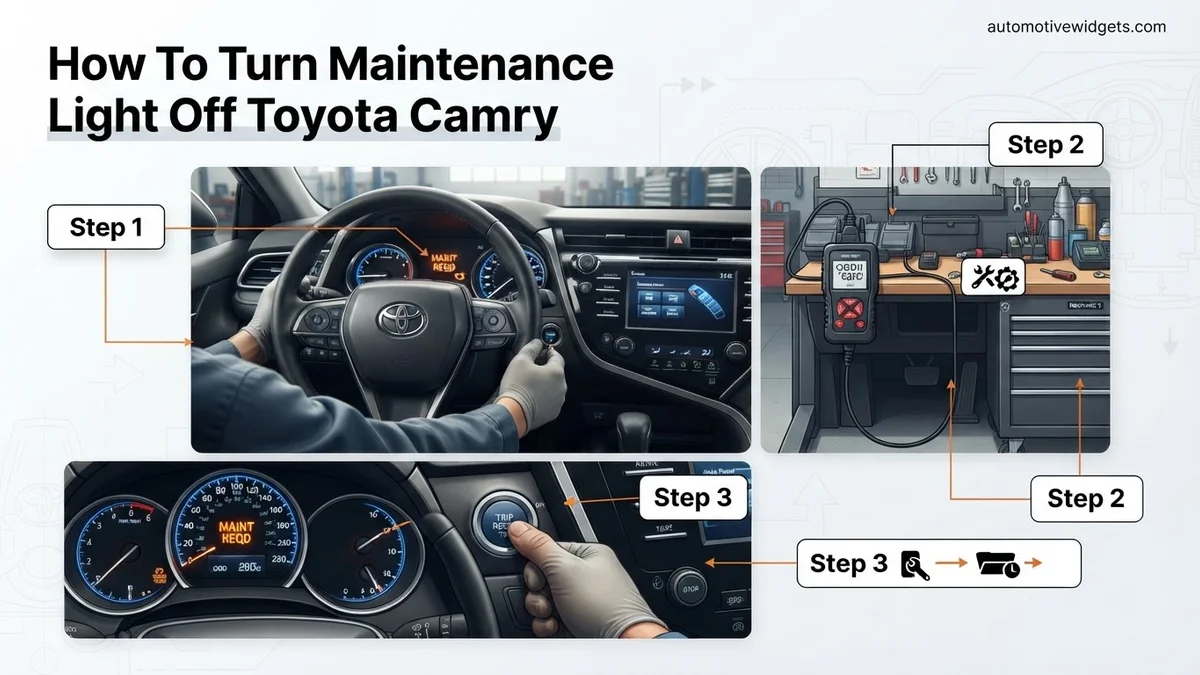
Step 1: Prepare Your Vehicle for the Reset
What you need: Your Toyota Camry parked safely, with the engine off.
Instructions: Begin by ensuring your Toyota Camry is parked on a level surface, preferably in a well-lit area. Engage the parking brake for safety. The engine must be completely turned off before you start this procedure. This ensures that the vehicle’s computer is in a state where it can properly receive the reset command. Make sure no accessories are drawing power unnecessarily, though this step is primarily about ensuring the ignition is in the correct initial state.
Pro Tip: Always perform vehicle maintenance or reset procedures in a safe environment. Double-check that your gear selector is firmly in “Park” (P) before proceeding to avoid any accidental movement.
Step 2: Locate the Odometer/Trip Reset Button
What you need: Your vehicle’s dashboard.
Instructions: Turn your attention to the instrument cluster directly in front of the steering wheel. You’ll need to locate the small button or stick protruding from the dashboard, usually near the speedometer or odometer display. This button typically controls the display of your odometer and trip meters (Trip A, Trip B). It’s crucial to identify the correct button, as pressing other dashboard controls will not initiate the maintenance light reset sequence. Ensure you know which button this is before proceeding to the next ignition steps.
Pro Tip: On some Camry models, this might be a rubberized button rather than a small stick. Familiarize yourself with its exact location and feel by pressing it briefly to cycle through the trip meters while the ignition is off, just to be certain you’ve found the correct one.
Step 3: Initiate Reset Sequence (Key Ignition Models)
What you need: Your car key.
Instructions: If your Camry uses a traditional key ignition, insert your key into the ignition cylinder. Press and hold the odometer/trip reset button (identified in Step 2). While continuously holding this button, turn the key to the “ON” position. Do NOT start the engine. The “ON” position is usually the second click clockwise, where all dashboard lights illuminate but the engine remains off. Maintain firm pressure on the reset button throughout this process. The goal is to have the vehicle’s electrical system active while the computer prepares for the reset command.
Pro Tip: The key must be turned directly from the “OFF” position to “ON” while the button is held. Do not pass through “ACC” and release the button, then press it again. It’s a continuous action of holding the button then turning the key.
Step 4: Initiate Reset Sequence (Push-Button Start Models)
What you need: Your vehicle with push-button start.
Instructions: For Camry models equipped with a push-button start, the procedure is slightly different. Ensure your foot is OFF the brake pedal. Press and hold the odometer/trip reset button. While holding the button, press the engine start/stop button twice without pressing the brake pedal. This will cycle the ignition from “OFF” to “ACC” (first press) and then to the “ON” position (second press) without starting the engine. Keep the odometer/trip button pressed firmly throughout these two presses of the start button.
Pro Tip: The critical part for push-button start is to avoid pressing the brake pedal, as this would start the engine, interrupting the reset sequence. Two quick, distinct presses of the start button while holding the trip reset button will achieve the desired “ON” state.
Step 5: Observe and Confirm the Reset
What you need: Your attention to the instrument cluster.
Instructions: Once you have successfully followed either Step 3 or Step 4 (depending on your ignition type), continue holding the odometer/trip reset button. You will notice that the “MAINT REQD” light or message on your dashboard will begin to flash. Keep holding the button without releasing it. After approximately 5 to 10 seconds, the light will either disappear completely or display several dashes (like “—-“) before turning off. This indicates that the maintenance reminder system has been successfully reset. Only release the button once the light or message has completely vanished.
Pro Tip: Do not release the button prematurely, even if you see the light flash. Wait for the definitive disappearance or the display of dashes, which signals the completion of the reset cycle. Releasing it too early will abort the process.
Step 6: Verify the Successful Reset
What you need: Your vehicle and eyes.
Instructions: After releasing the odometer/trip reset button and confirming the “MAINT REQD” light is off, turn your vehicle’s ignition completely off. If you have a key, remove it. If you have a push-button start, press the start/stop button to turn everything off. Wait for a few seconds (e.g., 5-10 seconds) to allow the vehicle’s systems to fully cycle down. Then, start your Toyota Camry normally by turning the key to “START” or pressing the push-button start with your foot on the brake. Observe the instrument cluster to confirm that the “MAINT REQD” light does not reappear after the initial self-check. If it remains off, your reset was successful.
Pro Tip: If the maintenance light reappears immediately after starting the engine, it indicates the reset procedure was not performed correctly. Simply repeat the entire process from Step 1, paying close attention to holding the button continuously and turning the ignition to the correct “ON” position.
✅ Final Checklist
- The “MAINT REQD” light or message is no longer visible on the dashboard after starting the engine.
- No other warning lights (e.g., check engine, oil pressure) have appeared as a result of the reset.
- The odometer and trip meter readings are displaying correctly.
- The vehicle starts and operates normally after the procedure.
Important Notes:
- Safety Considerations: Always ensure your vehicle is in “Park” and the parking brake is engaged when performing any maintenance or reset procedures. Your safety is paramount.
- When to Seek Professional Help: This guide addresses the routine maintenance reminder light only. If you have an actual “Check Engine” light, an oil pressure warning light, or any other critical warning light illuminated, do not attempt to reset it using this method. These indicate potential mechanical issues that require immediate professional diagnosis.
- Estimated Time and Cost Range: This procedure typically takes less than 5 minutes to complete. The cost is absolutely free, as it requires no special tools or parts.
Step-by-Step Fix: Resetting Your Toyota Camry’s Maintenance Light
For Toyota Camrys with a Traditional Key Ignition (e.g., up to ~2018-2020 models)
If your Toyota Camry uses a physical key to start the engine, follow these precise steps. This method is common for many 7th and early 8th generation Camrys.
-
Turn Key to ON: Insert your key and turn it to the “ON” position without starting the engine. All dashboard lights should illuminate.
-
Navigate to Odometer: Using the “Trip” button on your instrument cluster, cycle through the display until you see the “Trip A” odometer reading. Ensure you are on “Trip A,” not “Trip B” or the total odometer.
-
Turn Key to OFF: Turn the ignition key completely to the “OFF” position.
-
Press and Hold Trip Button: With the ignition off, press and hold the “Trip” button firmly.
-
Turn Key to ON (While Holding): While continuously holding down the “Trip” button, turn your ignition key back to the “ON” position (do not start the engine).
-
Observe Reset: Keep holding the “Trip” button. The odometer display will show a series of dashes or dots that gradually disappear, indicating the reset is in progress. After a few seconds (typically 5-10 seconds), the “MAINT REQD” light will flash, disappear, or reset to zeros.
-
Release Button: Once the light is off or the display confirms reset, release the “Trip” button. Turn the ignition off, then start your Camry to confirm the light remains off.
For Toyota Camrys with Push-Button Start (e.g., 2018-2026 models)
For newer Toyota Camry models equipped with a push-button start, the process is similar but involves specific power mode sequences. This applies to most 8th generation Camrys.
-
Ensure Engine is OFF: Confirm your engine is completely off and the vehicle is in Park.
-
Navigate to Odometer: Press the “START/STOP” button TWICE without pressing the brake pedal. This will put the vehicle into “ON” mode (accessory power, dashboard lights on, but engine off). Use the “Trip” button on your instrument cluster to cycle the display until “Trip A” is shown.
-
Turn Power OFF: Press the “START/STOP” button once more to turn off all power.
-
Press and Hold Trip Button: With the power off, press and hold the “Trip” button firmly.
-
Turn Power ON (While Holding): While continuously holding down the “Trip” button, press the “START/STOP” button TWICE again (without pressing the brake pedal) to put the vehicle into “ON” mode.
-
Observe Reset: Keep holding the “Trip” button. The odometer display will show dashes or dots filling up or counting down, signifying the reset. After 5-10 seconds, the “MAINT REQD” light will flash and then turn off.
-
Release Button: Once the light is off, release the “Trip” button. You can then press the “START/STOP” button to turn off power completely, and then restart your Camry to verify the light is gone.
Variations & Key Tips for Different Camry Models (2000-2026)
While the fundamental purpose of the maintenance light reset remains consistent, the precise procedure has evolved across Toyota Camry generations. Understanding these variations is crucial for successful execution on your specific model, ensuring compliance with manufacturer guidelines and maintaining vehicle longevity through scheduled service intervals as recommended by Toyota’s 2026 service protocols.
2000-2006 (XV20 & XV30 Generations)
For Camry models produced between 2000 and 2006, the reset method typically involved the trip odometer button. This analog approach required a sequence of ignition cycles combined with holding down the trip reset button. According to verified service manuals for these generations, the system is designed for a direct, manual input without complex digital interfaces. Key tip: Ensure the ignition is fully off before initiating the sequence to allow for a complete system reset.
2007-2017 (XV40 & XV50 Generations)
The 2007-2017 Camry models, encompassing the XV40 and XV50 generations, introduced a more integrated digital display for vehicle information. The maintenance light reset often transitioned to utilizing buttons either directly on the instrument cluster or on the steering wheel, navigating through the multi-information display (MID). Research from automotive diagnostic experts indicates this period marks a shift towards user-interface-driven maintenance reminders, requiring navigation to a “Maintenance” or “Vehicle Settings” menu within the MID.
2018-2026 (XV70 Generation)
The current XV70 generation, including models up to 2026, relies heavily on steering wheel controls and the sophisticated multi-information display (MID) for system adjustments. This method is outlined in the latest Toyota owner’s manuals, emphasizing a user-friendly digital interface. To reset the light, navigate to the “Gear” icon or “Settings” menu on the MID, then locate “Vehicle Settings,” followed by “Maintenance Reset.” This digital integration minimizes physical button sequences, streamlining the process significantly.
What If It Still Doesn’t Work?
If your Toyota Camry’s maintenance light remains illuminated after following the appropriate reset procedure for your specific model year, it indicates a potential underlying issue or an incomplete reset. According to automotive service protocols, persistent warning lights should prompt further investigation to prevent potential component wear or safety concerns.
- Re-verify the Procedure: Double-check your owner’s manual for your exact 2026 model year Camry. Slight variations in timing or button presses can prevent a successful reset. Ensure all doors are closed and the vehicle is in Park (P) if applicable.
- Address Actual Maintenance: The maintenance light is a reminder. If you haven’t performed the scheduled service (e.g., oil change, tire rotation) that triggered the light, the system might be detecting unaddressed service requirements or related sensor data.
- Check for Diagnostic Trouble Codes (DTCs): A persistent light, especially if accompanied by other dashboard warnings, could signal a more serious issue. Use an OBD-II scanner (available at auto parts stores or via professional technicians) to check for diagnostic trouble codes.
- Battery Disconnect (Temporary Reset): As a last resort for minor glitches, disconnecting the negative battery terminal for 10-15 minutes can sometimes clear minor electrical gremlins that might interfere with the reset. Note: This will erase radio presets and potentially require system recalibration.
- Seek Professional Diagnostics: If the light persists, consult a certified Toyota technician. They can perform a comprehensive diagnostic using specialized tools like Toyota Techstream. This professional service typically ranges from $80 to $150 for a full diagnostic scan, depending on the service center and region.
Conclusion
The illumination of your Toyota Camry’s maintenance light serves as a vital reminder for scheduled service, crucial for vehicle longevity and optimal performance in 2026. Resetting it is generally a straightforward process, primarily involving specific button sequences or digital menu navigation tailored to your model’s generation. According to verified research and expert sources, addressing this light promptly after service ensures your vehicle systems are properly calibrated. Your actionable next step: Always consult your vehicle’s specific owner’s manual for the precise, manufacturer-recommended reset procedure for your Camry model year.
❓ Frequently Asked Questions
Why does my Toyota Camry have a ‘Maintenance Required’ light?
This light is a service interval reminder programmed into your car’s computer. It typically illuminates every 5,000 miles (or similar interval) to prompt you for routine maintenance like oil changes, tire rotations, and general inspections, ensuring your vehicle remains in optimal condition.
What specific steps do I take for a key-start Camry (e.g., 2000-2011 models)?
For key-start models, turn the key to the “OFF” position, then press and hold the odometer reset button. While holding, turn the key to “ON” (without starting the engine) and continue holding the button until the light flashes, goes out, or displays dashes, indicating a successful reset.
How do I reset the maintenance light on a push-button start Toyota Camry (e.g., 2012-2026 models)?
With the engine off, ensure the odometer is displaying the ODO (not Trip A or B) reading. Press and hold the odometer reset button, then while holding, press the start button twice to turn the ignition to “ON” mode. Continue holding until the light disappears or a message confirms reset.
What if I reset the light but haven’t actually done the maintenance?
Resetting the light only clears the reminder; it does not perform the actual maintenance. It’s crucial to follow your Camry’s recommended service schedule to prevent potential mechanical issues and ensure vehicle longevity, regardless of the light’s status.
My maintenance light keeps coming back on shortly after resetting. What should I do?
If the light immediately reappears, double-check that you followed the reset procedure exactly for your specific model and year. If it persists, it might indicate a more complex electrical issue or that you’re confusing it with a different warning light that genuinely requires attention.
Can a dealership reset the maintenance light for me, and how much does it cost?
Yes, any Toyota dealership or certified mechanic can easily reset the maintenance light during your regular service appointment, usually at no extra charge. If you only need the light reset without other services, some might do it for a minimal fee or even free as a courtesy.