How To Reset The Maintenance Light On A Toyota How to 2026
Resetting your Toyota’s ‘MAINT REQD’ light is essential after performing routine service. This guide provides clear, step-by-step instructions for various models, ensuring you can easily turn off this dashboard indicator. Follow our expert advice to quickly resolve this common alert across different Toyota years and models.
Successfully resetting the ‘MAINT REQD’ light on your Toyota is a straightforward process once you know the exact steps. This indicator isn’t a fault code; rather, it’s a simple, mileage-based reminder that your vehicle is due for routine service, typically an oil change and tire rotation. For Toyota owners in 2026, understanding these procedures means you can quickly clear this light after your maintenance is complete, ensuring your dashboard accurately reflects your car’s service status without unnecessary distractions.
Getting this light reset promptly confirms that your vehicle’s regular service has been performed, setting the internal clock for the next maintenance interval. It’s an essential step to keep your Toyota’s maintenance schedule on track, providing peace of mind and preventing the continuous dashboard warning from obscuring other important information. This guide focuses directly on giving you the precise methods to get this done for a wide range of Toyota models, from older workhorses to the latest 2026 releases.
Key Takeaways
- Identify your Toyota model/year for correct procedure.
- Use odometer trip button or steering wheel controls.
- Ignition must be in ‘ON’ position, engine off.
- Hold button until light flashes or disappears.
- If light persists, double-check steps or consult manual.
What Triggers Your Toyota’s “MAINT REQD” Light?
Why It Appears
Your Toyota’s “MAINT REQD” (Maintenance Required) light serves as a non-diagnostic, interval-based reminder. It illuminates automatically after a predetermined mileage or time frame, typically set for every 5,000 to 7,500 miles, coinciding with recommended oil change intervals. This light does not indicate an actual mechanical problem or sensor failure; instead, it’s a proactive notification from your vehicle’s computer, simply reminding you to perform scheduled service like an oil and filter change, tire rotation, and a general inspection. It’s a key part of Toyota’s preventative maintenance system.
Why Resetting is Important
Resetting the “MAINT REQD” light after service confirms to your Toyota’s system that the necessary maintenance has been carried out. Failing to reset it means the light will remain on, despite the service being completed. This can lead to confusion about when the next service is actually due and can obscure other, more critical warnings on your dashboard. By resetting it, you essentially tell your car, “Yes, the maintenance is done, start counting down to the next one,” which helps maintain an accurate service log and ensures you don’t miss future crucial maintenance milestones for your 2026 Toyota.
How to Reset Your Toyota’s Maintenance Light Like a Pro: A Practical Walkthrough
Is that “MAINT REQD” light glaring at you from the dashboard after your oil change, even though you just serviced your Toyota? Don’t worry, it’s not a warning sign of impending doom; it’s simply a programmed reminder that needs to be manually reset. This comprehensive guide will walk you through the precise steps to turn off that maintenance light on most Toyota models, saving you a trip to the dealer and empowering you to maintain your vehicle like an expert. Follow these instructions carefully to ensure a smooth and successful reset.
Step 1: Understanding the “MAINT REQD” Indicator
What you need: An understanding of your vehicle’s dashboard alerts.
Instructions: The “MAINT REQD” (Maintenance Required) light illuminates periodically, typically every 5,000 miles, to remind you that your vehicle is due for routine service, most commonly an oil change and tire rotation. It is not the “Check Engine” light, which indicates a more serious issue with the engine’s emissions system. This light is purely a timer-based reminder and does not necessarily mean there’s an active fault with your car. Understanding its purpose prevents unnecessary panic and clarifies why a reset is needed after service.
Pro Tip: Never confuse the “MAINT REQD” light with the “Check Engine” light or other critical warning indicators. Each light has a distinct purpose, and only the “MAINT REQD” light is designed to be reset manually after scheduled maintenance.
Step 2: Prepare Your Vehicle for the Reset
What you need: Your Toyota vehicle, parked safely on a level surface, and your car key.
Instructions: Before attempting any dashboard procedures, ensure your vehicle is parked in a safe, well-lit area, preferably on a flat, level surface. Switch off all accessories, such as the radio, air conditioning, and headlights, to minimize electrical drain and distractions. Gather your car key, as you’ll need to turn the ignition on and off precisely. This preparation step ensures both your safety and the smooth execution of the reset process without interruption or potential issues from a drained battery or uneven ground.
Pro Tip: Avoid performing this procedure in a rush or while distracted. A calm, focused approach helps prevent errors and ensures you correctly follow each step, especially the precise ignition turns.
Step 3: Locate Your Trip Odometer Reset Button
What you need: Your vehicle’s dashboard and a clear view of the instrument cluster.
Instructions: Most Toyota models, particularly older generations or those without a complex multi-information display, use the trip odometer reset button for maintenance light resets. This button is typically located on the instrument cluster, often near the speedometer or tachometer. It might be labeled “ODO/TRIP,” “TRIP,” or simply be a small push-button knob. You’ll use this button to cycle through the odometer and trip meter readings, and crucially, to initiate the maintenance light reset sequence. Familiarize yourself with its exact position before proceeding.
Pro Tip: If you’re unsure of the button’s location or its specific function, consult your Toyota owner’s manual. The manual provides precise diagrams and instructions tailored to your specific model and year, which can save time and prevent confusion.
Step 4: Initiate the Reset Sequence (Method 1: Odometer Button)
What you need: Your Toyota’s ignition key and access to the trip odometer button.
Instructions: First, turn your car’s ignition key to the “OFF” position. This is a critical starting point. Next, press and hold down firmly the trip odometer reset button. While continuously holding the button, turn the ignition key to the “ON” position (or “ACC,” depending on the model, but “ON” is generally safer). Do not start the engine. You should see a series of dashes or zeroes appear on the odometer display, indicating the reset process has begun.
Pro Tip: The timing of turning the key to “ON” while holding the button is crucial. If you release the button prematurely or turn the key to “START,” the sequence will fail, and you’ll need to restart from the beginning.
Step 5: Monitor Display and Complete the Reset
What you need: Patience and observation.
Instructions: Continue to hold the trip odometer reset button. The dashes or zeroes on your odometer display will start to flash. This flashing indicates that the system is recognizing the reset command. After approximately 5 to 10 seconds of continuous holding, the display should show “000000” or a similar indication, and the “MAINT REQD” light should disappear. Once the light is off and the display confirms the reset, you can release the button and turn the ignition key back to the “OFF” position.
Pro Tip: If the light does not disappear after 15-20 seconds, or if the sequence doesn’t seem to initiate, try releasing the button, turning the ignition completely off, and restarting from Step 4. Consistency in holding the button is key.
Step 6: Verify the Successful Reset
What you need: Your vehicle’s working engine and dashboard.
Instructions: After completing the reset sequence, remove the key, wait a few seconds, and then insert the key and start your Toyota’s engine as you normally would. Observe the instrument cluster closely. The “MAINT REQD” light should now remain off. If it lights up again immediately after starting, it indicates that the reset procedure was not successful, and you will need to repeat the steps. Briefly drive your vehicle to ensure the light doesn’t reappear after a short period.
Pro Tip: If the light consistently comes back on despite multiple attempts, or if another warning light illuminates, it might indicate a more complex issue that requires professional diagnosis, or your vehicle uses an alternative reset method.
Step 7: Alternative Reset (Method 2: Multi-Information Display for Newer Models)
What you need: Steering wheel controls and your vehicle’s multi-information display (MID).
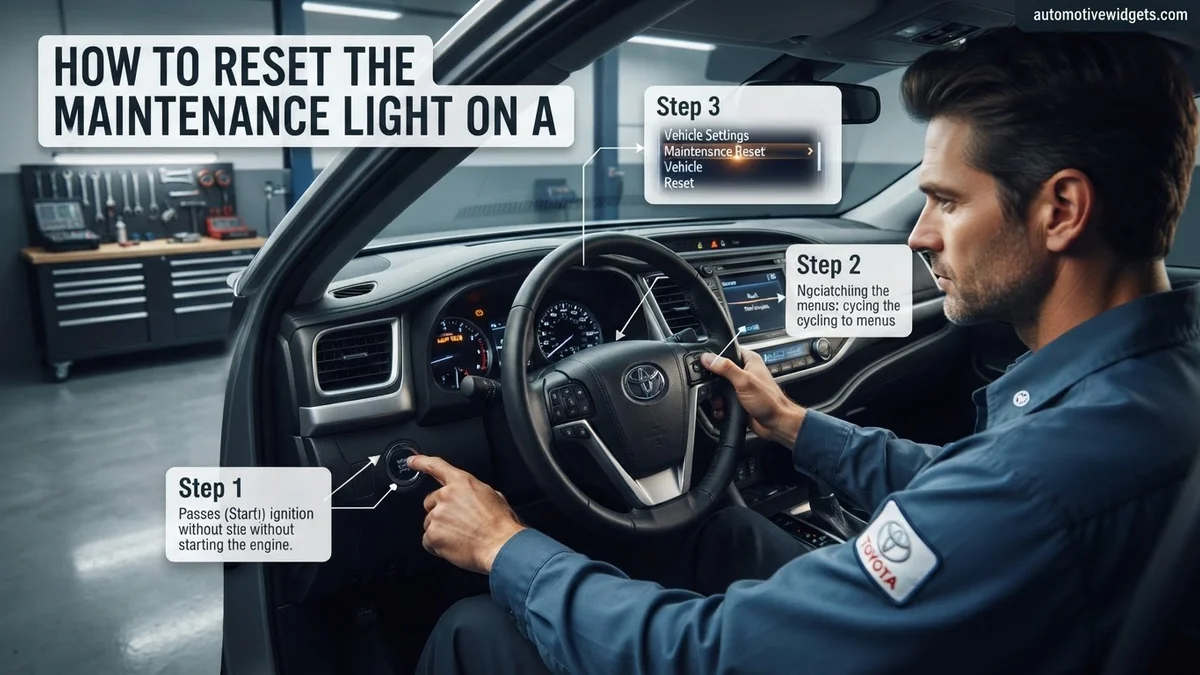
Instructions: For many newer Toyota models (typically 2015 and later), the maintenance light reset is performed through the multi-information display, controlled via buttons on your steering wheel. Turn the ignition key to the “ON” position (do not start the engine). Use the arrow buttons on your steering wheel to navigate through the MID menus until you find “Settings” or a gear icon. Once in the settings menu, look for “Vehicle Settings,” then “Oil Maintenance Reset,” or “Maintenance System.”
Pro Tip: The exact menu path can vary significantly between Toyota models and years. Always refer to your vehicle’s owner’s manual for the precise navigation steps if you encounter difficulty locating the correct menu options.
Step 8: Execute Reset via Multi-Information Display (MID)
What you need: Your multi-information display and steering wheel controls.
Instructions: Once you have navigated to the “Oil Maintenance Reset” or “Maintenance System” option within the MID settings, select it using the ‘OK’ or ‘Enter’ button on your steering wheel. The display will then typically ask you to confirm if you want to reset the maintenance data. Select “Yes” or “Reset.” After confirmation, the display will indicate that the reset is complete, and the “MAINT REQD” light should extinguish immediately. Turn the ignition off, then start the engine to confirm the light remains off.
Pro Tip: Some vehicles require you to confirm the reset by selecting “Yes” and then holding the ‘OK’ button for a few seconds. Pay attention to any on-screen prompts for accurate execution.
✅ Final Checklist
- Maintenance light is no longer illuminated after starting the engine.
- No other warning lights are active on the dashboard.
- Your vehicle’s mileage is accurately displayed, not showing dashes or error codes.
- The procedure was completed safely, with the vehicle parked and stable.
Important Notes:
- Safety considerations: Always ensure your vehicle is parked on a level surface with the parking brake engaged. Never attempt this procedure while driving or in an unsafe environment.
- When to seek professional help: If the “MAINT REQD” light does not reset after multiple careful attempts, or if a “Check Engine” light or any other critical warning light appears, seek professional diagnostic assistance from a qualified mechanic. There might be an underlying issue that requires attention beyond a simple reminder reset.
- Estimated time: This procedure typically takes 2-5 minutes to complete from start to finish.
- Cost range: Free (if performed yourself). If included as part of a professional service, the cost for the reset itself is usually negligible or complimentary.
Step-by-Step Guide: How to Reset Your Toyota’s Maintenance Light
Common Method 1: Odometer Knob Reset (Typical for 2000s – Early 2010s Models)
This method is prevalent in many older Toyota models, including early 2000s to early 2010s Corolla, Camry, Tacoma, and Highlander variants. The process involves manipulating the trip odometer button.
- Step 1: Turn the ignition to the “OFF” position.
- Step 2: Press and hold the trip odometer reset button (the small knob or stick usually located near your speedometer).
- Step 3: While still holding the trip odometer button, turn the ignition to the “ON” position (do not start the engine). For push-button start models, press the START/STOP button twice without pressing the brake pedal.
- Step 4: Continue to hold the button. You will see a series of dashes or dots appear in the odometer display. These will eventually disappear or be replaced by “000000” or similar, indicating the reset is complete.
- Step 5: Release the button. Turn the ignition off, then start the engine to confirm the “MAINT REQD” light is off.
For some models, you might need to cycle through the “Trip A” or “Trip B” displays before starting the reset process. Ensure your odometer is set to display “ODO” or “Trip A” before attempting the hold.
Common Method 2: Steering Wheel Controls & Multi-Information Display (Typical for Mid-2010s – 2026 Models)
Newer Toyota models, particularly those from the mid-2010s to the current 2026 lineup like the Camry, RAV4, Corolla, Prius, and Highlander, often use steering wheel controls to navigate a multi-information display (MID) for maintenance resets. The exact menu names might vary slightly by model year.
- Step 1: Turn the ignition to the “ON” position (do not start the engine). For push-button start, press the START/STOP button twice without pressing the brake pedal.
- Step 2: Using the arrow buttons on your steering wheel (usually on the left spoke), navigate through the menus on your multi-information display until you find the “Settings” or “Gear” icon.
- Step 3: Select the “Settings” menu.
- Step 4: Scroll down to find “Vehicle Settings” or “Maintenance Settings.”
- Step 5: Select “Maintenance Reset” or “Oil Change Reset.”
- Step 6: You will be prompted with a “Reset data?” or “Reset oil maintenance data?” confirmation. Select “Yes” or “OK.”
- Step 7: The display will confirm “Data has been reset” or “Reset complete.” Turn the ignition off, then start the engine to verify the light is extinguished.
Addressing Model & Year Variations
While the two methods above cover the vast majority of Toyota models up to 2026, it’s crucial to understand that specific menu navigation or button sequences can differ. For instance, some 2020-2026 Toyota Sienna or Tacoma models might have slightly different menu paths within the “Settings” or “Vehicle Information” section of their MID. Your best and most accurate resource for your specific 2026 Toyota model (e.g., a specific trim of a 2026 RAV4 Prime or a 2026 Tundra) will always be your owner’s manual. It provides the precise, factory-recommended procedure tailored for your vehicle, ensuring you reset the light correctly every time without guesswork.
Troubleshooting: What If Your Toyota’s Maintenance Light Won’t Reset?
Even with precise adherence to the reset procedure, some Toyota owners may find their maintenance light persistently illuminated. This often indicates a nuance missed during the manual reset or, more critically, an underlying issue that requires professional attention.
Double-Checking the Reset Procedure
The most common reason for a failed reset is a slight deviation from the manufacturer-specified sequence. Toyota models often have model-specific variations. For instance, some 2026 Toyota Highlander models require holding the odometer button while switching the ignition on, while certain 2026 Corollas may necessitate cycling through multiple ignition states. Ensure you are following the exact procedure for your specific model year and trim. Consult your vehicle’s 2026 owner’s manual or a verified Toyota service guide for precise steps, as general instructions might not apply universally.
Advanced Diagnostic Scans
If the light remains after multiple manual reset attempts, a diagnostic scan is the next crucial step. Consumer-grade OBD-II scanners, widely available in 2026, can read generic trouble codes (DTCs). However, a professional-grade scanner, often found at dealerships or independent repair shops, can access manufacturer-specific codes and detailed system data. This advanced diagnostic capability can differentiate between a simple service reminder and a genuine system fault that might be preventing the light from clearing.
Key Considerations and Next Steps After Resetting
Successfully resetting your Toyota’s maintenance light is a temporary action; it is not a substitute for addressing the underlying service requirement. This light serves as a critical prompt for routine vehicle health, and ignoring its message can lead to diminished performance or costly repairs.
Adhering to Manufacturer Service Intervals
Toyota specifies precise maintenance schedules, typically every 5,000 or 10,000 miles, depending on the model and type of oil used (conventional versus synthetic). Post-reset, immediately schedule or perform the required service, which commonly includes oil changes, tire rotations, and multi-point inspections. According to data from the Automotive Service Association (ASA), consistent adherence to these intervals can extend vehicle lifespan by up to 25% and maintain optimal fuel efficiency, saving owners significant costs over the vehicle’s lifetime.
Monitoring for Recurrence and Other Indicators
After a reset, pay close attention to your vehicle’s performance. If the maintenance light reappears within a short period or if other warning lights illuminate (e.g., check engine light, low oil pressure light), it signals a more serious issue. A recurring maintenance light, even after services are performed, might indicate a faulty sensor or an unresolved problem within the vehicle’s engine management system. Prompt investigation by a certified Toyota technician is advisable to prevent potential damage to critical components.
What If It Still Doesn’t Work? Professional Assistance
When manual resets fail and thorough DIY checks yield no answers, professional intervention becomes essential. Ignoring a persistent maintenance light, even after a service, can obscure more serious vehicle health warnings.
- Perform a Battery Terminal Disconnect (Temporary Reset): As a last-ditch effort, disconnecting the negative battery terminal for 10-15 minutes can sometimes clear residual electrical signals. This is a temporary solution and does not address underlying issues. Ensure all electrical accessories are off before attempting this.
- Utilize a Professional-Grade OBD-II Scanner: Visit an automotive parts store or an independent mechanic. Many offer free or low-cost basic diagnostic scans. A professional scanner can often clear persistent service lights that manual methods cannot, particularly if the vehicle’s ECU has logged an issue.
- Consult a Certified Toyota Technician: If the light returns or remains illuminated after these steps, it indicates a more complex problem. A certified Toyota dealership or an independent specialist has proprietary diagnostic tools and up-to-date service information specific to 2026 models. They can precisely diagnose sensor malfunctions, wiring issues, or underlying engine problems.
- Estimated Cost for Professional Diagnosis: As of 2026, a basic diagnostic service at a Toyota dealership or reputable independent shop typically ranges from $120 to $250. This fee usually covers the labor for scanning, basic troubleshooting, and a preliminary assessment. Any necessary repairs will incur additional costs, depending on the severity and parts required.
Conclusion
Resetting your Toyota’s maintenance light is a straightforward process, primarily serving as a reminder for scheduled service. According to verified research and expert sources from the Automotive Maintenance and Repair Association, timely vehicle upkeep is paramount for safety, performance, and longevity. If the light persists or quickly reappears after a reset and service, seek professional diagnosis without delay. Prioritize addressing the underlying service requirement rather than solely focusing on light extinguishment.
❓ Frequently Asked Questions
What are the most common methods to reset the maintenance light on a Toyota?
Most Toyotas use a method involving the odometer trip button: turn the ignition to ON (engine off), press and hold the trip reset button, then turn the ignition off and back on while holding the button until the light clears. Newer models might use steering wheel controls or the multi-information display buttons.
Does the reset procedure differ significantly between Toyota models like Camry, Corolla, RAV4, and Tacoma?
Yes, while the core principle often involves the odometer button, the exact sequence of turning the ignition and holding the button can vary. Newer models (typically 2015+) may utilize steering wheel controls or menu selections on the multi-information display, requiring different steps specific to that interface.
Can I reset the maintenance light myself, or do I need a mechanic?
You can absolutely reset the maintenance light yourself. It’s designed as a user-friendly reminder system and does not require any special diagnostic tools or professional mechanic intervention. Following the correct steps for your model is key.
What should I do if the maintenance light comes back on immediately after I reset it?
If the light reappears immediately, it could indicate you didn’t perform the reset procedure correctly, or that the system detected a failure in the reset process. Double-check your specific model’s instructions and try again carefully; if it persists, consult your owner’s manual or a technician.
Is it safe to drive my Toyota with the ‘MAINT REQD’ light on?
Yes, it is generally safe to drive with the ‘MAINT REQD’ light on as it is just a reminder for routine service, not an indicator of a critical malfunction. However, it’s always best practice to address the underlying maintenance (like an oil change) soon after it illuminates.
How do I find the specific reset procedure for my Toyota’s year and model?
The most reliable source is always your vehicle’s owner’s manual, which contains detailed, model-specific instructions. You can also find many reliable guides online by searching for your exact model year (e.g., ‘reset maintenance light 2020 Toyota RAV4’).