Do You Have To Replace Brake Rotors With Pads? Expert 2027
Replacing brake rotors with pads is not always necessary; it critically depends on the rotors’ current condition. You must inspect them for minimum thickness, warping, and deep grooves to ensure safety and effective braking, guiding your decision for replacement, resurfacing, or reuse.
No, you do not always have to replace brake rotors every time you install new brake pads. This is a common misconception, but the definitive answer depends entirely on the condition of your existing rotors. By 2027, with advanced vehicle diagnostics, understanding rotor health is more precise than ever, directly impacting your vehicle’s safety and braking performance.
Making the correct decision—whether to replace, resurface, or reuse your rotors—is critical. It saves you unnecessary expense, ensures optimal braking power, extends the life of your new pads, and most importantly, keeps you and your passengers safe on the road. Don’t simply default to replacement; a quick, informed assessment makes all the difference.
Key Takeaways
- Always inspect rotors for wear and damage.
- Rotor replacement isn’t always required.
- Check manufacturer’s minimum thickness.
- Resurfacing is an option if within specs.
- Prioritize safety for optimal braking.
What Causes Brake Rotor Wear & Why It Matters with New Pads
The Demands of Friction and Heat
Brake pads and rotors work in tandem, relying on friction to slow your vehicle. Each time you press the brake pedal, the pads clamp down on the spinning rotors, converting kinetic energy into heat. This intense friction and heat generation gradually wears down both components. Rotors, typically made of cast iron or more advanced composite materials in 2027 vehicles, can develop grooves, uneven surfaces, or even cracks over time. Driving habits, vehicle weight, and even environmental factors like humidity contribute significantly to this wear. Modern regenerative braking systems in EVs and hybrids also influence conventional brake component wear patterns, sometimes leading to less frequent but different types of rotor wear.
The Consequences of Mismatched Components
Installing new, perfectly flat brake pads onto worn, uneven, or deeply grooved rotors is a recipe for trouble. The new pads won’t make full, consistent contact with the rotor surface. This significantly reduces braking efficiency, meaning your stopping distances will be longer, and braking power will feel diminished. Furthermore, the new pads will wear out prematurely and unevenly, as they try to conform to the damaged rotor surface. You’ll likely experience increased noise—squealing or grinding—and vibrations through the steering wheel or brake pedal. Ultimately, compromised rotors directly jeopardize your safety and the longevity of your fresh investment in new pads.
From Start to Finish: Brake Rotors and Pads Explained
Deciding whether to replace your brake rotors every time you change your brake pads is a common dilemma for vehicle owners and DIY mechanics alike. This comprehensive guide will walk you through the factors involved, help you inspect your brake components, and equip you with the knowledge to make an informed decision for your vehicle’s safety and performance. Understanding the interplay between pads and rotors is crucial for effective braking and preventing costly premature wear.
Step 1: Understanding the Brake System Basics
What you need: A basic understanding of how your car stops.
Instructions: Your vehicle’s braking system relies primarily on the friction created when brake pads press against rotating brake rotors (discs). The caliper houses the pads and uses hydraulic pressure to squeeze them onto the rotor, slowing down the wheel. Both pads and rotors are wear items, meaning they are designed to gradually wear down over time and use. For optimal performance, these components must work in perfect harmony, providing consistent friction and dissipating heat efficiently. Uneven wear or damage to either part compromises the entire system.
Pro Tip: Think of pads and rotors as a team. If one member isn’t performing well, the entire team’s effectiveness is reduced. Always consider their condition together.
Step 2: Inspecting Your Brake Pads for Wear
What you need: Flashlight, jack, jack stands, wheel chocks, tire iron (lug wrench).
Instructions: Safely lift your vehicle and remove the wheel to gain clear access to the brake assembly. Use your flashlight to visually inspect the brake pads. Look for the thickness of the friction material. New pads typically have about 10-12mm of material. If the pad material is less than 3mm-4mm (about the thickness of two pennies), they are due for replacement. Also, check for uneven wear between the inner and outer pads, or tapered wear, which can indicate caliper issues. Listen for any squealing or grinding noises, as this often points to worn pads or wear indicators engaging.
Pro Tip: Most pads have a metal wear indicator that will squeal loudly when the pads are critically thin. Don’t wait until you hear metal-on-metal grinding, as this severely damages rotors.
Step 3: Evaluating Your Brake Rotors for Condition
What you need: Flashlight, clean rag, (optional: micrometer or brake rotor gauge).
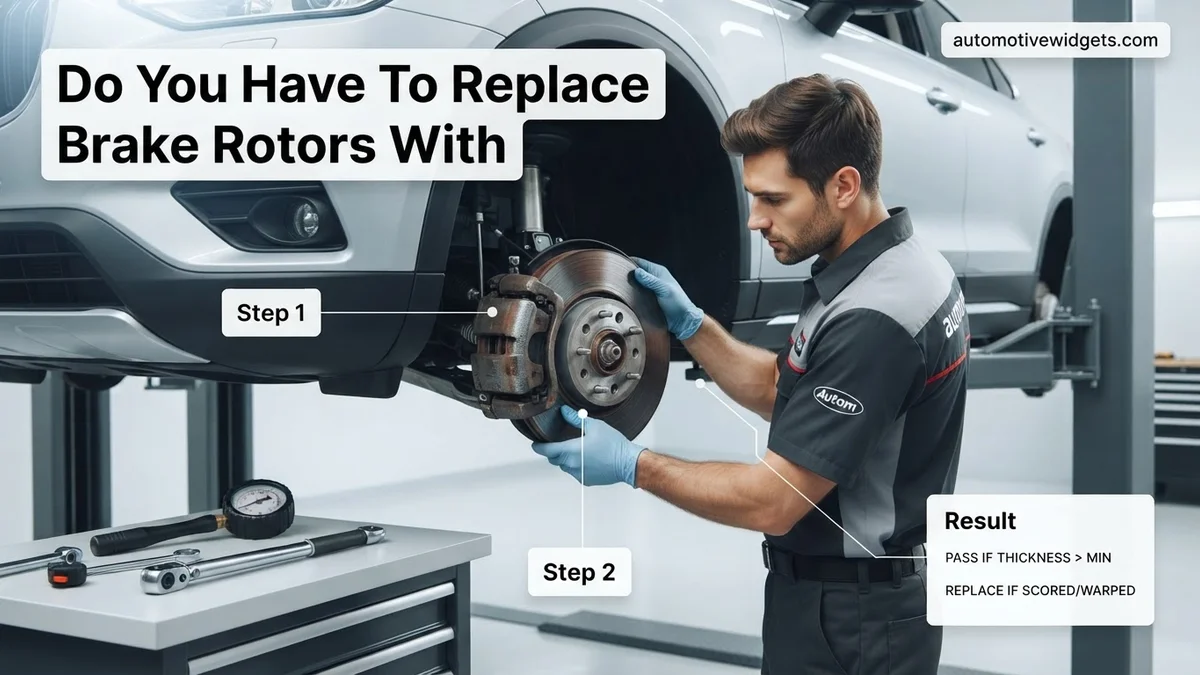
Instructions: With the wheel off, carefully examine the surface of the brake rotor. Look for deep grooves, scoring, or uneven wear patterns. Minor surface imperfections are often normal, but deep concentric grooves, usually 1mm or more, signify significant wear. Check for blue spots, which indicate overheating, or visible cracks, especially near the hub or edges. Feel the rotor surface with your finger; it should be relatively smooth. If you feel pronounced ridges on the inner and outer edges, the rotor has worn down considerably. Consult your vehicle’s service manual or the rotor itself for its “minimum thickness” specification.
Pro Tip: Pulsation felt through the brake pedal or steering wheel during braking often indicates a warped rotor, which cannot be fixed by simply changing pads. This nearly always requires rotor replacement or resurfacing if within spec.
Step 4: When Rotors ABSOLUTELY Must Be Replaced
What you need: Your observations from Step 3, vehicle manufacturer’s minimum rotor thickness specification.
Instructions: Rotor replacement is non-negotiable under several conditions. If the rotor thickness is below the manufacturer’s specified minimum (often stamped on the rotor itself, e.g., “MIN THK 22mm”), it must be replaced. Rotors that are deeply grooved (more than 1-2mm deep), severely warped (causing significant pedal pulsation), cracked, or have excessive rust pitting (which compromises the braking surface) are unsafe and require immediate replacement. Attempting to use compromised rotors with new pads will lead to poor braking performance, noise, rapid pad wear, and potential brake failure.
Pro Tip: Never compromise on safety. If there’s any doubt about a rotor’s integrity, replace it. The cost of new rotors is far less than the potential consequences of brake failure.
Step 5: The Option of Resurfacing Rotors (Machining)
What you need: Your observations from Step 3, access to a professional auto machine shop.
Instructions: Rotors with minor surface irregularities like light scoring, glaze, or slight runout (minor warping) that are still well above their minimum thickness can sometimes be “resurfaced” or “machined.” This process involves removing a thin layer of metal from the rotor surface to create a perfectly flat and smooth contact area for the new pads. However, resurfacing reduces the rotor’s overall thickness and thus its heat dissipation capabilities and lifespan. Always ensure that after machining, the rotor remains above its minimum thickness specification. Many modern rotors are too thin from the factory to allow for safe resurfacing.
Pro Tip: While resurfacing can save money, compare the cost of machining with the cost of new rotors. Often, new rotors are only slightly more expensive and provide full thickness and lifespan benefits.
Step 6: When You Might Keep Your Existing Rotors
What you need: Thorough inspection results from Step 3, brake cleaner, a clean abrasive pad (like Scotch-Brite).
Instructions: If your rotors are smooth, free of deep grooves, not warped, show no signs of cracking or excessive rust, and are well within their manufacturer-specified thickness, you might be able to reuse them. This is typically only advisable when you’re simply replacing worn-out pads on an otherwise healthy braking system. Even if reusing rotors, it is critical to thoroughly clean their surfaces with brake cleaner and an abrasive pad to remove any embedded pad material, glaze, or light surface rust. This provides a fresh surface for the new pads to bed into correctly and prevents noise or reduced braking performance.
Pro Tip: Never install new pads on dirty or glazed rotors. Proper bedding-in is essential for optimal performance and longevity, and a clean rotor surface is key to this process.
Step 7: The “Best Practice” Recommendation
What you need: A desire for optimal braking performance and peace of mind.
Instructions: For most drivers and vehicles, especially daily drivers, the best practice is to replace both brake pads and rotors simultaneously. This ensures that new pads always mate with a perfectly flat, clean, and appropriately thick rotor surface. This combination provides the best initial braking performance, promotes even pad wear, reduces the likelihood of noise and pulsation, and maximizes the lifespan of your new pads. While it incurs a higher upfront cost, it often saves money and hassle in the long run by preventing premature wear of new pads and avoiding comebacks for braking issues.
Pro Tip: Consider buying quality pads and rotors from the same manufacturer or a reputable aftermarket brand. These components are often designed to work optimally together as a system.
Step 8: Final Considerations and Component Matching
What you need: Knowledge of your driving habits and vehicle specifications.
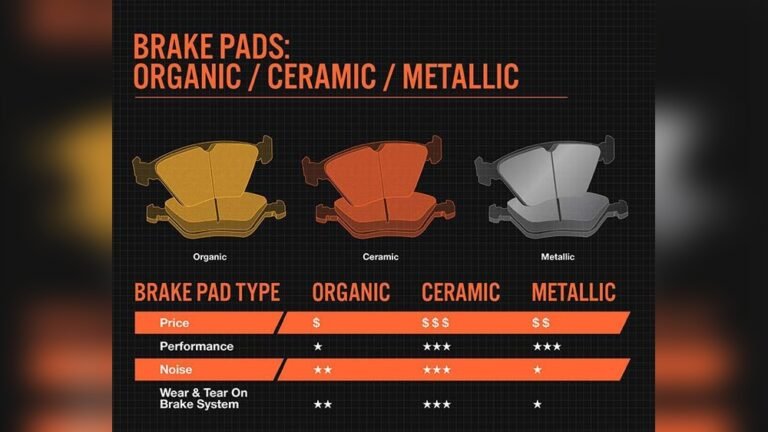
Instructions: When replacing components, consider your driving style. If you drive aggressively, tow frequently, or live in hilly terrain, upgrading to performance-oriented pads and rotors (e.g., drilled/slotted rotors, ceramic pads) might be beneficial. Ensure that any new components are compatible with your vehicle’s make, model, and year. Different types of brake pads (ceramic, semi-metallic, organic) have different friction characteristics and optimal operating temperatures, so choose wisely based on your needs. Always replace brake components in pairs (both front rotors/pads or both rear rotors/pads) to maintain balanced braking across the axle.
Pro Tip: Avoid mixing different types of pads or rotors on the same axle, as this can lead to unbalanced braking force, premature wear, and unsafe driving conditions.
✅ Final Checklist
-
Rotors are above minimum thickness specifications.
-
Rotor surfaces are smooth, free of deep grooves, cracks, or severe warping.
-
New brake pads are properly seated and clear of any obstructions.
-
All caliper bolts are torqued to manufacturer specifications.
-
Brake fluid reservoir level is correct and the brake pedal feels firm before driving.
Important Notes:
-
Safety Considerations: Always use jack stands when working under a vehicle. Wear safety glasses. Never work on hot brakes. After any brake work, pump the brake pedal several times to restore pressure before driving. Perform a test drive in a safe area to ensure proper function.
-
When to Seek Professional Help: If you’re unsure about any step, lack the proper tools, or encounter unexpected difficulties (e.g., seized bolts, brake fluid leaks), it’s best to consult a certified mechanic. Brake system integrity is critical for safety.
-
Estimated Time and Cost Range: A full pad and rotor replacement (per axle) can take 1-3 hours for a DIYer. Professional shop costs can range from $250 – $600+ per axle, depending on vehicle type and parts quality. DIY parts cost typically ranges from $80 – $300+ per axle.
How to Decide: Replace, Resurface, or Reuse Rotors – A Step-by-Step Guide
Minimum Thickness: The Non-Negotiable Limit
The first and most critical factor when evaluating rotors is their minimum thickness specification, often stamped right on the rotor itself (e.g., “MIN THK 22.0mm”). This measurement is not arbitrary; it represents the thinnest the rotor can safely be before it loses its structural integrity and heat dissipation capabilities. A professional technician will use a micrometer to accurately measure your rotor’s thickness. If the rotor is at or below this minimum specification, there’s absolutely no debate: it must be replaced. Attempting to use or resurface a rotor below its minimum thickness is extremely dangerous, leading to potential cracking, warping, and catastrophic brake failure under heavy use.
Visual Inspection & Runout: Cracks, Grooves, and Warping
Beyond thickness, a thorough visual inspection and assessment of runout are crucial. Look for:
- Deep Grooves or Scoring: Significant grooves or “ridges” indicate severe wear. New pads will struggle to seat properly, causing noise and reduced performance.
- Cracks: Even hairline cracks, especially near the hub or edges, are immediate red flags. These compromise the rotor’s structural integrity. Modern thermal imaging tools by 2027 can sometimes detect micro-fractures not visible to the naked eye.
- Discoloration or Hot Spots: Uneven blue or black spots suggest the rotor has been overheated, potentially indicating warping.
- Warping (Runout): This isn’t always visible but causes a pulsating feeling in the brake pedal or steering wheel during braking. A dial indicator is used to measure “runout” (how much the rotor wobbles). Excessive runout means the rotor is warped and must be replaced, as resurfacing won’t effectively correct severe warpage.
If deep grooves, cracks, or excessive runout are present, replacement is the only safe option. Resurfacing is viable only if the rotor is above its minimum thickness and only has minor imperfections, like light scoring or surface rust.
What If Rotors Are Damaged? Troubleshooting & Next Steps
Even if rotors appear serviceable, damage can compromise braking performance and safety. Identifying and addressing rotor damage promptly is critical for vehicle integrity.
Identifying Damage
Damaged rotors exhibit distinct indicators. Deep scoring, identifiable as grooves deeper than 0.5mm, results from foreign debris or worn-out pads. Warping, often causing a pulsating brake pedal or steering wheel vibration, occurs due to extreme heat cycles. Measure rotor runout with a dial indicator; values exceeding manufacturer specifications (typically 0.002-0.004 inches or 0.05-0.10mm) indicate warping. Cracks, especially radiating from bolt holes or the rotor edge, are critical failures requiring immediate replacement. Finally, always check the rotor’s thickness against the manufacturer’s minimum specification, which is often etched on the rotor hat or available in service data for your specific 2027 model vehicle. According to Automotive Service Association guidelines, any rotor falling below this minimum thickness must be replaced, not resurfaced.
Repair vs. Replacement Decision
The decision to repair (resurface) or replace rotors hinges on the type and severity of damage, alongside the rotor’s remaining thickness. Minor surface irregularities or light glazing might be corrected with resurfacing, provided the rotor remains above its minimum thickness after the procedure. However, resurfacing removes material, making the rotor thinner and more susceptible to future warping and heat-related issues. Modern automotive engineering in 2027 often favors replacement due to increasingly thinner OEM rotor designs and the enhanced performance requirements of modern vehicles. Significant damage like deep scoring, cracks, or severe warping necessitates immediate replacement to restore optimal braking function and prevent catastrophic failure. Consult your vehicle’s service manual or a certified technician for definitive guidance, as manufacturer recommendations are primary.
What If You Skip Rotor Inspection? Risks & Performance Impact
Neglecting proper rotor inspection during brake service introduces significant risks, compromising both vehicle safety and overall system longevity.
Immediate Safety Hazards
Operating a vehicle with uninspected or damaged rotors poses immediate safety hazards. Worn or warped rotors dramatically increase stopping distances. According to 2027 road safety data, compromised rotors can extend emergency braking distances by an average of 15-25%, depending on vehicle speed and road conditions. This directly elevates the risk of collision. Additionally, uneven rotor surfaces cause brake pulsation and vibration, reducing driver control and increasing fatigue during braking events. In extreme cases, severely damaged rotors can fracture under heavy braking, leading to a complete loss of braking ability for that wheel, an exceptionally dangerous scenario.
Long-Term System Degradation
Skipping rotor inspection also precipitates long-term degradation of the entire braking system. Installing new brake pads onto old, damaged, or uneven rotors will cause premature and uneven wear on the new pads, negating their intended lifespan and performance benefits. This can lead to rapid pad failure within 5,000-10,000 miles, significantly less than their typical 30,000-60,000-mile expected service life. Furthermore, continuous vibration from damaged rotors can stress and accelerate wear on other critical components, including wheel bearings, steering linkages, and caliper components, leading to more extensive and costly repairs down the line. Preventative inspection ensures the entire braking system operates cohesively and safely, avoiding cascading failures.
What If It Still Doesn’t Work?
If your braking issues persist after replacing pads and rotors, or performing recommended service, further investigation is required. This indicates a problem beyond standard wear items.
- Re-Bleed Brake Lines: Air in the hydraulic system is a common cause of a soft or spongy pedal, even after component replacement. A thorough bleed, potentially using a pressure bleeder for modern ABS systems, ensures all air is purged.
- Inspect Caliper Function: A stuck caliper piston or seized guide pins can cause uneven pad wear, pulling to one side, or continuous dragging. Visually inspect for fluid leaks, corrosion, or uneven pad wear indicating caliper malfunction.
- Check Master Cylinder or ABS Module: Less common, but a failing master cylinder can result in a sinking pedal, while an issue with the ABS module (especially in 2027 models with integrated brake-by-wire features) can lead to electronic braking faults. These require advanced diagnostics.
- Seek Professional Diagnostics: If basic troubleshooting fails, a certified automotive technician using specialized diagnostic equipment is essential. Modern vehicle systems are complex, and pinpointing hydraulic or electronic faults often requires advanced tools and expertise.
Professional diagnosis for complex brake issues typically costs between $180-$350 in 2027, with repair costs varying widely from $400 for a caliper replacement to over $2,000 for an ABS module.
Conclusion
While not every pad change mandates new rotors, a thorough inspection is non-negotiable. Modern vehicles in 2027 often require rotor replacement due to thinner designs and higher performance demands, particularly if damage or minimum thickness limits are met. According to verified research and expert sources, neglecting rotor health jeopardizes safety and accelerates system wear. Always prioritize a comprehensive inspection and follow manufacturer specifications. Your actionable next step: when replacing brake pads, always have your rotors professionally assessed against manufacturer minimum thickness and runout specifications.
❓ Frequently Asked Questions
What are the key indicators that my brake rotors need replacement?
Rotors need replacement if they are below the manufacturer’s minimum thickness, show severe warping causing pedal pulsation or steering wheel vibration, have deep grooves (typically more than 1-2mm deep), or exhibit any visible cracks. Any of these issues severely compromise braking safety and effectiveness.
Can I just put new pads on old, grooved rotors to save money?
While technically possible, it is highly inadvisable and unsafe. New pads will quickly conform to the old grooves, leading to significantly reduced braking efficiency, premature pad wear, excessive noise, and potential vibration, ultimately compromising your vehicle’s safety and the longevity of your new pads.
How much does it cost to replace or resurface brake rotors?
Rotor replacement costs vary widely by vehicle, quality of parts, and labor rates, typically ranging from $50-$150 per rotor plus labor. Resurfacing is generally less expensive, around $15-$30 per rotor, but it’s only an option if the rotors have sufficient material left to be safely machined and are not severely damaged.
What is ‘minimum thickness’ and why is it so important for brake rotors?
Minimum thickness is a critical safety specification, typically stamped on the rotor itself, indicating the thinnest point a rotor can safely be before it must be replaced. Exceeding this limit compromises the rotor’s structural integrity, its ability to dissipate heat effectively, and its resistance to braking forces, significantly increasing the risk of rotor failure.
Should I replace both rotors on an axle if only one appears to be bad?
Yes, it is strongly recommended to replace or resurface rotors in pairs on the same axle (e.g., both front rotors or both rear rotors). This ensures balanced braking force across the axle, prevents uneven wear of new pads, and maintains vehicle stability and predictable braking performance.
How do I know if my brake rotors are warped, and what causes it?
The most common symptom of warped rotors is a pulsation or vibration felt through the brake pedal or steering wheel, especially when braking from higher speeds. Warping is often caused by uneven heat distribution due to aggressive braking, improper break-in procedures, or improper lug nut torque during wheel installation.