How to Fix Service Theft Deterrent System Chevy Cruze: Quick Solutions
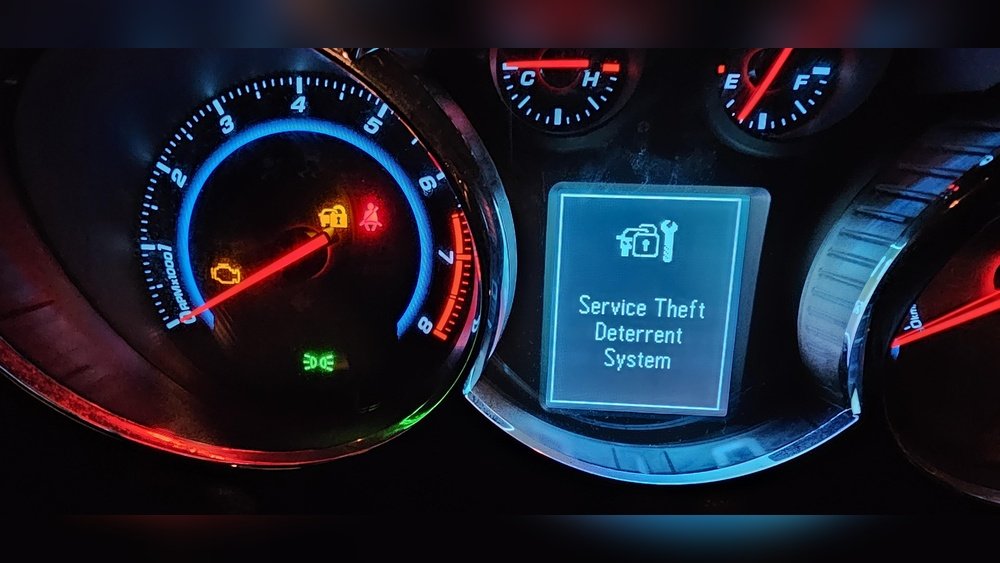
If you own a Chevy Cruze, you know how frustrating it can be when the Service Theft Deterrent System suddenly acts up. This system is designed to keep your car safe, but when it malfunctions, it can leave you stuck and confused.
You don’t have to be a mechanic to fix this issue. You’ll discover simple, step-by-step solutions to get your Chevy Cruze back on the road quickly. Keep reading, because the answers you need are easier than you think.

Credit: www.reddit.com
Common Causes Of Service Theft Deterrent Issues
Service theft deterrent issues in a Chevy Cruze can be frustrating. These problems stop the car from starting or cause warning lights to appear. Knowing the common causes helps you fix the problem faster. This section covers the main reasons behind these issues.
Faulty Key Or Key Fob
The key or key fob may have a weak battery. A damaged chip inside the key can also cause trouble. If the car cannot read the key, the theft deterrent system activates. This prevents the engine from starting.
Immobilizer System Malfunction
The immobilizer controls the theft deterrent system. A fault in this system can stop the car from recognizing the key. Wiring problems or a bad control module may cause this. It blocks the fuel system or starter motor.
Damaged Wiring Or Connectors
Wiring issues affect the communication between the key and car system. Loose or corroded connectors cause errors. Physical damage to wires from wear or accidents can trigger the theft deterrent warning.
Battery Or Electrical Problems
A low or dead car battery causes system errors. Voltage drops can confuse the theft deterrent system. Electrical shorts or blown fuses also lead to warning lights and starting issues.
Software Or Ecu Errors
The car’s computer controls many systems, including theft deterrent. Software bugs or corrupted data may cause false warnings. Resetting or updating the ECU software often solves this problem.

Credit: www.youtube.com
Diagnosing The Theft Deterrent System
Diagnosing the theft deterrent system in a Chevy Cruze helps identify why it won’t work. This system stops the engine from starting without the right key. Sometimes, the car may not start, or the security light stays on. Finding the exact issue is the first step to fixing it.
The process involves checking the key, the system’s signals, and the car’s computer. You need simple tools and some patience. Understanding the main parts of the theft deterrent system makes diagnosis easier.
Using An Obd-ii Scanner To Read Error Codes
An OBD-II scanner reads trouble codes from the car’s computer. These codes show problems with the theft deterrent system. Plug the scanner into the car’s port under the dashboard. Turn the key to the ON position without starting the engine. Follow the scanner’s instructions to get the codes. Write them down for reference.
Checking The Key And Transponder Chip
The key has a transponder chip that sends a signal to the car. If the chip is damaged, the car won’t start. Try using a spare key. If the spare works, the original key may be faulty. A locksmith or dealer can test and replace the chip if needed.
Inspecting The Theft Deterrent Module
The theft deterrent module controls the system. It receives the key’s signal and allows the engine to start. Check the module for loose wires or damage. Look under the dashboard or near the steering column. Repair or replace any damaged parts.
Testing The Security Light Behavior
The security light on the dashboard shows the system’s status. When you turn the key on, the light should blink for a few seconds. If it stays on or flashes rapidly, the system detected a problem. Note the light pattern to help find the issue.
Resetting The Theft Deterrent System
Resetting the theft deterrent system in a Chevy Cruze can solve many common security problems. This system helps protect your vehicle from unauthorized use. Sometimes, it can lock you out or stop the engine from starting. Resetting the system can clear these issues and get your car running again.
The process is simple and does not need special tools. Follow the steps carefully to avoid causing more problems. This guide explains how to reset the theft deterrent system safely.
Step 1: Turn The Ignition To The “on” Position
Insert your key into the ignition. Turn it to the “ON” position without starting the engine. Leave it there for about 10 minutes. This allows the system to reset itself.
Step 2: Turn The Ignition Off And Remove The Key
After 10 minutes, turn the ignition off. Remove the key from the ignition. Wait for a few minutes before moving to the next step.
Step 3: Start The Engine Normally
Put the key back in the ignition. Turn it to start the engine as usual. If the engine starts and runs smoothly, the reset worked.
Step 4: Check For Warning Lights
Look at the dashboard for any warning lights. If the theft deterrent light is off, the system reset is complete. If the light stays on, repeat the process or seek help.
Replacing Faulty Components
Replacing faulty components is a key step in fixing the Service Theft Deterrent System on a Chevy Cruze. This system stops the car from starting without the right key. Faulty parts can cause it to fail and prevent your car from starting. Fixing or replacing these parts can solve the problem and get your car running again.
Key Fob And Transponder Issues
The key fob and transponder send signals to the car to allow starting. If the battery in the key fob is low, it might not work properly. Sometimes, the transponder chip inside the key can become damaged. Replacing the key fob battery or getting a new key made can fix these issues. Make sure the new key is programmed to your car’s system.
Ignition Switch Problems
The ignition switch reads the key and signals the theft deterrent system. A worn or broken ignition switch can stop the car from recognizing the key. Replacing the ignition switch involves removing the steering column cover and swapping out the old switch. After replacement, the system may need to be reset or reprogrammed to work correctly.
Body Control Module Faults
The Body Control Module (BCM) controls many car functions, including the theft deterrent system. Faults in the BCM can cause error messages and prevent the car from starting. Diagnosing BCM problems requires a scan tool to read error codes. Replacing the BCM or updating its software can fix these faults and restore system function.
Using Diagnostic Tools For Chevy Cruze
Using diagnostic tools for a Chevy Cruze is essential to fix the Service Theft Deterrent system. These tools help read error codes that show what is wrong with the car’s security features. They provide clear data, making the repair process easier and faster.
Diagnostic tools connect to the car’s onboard computer. This connection allows the tool to scan for problems related to the theft deterrent system. The information gathered points out specific issues, such as a faulty sensor or a programming error.
Choosing the Right Diagnostic ToolSelect a diagnostic tool that supports Chevy Cruze models. Some tools only work with specific car brands or systems. An OBD-II scanner is commonly used and works well with most Chevy cars.
Look for tools with live data streaming. This feature shows real-time sensor information. It helps identify intermittent issues in the theft deterrent system.
Connecting the Diagnostic Tool to Your CruzeLocate the OBD-II port under the dashboard. It is usually near the steering wheel. Plug the diagnostic tool into this port firmly.
Turn the car’s ignition to the ON position. This step powers the car’s computer and the diagnostic tool. Follow the tool’s instructions to begin scanning.
Reading and Understanding Error CodesThe tool will display one or more error codes related to the theft deterrent system. Each code corresponds to a specific issue or sensor failure.
Use the tool’s manual or online resources to decode the meaning. This step helps find the exact problem quickly. Clear codes after repairs to reset the system.
Resetting the Service Theft Deterrent SystemSome diagnostic tools allow resetting the theft deterrent system. This resets the security function and clears error messages.
After fixing the problem, use the tool to reset the system. This action ensures the car recognizes the repair and disables the error light.
Preventing Future Theft Deterrent Errors
Preventing future errors in the Service Theft Deterrent System of a Chevy Cruze helps keep the vehicle safe. It also avoids costly repairs and inconvenient lockouts. Simple steps can reduce the chance of these problems happening again. Regular care and attention are key to smooth system operation.
Regular Battery Maintenance
Battery issues often cause theft deterrent errors. Check the battery terminals for corrosion. Clean them if needed. Replace the battery if it is weak or old. A stable power supply keeps the system working right.
Use The Correct Key
The Chevy Cruze theft deterrent system works only with programmed keys. Use the original or properly programmed spare keys. Avoid using damaged or uncut keys. This prevents the system from triggering false alarms.
Keep The Ignition Switch Clean
Dirt and debris in the ignition switch can cause errors. Clean the ignition area gently with a soft cloth. Avoid harsh chemicals that damage components. Smooth ignition helps the system recognize the key properly.
Update Vehicle Software
Software glitches may trigger theft deterrent faults. Check for software updates at your dealership or trusted mechanic. Updated software improves system stability and fixes known issues. Staying current reduces error risks.
Avoid Quick Battery Disconnects
Disconnecting the battery without proper steps can reset the theft deterrent system. Use the correct procedure or let a professional handle it. This keeps the system synchronized with the vehicle’s electronics.

Credit: www.youtube.com
Frequently Asked Questions
What Causes The Service Theft Deterrent System Error In Chevy Cruze?
A faulty key or damaged immobilizer system often triggers this error. It means the car can’t recognize the key’s security code. This stops the engine from starting.
How Can I Reset The Service Theft Deterrent System On My Chevy Cruze?
Turning the ignition on and off several times can reset the system. Also, disconnecting the battery for 10 minutes may help. This clears errors and lets the system restart.
Can A Dead Car Battery Cause The Theft Deterrent System Issue?
Yes, a weak or dead battery can disrupt the theft deterrent system. It may cause communication errors with the key or immobilizer. Replacing or charging the battery often fixes the problem.
Is It Possible To Fix The Theft Deterrent System Without A Mechanic?
Some fixes like resetting or battery replacement can be done at home. But complex issues need professional diagnostic tools and expertise. Visiting a mechanic is best for serious problems.
How To Prevent The Service Theft Deterrent System From Activating Wrongly?
Always use the correct key and keep it in good condition. Avoid battery drain and electrical faults in your car. Regular maintenance helps prevent false theft deterrent alerts.
Conclusion
Fixing the Service Theft Deterrent System on your Chevy Cruze can save time and money. Start by checking your key and battery first. Follow the steps carefully to avoid errors. If problems persist, seek help from a professional mechanic. Staying patient and methodical helps you solve the issue faster.
Your car will run smoothly again with a working theft deterrent system. Keep these tips handy for future reference. Simple actions often prevent bigger problems later.