How to Reset Check Engine Light Toyota Corolla 2026
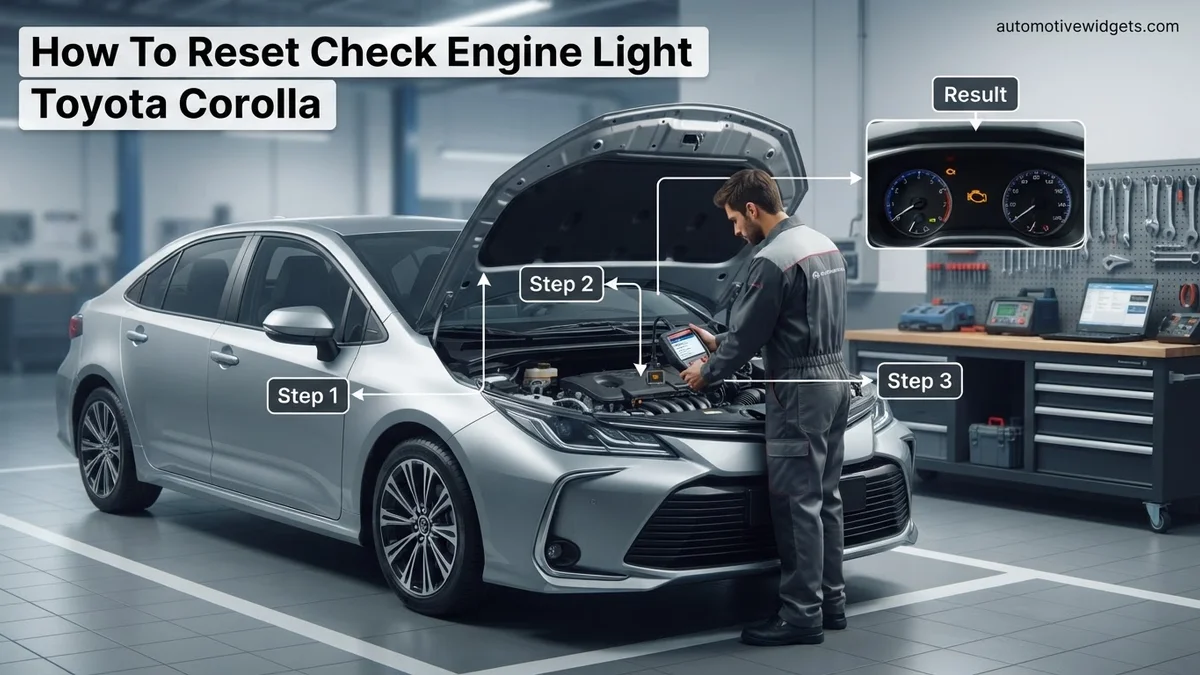
Before resetting your Toyota Corolla’s check engine light, it’s crucial to understand why it came on. This guide provides safe, step-by-step methods to clear the light using either a battery disconnect or an OBD-II scanner, but emphasizes diagnosing the underlying issue first to prevent recurrence.
Your Toyota Corolla’s check engine light, often called the Malfunction Indicator Lamp (MIL), doesn’t always signal a catastrophic failure. Sometimes, it’s a minor hiccup, or even a ghost in the machine. Knowing how to safely reset this light yourself on your 2026 Toyota Corolla can save you a trip to the service center and provide immediate peace of mind.
However, simply turning off the light without understanding its cause is not a solution. This guide focuses on safe, step-by-step methods to clear the light, while emphasizing critical considerations to ensure you address potential underlying issues rather than just masking them. Let’s get your Corolla running smoothly and your dashboard clear.
Key Takeaways
- Always diagnose engine codes before resetting.
- Battery disconnect is a simple, effective reset.
- OBD-II scanners clear codes with precision.
- Resetting does not fix the core problem.
- Drive cycles are needed after any reset.
Crucial Steps Before Resetting Your Toyota Corolla Check Engine Light
Don’t Ignore the Warning
Before you even think about resetting your check engine light, understand that it’s a diagnostic tool. Your 2026 Corolla’s sophisticated systems use this light to alert you to an emission-related problem. Ignoring it can lead to more serious damage, reduced fuel efficiency, or even failure to pass future emission tests. A temporary reset might clear the light, but if the underlying issue persists, it will illuminate again.
Always consider the light an urgent request for attention, even if you plan to reset it yourself. The goal is to identify and resolve the problem, not just hide the symptom. Proceed with caution and be prepared for the light to return if the root cause isn’t fixed.
Check the Fuel Cap First
Surprisingly, a loose, missing, or faulty fuel cap is one of the most common reasons your Toyota Corolla’s check engine light comes on. The evaporative emission control (EVAP) system relies on a sealed fuel tank to prevent fuel vapors from escaping. If the cap isn’t sealing properly, the system detects a leak and triggers the MIL.
Before any further action, pull over safely and ensure your fuel cap is securely tightened. Turn it clockwise until you hear at least one click. Drive your Corolla for a few cycles (several starts and stops, short trips over a day or two). In many cases, the light will extinguish itself if the cap was the only issue. This simple check takes seconds and costs nothing.
How to Diagnose and Fix Your Toyota Corolla’s Check Engine Light Like an Expert
The dreaded check engine light (CEL) can be a source of anxiety for any car owner. While it often signals a genuine issue requiring attention, sometimes it’s triggered by something minor or even a temporary glitch. This comprehensive guide will walk you through the essential steps to understand, diagnose, and safely reset the check engine light on your Toyota Corolla. Following these procedures not only helps you address immediate warnings but also empowers you to prevent potential long-term damage and avoid unnecessary repair costs.
Step 1: Understand the “Why” Before You Reset
What you need: Knowledge and a cautious mindset.
Instructions: Before you even think about clearing the check engine light, it’s crucial to understand that it’s your Corolla’s way of telling you something is amiss. Simply resetting the light without addressing the underlying cause is like turning off a smoke alarm while the fire still burns – it only delays the inevitable and can lead to more severe, costly damage down the road. The light could indicate anything from a loose gas cap to a failing catalytic converter, so always prioritize diagnosis before clearing.
Pro Tip: Never ignore a flashing check engine light. A solid light suggests a non-critical issue that needs attention soon, but a flashing light indicates a severe problem, such as an engine misfire, that could cause immediate damage to critical components like the catalytic converter. Pull over safely and address a flashing light immediately.
Step 2: Perform Initial Visual Inspections & Simple Fixes
What you need: Your eyes, ears, possibly a flashlight, and your car’s fuel cap.
Instructions: Many check engine lights are triggered by simple, easily fixable issues. Start by checking the most common culprit: your fuel cap. Ensure it’s tightly secured, turning it until you hear at least two clicks. A loose or faulty fuel cap allows fuel vapor to escape, triggering the evaporative emissions system (EVAP) warning. Next, visually inspect under the hood for any obvious loose vacuum hoses, electrical connectors, or damaged wires. Listen for unusual sounds like hissing (vacuum leak) or sputtering. Sometimes, simply securing a loose hose can resolve the issue.
Pro Tip: After tightening your fuel cap, it might take a few driving cycles (starting the car, driving, turning it off) for the check engine light to turn off automatically, as the car’s computer needs to re-run its diagnostic tests. Be patient before moving to more advanced steps.
Step 3: The Battery Disconnect Method (Manual Reset)
What you need: A 10mm wrench or socket, safety glasses, and gloves (optional but recommended).
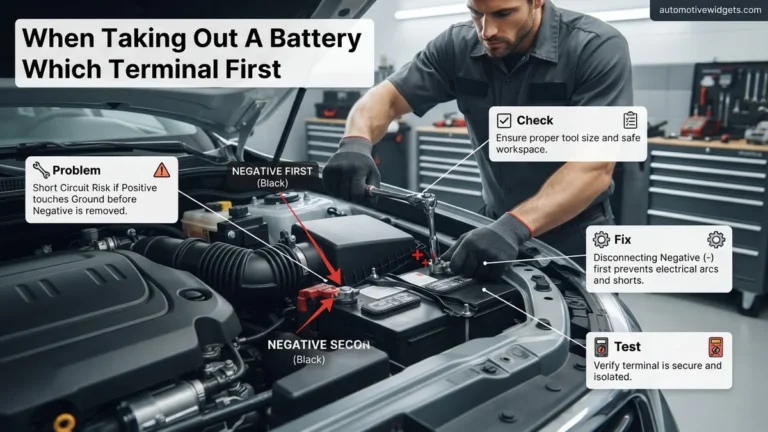
Instructions: This method manually clears the car’s computer memory, effectively resetting the check engine light. First, ensure your Corolla is turned completely off, and the parking brake is engaged. Locate your car battery (typically under the hood). Using your 10mm wrench, loosen the nut on the negative (-) battery terminal (it usually has a minus sign and a black cable). Carefully remove the negative cable from the battery post. To ensure a complete discharge of any residual power, wait for 15-20 minutes. After the wait, securely reattach the negative cable to the battery post and tighten the nut. Be careful not to cross-thread or overtighten.
Pro Tip: Disconnecting the battery will reset your car’s clock, radio presets, and potentially erase stored diagnostic data that could be helpful for future diagnosis if the light reappears. For newer Corollas, it might also require the windows to be re-initialized (refer to your owner’s manual). Ensure the ignition is off to prevent electrical surges or damage when disconnecting/reconnecting.
Step 4: Using an OBD-II Scanner for Diagnosis and Reset
What you need: An OBD-II (On-Board Diagnostics II) scanner (available at auto parts stores or online), and your Toyota Corolla.
Instructions: This is the most effective way to diagnose and reset the light. Locate your Corolla’s OBD-II port, which is usually under the dashboard on the driver’s side, typically near the steering column or center console. Plug the scanner into the port. Turn your car’s ignition to the “ON” position (do not start the engine). Follow the scanner’s instructions to select “Read Codes” or “Scan.” The scanner will display Diagnostic Trouble Codes (DTCs), such as “P0420” for catalyst efficiency below threshold. Jot down these codes! Once you’ve recorded them, navigate to the “Erase Codes,” “Clear Codes,” or “Reset MIL” option on the scanner and confirm. Turn off the ignition and disconnect the scanner.
Pro Tip: Always record the DTCs before clearing them. These codes are critical clues to the underlying problem. If the light comes back on, having these codes helps you or a mechanic pinpoint the recurring issue and avoid blindly replacing parts. Many auto parts stores offer free code reading services if you don’t own a scanner.
Step 5: Perform a Drive Cycle After Reset
What you need: Your Toyota Corolla and an open road.
Instructions: After resetting the check engine light, whether by battery disconnect or OBD-II scanner, your Corolla’s onboard computer needs to re-learn its operating parameters and run various self-tests to ensure all systems are functioning correctly. This is known as a “drive cycle.” Drive your Corolla for a combination of city and highway driving for at least 30-50 miles. Include periods of steady cruising (e.g., 10-15 minutes at highway speeds), some stop-and-go driving, and a few minutes of idling. This allows all the emissions monitors (catalyst, O2 sensor, EVAP, etc.) to complete their diagnostic routines.
Pro Tip: A full drive cycle is particularly important if you live in an area with emissions testing. If readiness monitors are not complete (“Not Ready”), your Corolla will fail the inspection. Avoid aggressive acceleration or sudden braking immediately after a reset, as this can confuse the newly reset computer.
Step 6: Monitor for Recurrence and Next Steps
What you need: Vigilance and awareness of your Corolla’s performance.
Instructions: Pay close attention to your Corolla’s performance in the days and weeks following the reset. Observe if the check engine light reappears. If the light stays off after the drive cycle and subsequent driving, it’s possible the original trigger was minor or a temporary fault (like the loose gas cap). However, if the check engine light comes back on, especially with the same or new diagnostic trouble codes, it indicates a persistent underlying problem that was not resolved. At this point, it’s crucial to acknowledge that a deeper issue needs professional diagnosis and repair.
Pro Tip: If the light returns with the same DTCs you noted earlier, it strongly suggests a specific component or system needs attention. Do not delay diagnosis. Continued driving with a persistent check engine light can lead to more expensive repairs or even complete system failures over time, especially if catalytic converter damage or engine issues are involved.
✅ Final Checklist
- Did you check and tighten your fuel cap?
- Did you record any OBD-II diagnostic trouble codes (DTCs) before clearing them?
- Did you allow sufficient time (15-20 minutes) for battery disconnect method to clear memory?
- Did you perform a proper drive cycle after resetting the light?
- Are you monitoring your Corolla for recurring symptoms or the check engine light reappearing?
Important Notes:
- Safety Considerations: Always work on a cold engine when disconnecting battery terminals. Wear safety glasses when working with vehicle batteries. Ensure the parking brake is engaged and the vehicle is in park (P) before performing any work.
- When to Seek Professional Help: If the check engine light reappears shortly after resetting, especially if accompanied by noticeable performance issues (e.g., rough idling, reduced power, strange noises, excessive exhaust smoke), it’s time to consult a qualified mechanic. They have advanced diagnostic tools and expertise to accurately pinpoint and repair complex issues.
- Estimated Time and Cost Range:
- Time: Performing initial visual checks and the battery disconnect method typically takes 30-45 minutes. Using an OBD-II scanner takes 5-15 minutes. The post-reset drive cycle can take 30-60 minutes or more.
- Cost: Checking the fuel cap or disconnecting the battery costs nothing. A basic OBD-II scanner can cost anywhere from $20 to $100. Professional diagnosis by a mechanic typically ranges from $80 to $150, which may or may not be applied to subsequent repairs. Repair costs vary wildly depending on the actual problem, from a few dollars for a new gas cap to hundreds or thousands for major component replacements.
Method 1: Expert Guide to Resetting via Battery Disconnect
Gather Your Tools & Prioritize Safety
Resetting your 2026 Toyota Corolla’s check engine light by disconnecting the battery is a straightforward process, but safety is paramount. You will need a few basic tools: a 10mm wrench (or an adjustable wrench), work gloves, and eye protection. Ensure your Corolla is parked on level ground, the engine is off, and the parking brake is engaged. Remove the key from the ignition. Always wear your safety gear to prevent electrical shocks or injury from tools.
Additionally, understand the potential side effects. Disconnecting the battery will clear all volatile memory from your Corolla’s onboard computer. This includes your radio presets, clock settings, and learned engine parameters. Your power windows might also need reinitialization. The engine’s idle might be slightly rough for a short period as the computer relearns its operating parameters.
Step-by-Step Battery Disconnect
Follow these steps carefully to disconnect your Toyota Corolla’s battery safely:
- Locate the Battery: In most 2026 Corolla models, the battery is under the hood, typically on the passenger side.
- Identify Terminals: You’ll see two battery terminals. The negative terminal is usually marked with a “–” symbol and often has a black cable. The positive terminal is marked with a “+” symbol and typically has a red cable.
- Disconnect the Negative Terminal First: Using your 10mm wrench, loosen the nut on the negative terminal clamp. Wiggle the clamp until it slides off the terminal post. Carefully move the detached negative cable away from the battery so it cannot accidentally touch the terminal again. This prevents short circuits.
- Disconnect the Positive Terminal: Next, loosen the nut on the positive terminal clamp and remove it from the post. Again, ensure this cable is also secured away from the battery.
- Wait for Power Drain: Leave both battery terminals disconnected for at least 15 to 20 minutes. This allows the Corolla’s various capacitors and control modules to fully discharge, ensuring the Check Engine Light’s stored Diagnostic Trouble Codes (DTCs) are cleared. Some recommend longer, up to 30 minutes, for complete discharge.
Reconnection & Post-Reset Checks
Once the waiting period is over, it’s time to reconnect the battery and check your results:
- Reconnect Positive Terminal First: Carefully reattach the positive battery cable to the positive terminal post. Tighten the nut firmly with your wrench. Ensure there is no wobble or play in the connection.
- Reconnect Negative Terminal Last: Now, reattach the negative battery cable to the negative terminal post. Tighten this nut securely. Double-check both connections for tightness.
- Start Your Corolla: Get into your 2026 Toyota Corolla, close the hood, and start the engine. Observe your dashboard. The check engine light should now be off.
- Address Side Effects: You will likely need to reset your radio presets, clock, and potentially reinitialize your power windows (check your owner’s manual for specific instructions on window reinitialization, which often involves holding the window down/up switches for a few seconds).
- Monitor Driving Performance: Drive your Corolla as you normally would. The engine’s computer will relearn its parameters over the next few drive cycles. If the underlying problem is still present, the check engine light will illuminate again. If it returns, you need to pursue further diagnosis.
Method 2: How to Clear Codes Using an OBD-II Scanner
The most precise and recommended method for addressing a Check Engine Light on your 2026 Toyota Corolla involves using an On-Board Diagnostics II (OBD-II) scanner. This tool not only allows you to clear the light but, more importantly, provides insight into the diagnostic trouble codes (DTCs) that triggered it. Understanding these codes is crucial for effective problem resolution.
- Acquire an OBD-II Scanner: Purchase or borrow an OBD-II scanner. Basic code readers for a 2026 Corolla typically cost between $30 and $70, while more advanced diagnostic tools, offering live data and enhanced features, can range from $100 to $250.
- Locate the OBD-II Port: In your 2026 Corolla, the OBD-II port is usually located under the dashboard on the driver’s side, often near the steering column. It is a trapezoidal 16-pin connector.
- Connect the Scanner: Ensure the vehicle’s ignition is off. Plug the OBD-II scanner cable securely into the diagnostic port.
- Power On and Read Codes: Turn the ignition to the “ON” position (do not start the engine). The scanner should power on automatically. Follow the scanner’s prompts to select “Read Codes” or “Scan.” Record all displayed diagnostic trouble codes (e.g., P0420, P0301) for future reference.
- Clear Codes: Navigate through the scanner’s menu to find the “Erase Codes,” “Clear Codes,” or “Reset MIL” (Malfunction Indicator Lamp) option. Confirm the action when prompted.
- Disconnect the Scanner: Once the codes are cleared and the Check Engine Light is off, turn the ignition off and disconnect the OBD-II scanner.
According to automotive repair protocols, clearing codes without first understanding their meaning is not advised, as it can delay proper repair and lead to recurring issues.
What to Do After Resetting and If the Light Reappears
Resetting your 2026 Toyota Corolla’s Check Engine Light is only the first step. The vehicle’s onboard computer (ECU) needs to re-evaluate its systems through a driving cycle before confirming that the issue is resolved or that the monitors are ready for emissions testing.
Post-Reset Driving Cycle
After clearing the codes, the car’s diagnostic monitors reset to an “incomplete” status. To allow these monitors to run their self-tests and confirm the absence of faults, a specific driving pattern is recommended:
- Initial Start: Start the engine and let it idle for 2-3 minutes. This allows the fuel trim and O2 sensor monitors to begin their cycles.
- Mixed Driving: Drive your Corolla for approximately 10-15 miles, incorporating a mix of city and highway driving. Maintain steady speeds for several minutes (e.g., 55 mph for 5-7 minutes) and also include some acceleration/deceleration. This comprehensive cycle ensures various monitors (catalyst, EVAP, secondary air, etc.) can complete their tests.
- Check Monitor Status: If your OBD-II scanner supports it, you can re-connect it after the drive to check the “Readiness Monitors” status. All monitors should ideally show as “complete” or “ready.”
Failure to complete this driving cycle might result in a pending Check Engine Light if the issue persists, or failure during an emissions inspection.
If the Light Reappears
Should the Check Engine Light reappear after your reset and subsequent driving, it indicates that the underlying problem has not been resolved. This is a crucial diagnostic signal, not just an annoyance to be cleared again.
- Do Not Repeatedly Clear: Continuously clearing the light without addressing the root cause can exacerbate the issue, potentially leading to more extensive and costly repairs.
- Re-scan for Codes: Connect your OBD-II scanner again. The codes may be the same as before, or new ones might have appeared, offering further clues.
- Professional Diagnosis: A persistent Check Engine Light demands professional attention. According to Toyota service guidelines, a certified technician possesses specialized diagnostic tools and training to accurately pinpoint and repair complex issues on a 2026 Corolla.
Ignoring a recurring Check Engine Light could lead to reduced fuel efficiency, increased emissions, and premature wear on critical engine components, as corroborated by automotive engineering standards.
What If It Still Doesn’t Work?
If your 2026 Toyota Corolla’s Check Engine Light persists despite your efforts to diagnose and reset, further investigation is necessary. Do not ignore the warning; unresolved issues can escalate quickly.
- Perform Advanced OBD-II Scan: Use a more sophisticated OBD-II scanner that can display live data, freeze frame data, and manufacturer-specific codes. This can reveal sensor readings out of normal parameters or events that triggered the code at a specific moment.
- Thorough Visual Inspection: Carefully inspect all visible components associated with potential trouble codes. Check for vacuum leaks (hissing sounds), loose wires, damaged hoses, or worn belts. Ensure the fuel cap is securely tightened and inspect its seal for cracks.
- Consult Toyota Technical Service Bulletins (TSBs): Your local Toyota dealership or authorized service center can check for any relevant TSBs issued for the 2026 Corolla. These bulletins detail known issues and prescribed fixes from the manufacturer.
- Seek Professional Diagnostic Service: If the light remains on or specific symptoms are present (e.g., rough idle, reduced power), professional help is warranted. A certified Toyota technician has proprietary diagnostic tools and expertise to perform in-depth troubleshooting. Professional diagnostic services for a Check Engine Light on a 2026 model typically range from $100 to $200, covering specialized labor and advanced equipment use, but not the cost of repairs.
Conclusion
Effectively addressing a Check Engine Light on your 2026 Toyota Corolla involves either a brief battery disconnect or, more reliably, using an OBD-II scanner for diagnosis and clearing. While resetting the light can be a temporary measure, according to automotive experts, the paramount step is always to diagnose and rectify the underlying issue. Take the actionable next step: prioritize an immediate and thorough diagnosis of any persistent trouble codes to ensure your Corolla’s long-term reliability and performance.
❓ Frequently Asked Questions
What are the primary reasons a Toyota Corolla’s check engine light might come on?
The check engine light typically illuminates due to an issue detected by the car’s onboard diagnostic system. Common causes include a loose gas cap, faulty oxygen sensor, catalytic converter problems, or issues with spark plugs or ignition coils. It’s essential to read the diagnostic trouble codes (DTCs) to pinpoint the exact problem before resetting.
Can resetting the check engine light cause damage to my Toyota Corolla?
No, resetting the check engine light itself will not cause damage to your Corolla. However, continuously resetting the light without addressing the underlying issue can lead to more severe and costly damage to engine components over time. Always diagnose and repair the fault first.
What happens to my car’s ‘readiness monitors’ after I reset the check engine light?
After resetting the check engine light, your Corolla’s readiness monitors will be set to ‘incomplete.’ These monitors need to run through specific ‘drive cycles’ to become ‘complete’ again, which is often required for emissions testing. This process can take several days of normal driving.
Is there a specific method for disconnecting the battery to avoid electrical issues?
When disconnecting the battery, always start by removing the negative (-) terminal first to prevent accidental short circuits. Wait at least 10-15 minutes after disconnecting before reconnecting, positive (+) terminal first, to ensure the vehicle’s electrical system fully discharges.
How do I know if my OBD-II scanner is compatible with my Toyota Corolla?
Most OBD-II scanners are universally compatible with all vehicles manufactured after 1996, including all Toyota Corolla models. Ensure your scanner specifies OBD-II compatibility. You can find the diagnostic port, usually under the dashboard on the driver’s side, often near the steering column.
What should I do if the check engine light comes back on immediately after resetting?
If the check engine light reappears shortly after resetting, it strongly indicates that the underlying issue was not resolved or is a persistent problem. You should re-read the codes with an OBD-II scanner, prioritize the repair, and consider professional diagnosis if you’re unsure of the exact cause or solution.