How to Change a Car Battery Without Losing Settings: Easy Steps
Changing your car battery might seem like a simple task, but if you’re worried about losing your radio presets, clock settings, or even more important computer data, you’re not alone. What if there was a way to swap out your old battery without resetting everything?
In this guide, you’ll discover easy, step-by-step methods to change your car battery while keeping all your settings intact. Whether you’re a DIY enthusiast or just want to avoid the hassle of reprogramming, stick with me—you’ll learn how to save time, avoid frustration, and get your car running smoothly without losing any of your personalized settings.
Ready to keep your car’s memory safe? Let’s dive in!

Credit: cloreautomotive.com
Choose A Memory Saver
Choosing a memory saver is an important step when changing a car battery. This small device helps keep your car’s settings safe. It prevents the loss of radio presets, clock time, and other electronic data. Using a memory saver saves time and avoids the hassle of resetting your car’s systems after battery replacement.
Types Of Memory Savers
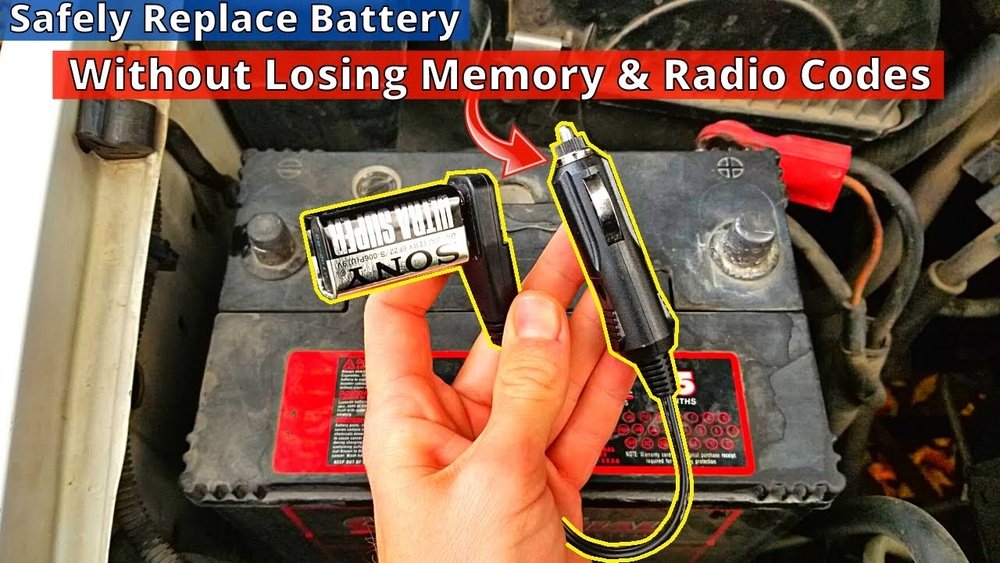
There are several types of memory savers available. Some plug into your car’s OBD-II port. Others connect to the cigarette lighter socket. Portable battery packs with USB outputs can also serve as memory savers. Each type offers different power sources to maintain your car’s memory during battery changes.
Where To Buy Memory Savers
Memory savers are available at auto parts stores and online shops. Popular retailers like AutoZone and Advance Auto Parts carry them. Online platforms such as Amazon offer a wide selection with customer reviews. Choose a memory saver that fits your car and budget for best results.
How Memory Savers Work
Memory savers provide a small, continuous power supply. They connect to your car’s power system before removing the battery. This keeps the car’s computer and radio memory active. The device ensures settings do not reset while the main battery is disconnected. Using a memory saver is a simple way to protect your car’s electronic data.
Prepare Your Tools
Preparing your tools is the first step to change a car battery without losing settings. Proper tools make the job easier and safer. Organize everything before starting to avoid interruptions. This helps protect your car’s computer and memory.
Gather Safety Gear
Wear safety glasses to protect your eyes from sparks. Use gloves to avoid acid burns and dirt. Have a fire extinguisher nearby just in case. Work in a well-ventilated area to avoid harmful fumes.
Select Proper Wrenches
Use the right size wrench for battery terminals. Most cars need a 10mm wrench, but check your battery to be sure. A socket wrench may work faster and better. Avoid using pliers or adjustable wrenches that may slip.
Have The New Battery Ready
Check the new battery matches your car’s specifications. Remove any plastic covers or caps before installation. Keep the new battery close to avoid long delays. Make sure terminals are clean and free of corrosion.
Disconnect The Old Battery
Disconnecting the old battery is a key step in changing your car’s battery without losing settings. This process requires care to avoid damaging the electrical system. Follow the right order and use proper tools to keep your car’s memory intact. Safety is important to prevent sparks and shorts while removing the battery.
Use The Memory Saver
Start by connecting a memory saver device. This small tool supplies power to your car’s computer. It keeps settings like radio presets and clock time. Plug the memory saver into the car’s OBD-II port or cigarette lighter. Make sure it has fresh batteries or is fully charged. This step helps avoid resetting your car’s systems.
Remove Negative Terminal First
Always disconnect the negative terminal first. This terminal is usually marked with a minus (-) sign. Use a wrench to loosen the clamp bolt carefully. Remove the cable and tuck it away from the battery. This prevents accidental contact with the battery post. Disconnecting the negative terminal first reduces the risk of electric shock.
Remove Positive Terminal Safely
Next, remove the positive terminal, marked with a plus (+) sign. Loosen the clamp bolt with a wrench as before. Lift the cable away from the battery post gently. Avoid touching the negative terminal or any metal parts. Keep the cable clear of the battery to prevent sparks. This step frees the battery completely for removal.
Install The New Battery
Installing the new battery is the final step in the replacement process. It requires careful handling to ensure the battery fits securely and the connections are correct. Proper installation avoids damage and helps keep your car’s settings intact.
Secure Battery In Tray
Place the new battery carefully into the tray. Align it so the terminals face the correct directions. Use the battery hold-down clamp to secure it tight. This prevents movement while driving and protects connections.
Connect Positive Terminal
Attach the positive cable first. It usually has a red cover or mark. Push the connector firmly onto the terminal. Tighten the nut with a wrench until snug. Avoid over-tightening to prevent damage.
Connect Negative Terminal
Next, connect the negative cable. This one often has a black cover or mark. Secure the connector onto the terminal firmly. Tighten the nut just enough to hold it in place. A secure connection ensures proper grounding and safety.
Verify Settings And Test
After changing your car battery, verifying the settings ensures everything works properly. Testing helps you catch any lost preferences early. This step protects your saved radio stations, clock, and other electronics. Follow these checks to confirm your vehicle functions as before.
Check Radio And Clock
Start by turning on the radio. Make sure your favorite stations are still saved. Check if the clock shows the correct time. If the clock resets, you will need to adjust it. This is a common setting lost during battery changes.
Test Vehicle Electronics
Turn on the headlights, indicators, and interior lights. Check if the dashboard lights up normally. Test power windows and door locks. Listen for any unusual sounds. Confirm the car’s computer systems are responsive. These quick tests reveal if settings remain intact.
Reset If Necessary
If any settings have reset, adjust them manually. Set the clock to the correct time. Reprogram the radio presets you lost. Consult your car manual for special resets. Some vehicles may need a computer reset using a scan tool. This step restores your personal preferences fully.
Credit: support.hulkman.com

Credit: www.youtube.com
Frequently Asked Questions
How To Keep Car Settings When Replacing Battery?
Use a memory saver device to maintain power during battery replacement. Connect it to the OBD-II port or cigarette lighter. Disconnect the old battery carefully and install the new one. This keeps your car’s settings, like radio presets and clock, intact without resets.
How To Reset Car Computer After Replacing Battery?
To reset your car computer after battery replacement, disconnect the negative terminal for 15 minutes. Reconnect it, then start the engine to recalibrate the system.
Do I Have To Reprogram My Car If I Change The Battery?
You usually don’t need to reprogram your car after changing the battery. Use a memory saver to keep settings intact. Without it, some systems may reset and require reprogramming. Always disconnect the negative terminal last and reconnect it last to avoid issues.
Do You Really Need A Memory Saver When Changing Car Battery?
Using a memory saver during a car battery change helps maintain your vehicle’s settings and prevents data loss. It keeps power flowing to the car’s computer, preserving radio presets, clock, and other electronic settings. Without it, you may need to reprogram these features after installation.
Conclusion
Changing a car battery without losing settings is simple with the right steps. Use a memory saver to keep power flowing during the switch. Always connect the positive terminal first when installing the new battery. Double-check your connections before closing the hood.
This way, your radio, clock, and other settings stay intact. Follow these tips to save time and avoid frustration. Your car will start smoothly with all settings saved. A little care makes a big difference when changing a battery.