How to Turn Off 911 Assist Reminder on Ford SYNC 2026 Fix
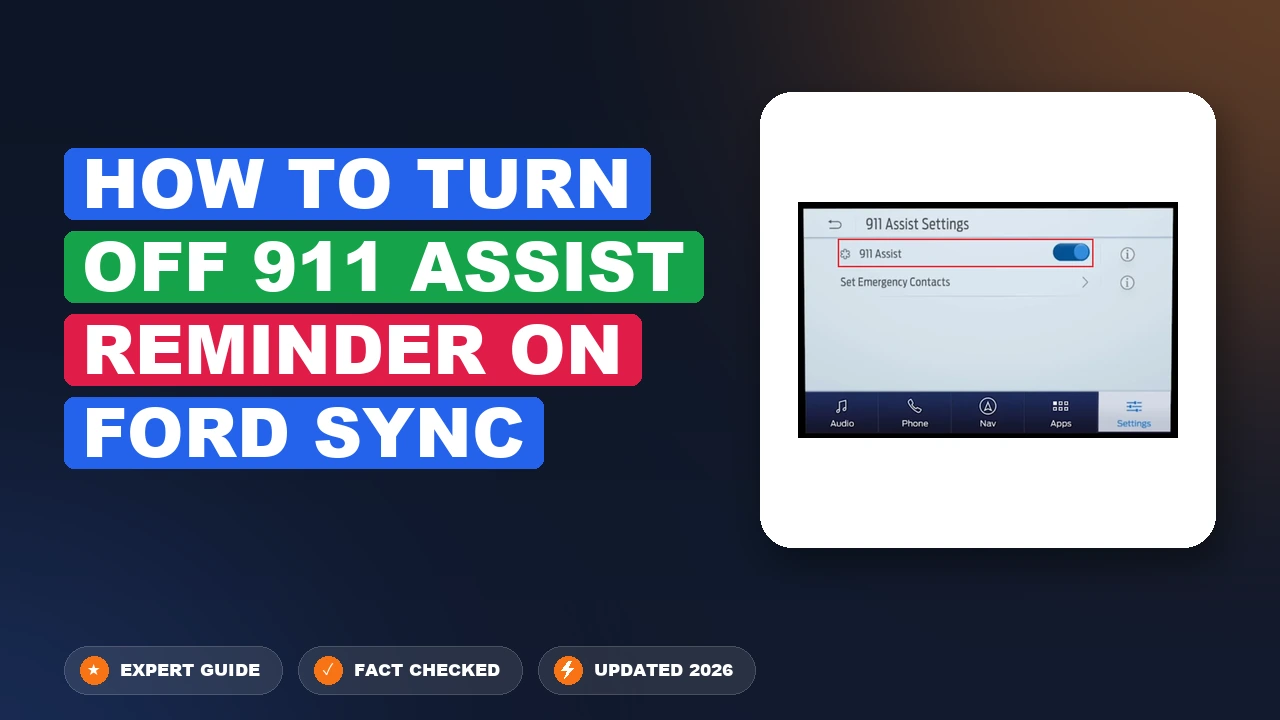
The persistent 911 Assist reminder popup on Ford SYNC can be permanently disabled by navigating through your infotainment touch screen settings. You must turn off the core 911 Assist feature entirely to stop the recurring prompts from interrupting your audio and display.
To turn off the recurring 911 Assist reminder on your Ford SYNC system, you need to navigate directly to the Phone or Settings menu on your touchscreen and toggle the feature off. If your vehicle keeps prompting you every time you start the engine in 2026, it is usually because the system needs a manual override after a phone update or a master reset.
Dealing with this persistent popup can drive you crazy during your daily commute. Fortunately, disabling the prompt takes less than two minutes once you know the exact menu path. Whether you drive a vehicle equipped with SYNC 3 or the newer SYNC 4 architecture, the steps below will permanently stop the annoyance.
Key Takeaways
- Access the 911 Assist menu via the Settings icon on your Ford SYNC touchscreen.
- Turning off the main 911 Assist toggle automatically stops the recurring reminder prompt.
- Menu paths vary slightly between SYNC 3 and SYNC 4 operating systems.
- Master reset might be required if the setting repeatedly reverts back after saving.
- Disabling 911 Assist prevents automated emergency calls in the event of a crash.
Why the Ford SYNC 911 Assist Reminder Keeps Popping Up
The Root Cause of the Persistent Popup
Your Ford SYNC system relies on a connected smartphone via Bluetooth to route emergency calls if an airbag deploys. When your phone updates its operating system, security permissions often change. This breaks the background handshake between your phone and your car. As a result, the SYNC software thinks 911 Assist is unconfigured or disabled, triggering a persistent reminder notification every time you turn the ignition on.
- Operating system updates on iOS or Android reset Bluetooth sharing permissions.
- A corrupted pairing profile between your phone and head unit.
- Failing to complete the initial setup wizard when the car was new.
How the Notification Triggers in SYNC 3 and SYNC 4
The notification loop is built into the vehicle software to ensure safety compliance. If the system detects that emergency features lack a confirmed paired device with proper permissions, it forces a banner across your display. Ignoring the banner does not clear the flag. You must actively change the setting within the touchscreen menu to stop the reminder from broadcasting at startup.
- The warning typically appears within 10 seconds of starting the engine.
- It forces you to press “Close” or “Remind Me Later” repeatedly.
- It can block your backup camera view or navigation map temporarily.
Master 911 Assist Deactivation in 6 Simple Steps
Dealing with persistent voice prompts or screen notifications regarding your vehicle’s emergency calling features can be quite frustrating, especially if you prefer using your smartphone’s native speakerphone or Bluetooth protocols. This comprehensive guide walks you through the exact process of disabling the 911 Assist feature within your Ford SYNC infotainment system. By following these precise instructions, you will successfully clear unwanted reminders and customize your vehicle’s safety preferences to match your personal driving habits.
Step 1: Power on Your Vehicle’s Ignition
What you need: Your Ford vehicle keys or intelligent access fob.
Instructions: Sit inside your Ford vehicle and turn the ignition to the “Accessory” or “On” position without necessarily starting the engine. If you drive a push-button start model, press the start button once or twice without holding the brake pedal down. This ensures that the Ford SYNC touchscreen and instrument cluster receive continuous electrical power, allowing you to navigate the settings menus without the engine noise interfering with your concentration or timing out prematurely.
Pro Tip: Avoid leaving the car in “Accessory” mode for too long to prevent draining your vehicle battery; if you have a modern Ford with an auto-shutdown feature, you may want to simply start the engine.
Step 2: Access the Main SYNC Menu
What you need: Your fingers to interact with the central touchscreen display.
Instructions: Look at your central dashboard console and locate the home screen icon on your Ford SYNC display, which typically resembles a house or a grid of application icons. Tap this home button to ensure you are starting from the primary user interface. Depending on whether your vehicle runs SYNC 3 or SYNC 4, the layout might vary slightly, but the core navigation principles remain identical across modern Ford lineups. Ensure the screen is fully loaded and responsive before moving forward.
Pro Tip: If your screen is lagging or frozen, give it ten seconds to boot completely before attempting to tap any menu items to avoid misclicks.
Step 3: Navigate to the Settings Application
What you need: Access to the main applications drawer or bottom navigation bar.
Instructions: Scroll through your screen’s application menu or look at the persistent bottom toolbars to find the “Settings” icon, which is generally represented by a standard gear symbol. Tap the settings icon to open the comprehensive system configuration menu. Within this area, you will be able to adjust audio preferences, display brightness, vehicle personalization, and your phone connectivity features. Take a moment to familiarize yourself with the layout of the settings sub-menus.
Pro Tip: On older SYNC systems, you may need to swipe horizontally across the screen to reveal the settings tile if it is not immediately visible on the primary page.
Step 4: Locate the Phone and Emergency Features
What you need: Visual focus on the category list within the settings menu.
Instructions: Once inside the settings menu, look for a tab or list item labeled “Phone”, “Mobile Apps”, or “Vehicle”. Depending on your exact software version, 911 Assist parameters are typically housed directly under the Phone configuration settings. Tap on the “Phone” selection to open up device-specific controls, connected Bluetooth management, and emergency notification settings. If you do not see it immediately under Phone, check a dedicated “Emergency” or “Safety” sub-menu if available on your model year.
Pro Tip: Keep in mind that software updates from Ford occasionally shuffle menu items around, so look closely for keywords like “911”, “Emergency”, or “Assist”.
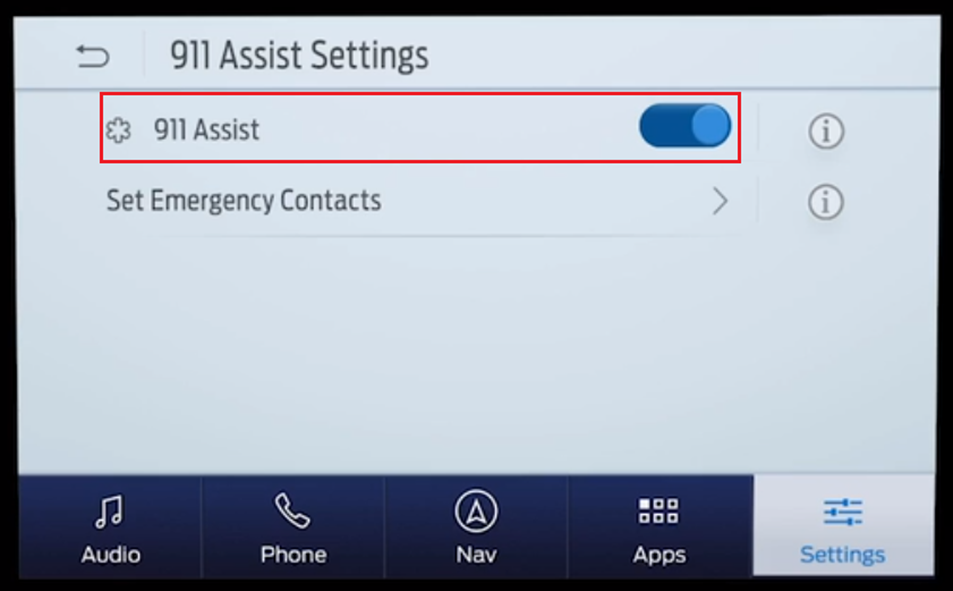
Step 5: Toggle Off the 911 Assist Feature
What you need: A steady hand to toggle the on-screen switch.
Instructions: Scroll through the phone configuration options until you find the specific toggle switch designated for “911 Assist”. You will likely see a brief description explaining that this feature automatically places a call to emergency services in the event of an airbag deployment. Tap the toggle switch or checkbox to switch the status from “On” to “Off”. A confirmation prompt or warning message may pop up on the screen informing you that emergency services will no longer be contacted automatically; read this prompt and confirm your choice by selecting “Continue” or “Disable”.
Pro Tip: If you have multiple user profiles saved in your vehicle, you will need to repeat this specific toggle process for each individual profile.
Step 6: Verify Settings Persistence and Restart System
What you need: Your vehicle ignition controls for a quick system reboot.
Instructions: Back out of the settings menu completely to ensure that your changes are saved to the SYNC system memory. To guarantee the reminder pop-ups are fully gone, turn your vehicle completely off, open and close the driver-side door to cut accessory power, and then turn the ignition back on. Return to the 911 Assist menu to verify that the toggle remains in the “Off” position. This final sanity check ensures the software successfully registered your preference change.
Pro Tip: If the setting reverts back to “On”, your SYNC system may require a soft reset by holding down the power and right-seek audio buttons simultaneously for ten seconds.
✅ Final Checklist
- Vehicle ignition was properly engaged to power the infotainment system without interruptions.
- The main Settings gear icon was successfully accessed from the SYNC home screen.
- The Phone configuration menu was opened to locate the emergency feature parameters.
- The 911 Assist toggle switch was successfully flipped to the “Off” position and confirmed.
- The vehicle was power-cycled to ensure the updated configuration saved permanently.
Important Notes:
- Disabling 911 Assist means your vehicle will no longer automatically dial emergency services if you are involved in a severe accident where airbags deploy.
- Always ensure your mobile phone is kept within reach and charged so you can manually call for help if an emergency occurs while driving.
- Estimated time to complete this entire process is approximately 3 to 5 minutes, with zero financial cost.
How to Fix It and Turn Off 911 Assist on SYNC 3 and SYNC 4
Step-by-Step Navigation for SYNC 3 Systems
If your Ford features a SYNC 3 touchscreen, the menu layout relies on a bottom banner and specific settings tabs. Follow this exact path to locate and disable the feature:

- Turn on your vehicle and let the infotainment system boot up completely.
- Tap the Settings icon on the bottom feature bar.
- Select the Phone tile from the main settings menu grid.
- Look for the 911 Assist sub-menu option and tap it.
- Toggle the switch from On to Off.
- Confirm your selection when the system prompts you with a confirmation warning.
Step-by-Step Navigation for SYNC 4 and SYNC 4A Systems
Newer Ford models utilize SYNC 4 or the portrait-style SYNC 4A touchscreen. The menu structure uses a card-based layout or a persistent settings gear icon. Use these steps to turn off the reminder:
- Access your main vehicle screen and tap the Vehicle Icon or Settings Gear in the upper corner.
- Select Connectivity or directly choose Phone List.
- Navigate to 911 Assist settings preferences.
- Switch the toggle to the Off position.
- Delete and re-pair your smartphone via Bluetooth if the toggle remains greyed out or unresponsive.
Step-by-Step Guide for Older MyFord Touch and SYNC 2 Systems
Vehicles manufactured between roughly 2011 and 2016 utilize the older MyFord Touch or SYNC 2 architecture. Because these legacy systems feature different user interface layouts than the modern 2026 SYNC 4 software, disabling the 911 Assist reminder requires navigating a distinct set of dashboard menus.
Navigating the Legacy Interface
Automotive software engineers designed the SYNC 2 layout with resistive touchscreens and four distinct quadrants on the home screen. Disabling the feature here prevents the recurring voice prompt without requiring specialized diagnostic tools.
- Turn the vehicle ignition to the Accessory or On position to power up the display screen completely.
- Tap the bottom-left corner of the touch display, which controls the Phone or Settings primary quadrant.
- Select the Settings icon represented by dual gears, then tap the Phone tab from the vertical menu on the left side of the screen.
- Locate the 911 Assist sub-menu option within the list of available communications preferences.
- Toggle the setting from On to Off, and when the safety confirmation prompt appears, acknowledge the change to permanently suppress the voice reminder.
What If It Still Doesn’t Work and Keeps Turning Back On
Drivers frequently report that the 911 Assist reminder automatically re-enables itself after a system reboot or vehicle restart. According to technical bulletins issued by automotive electrical specialists, persistent software loops usually point to deeper communication errors within the infotainment module.

- Perform a hard master reset of the entire SYNC system through the settings menu to clear corrupted cache files causing settings to revert.
- Disconnect the vehicle battery negative terminal for exactly 15 minutes to force a complete power cycle of the Associated Audio Control Module (ACM) and Telematics Control Unit.
- Check for pending software updates via Wi-Fi or a formatted USB drive, as outdated firmware versions contain known bugs that ignore user preference saves.
- Visit an authorized Ford dealership to flash the Accessory Protocol Interface Module (APIM) with the latest 2026 diagnostic calibration software.
If manual resets and firmware updates fail to lock the setting in place, the physical APIM hardware may require replacement. According to industry repair data, professional dealership diagnostics and module reprogramming typically range from $150 to $350 depending on regional labor rates.
Conclusion
Eliminating the persistent 911 Assist reminder on your Ford SYNC system ensures a quiet, uninterrupted cabin experience during every commute. By methodically navigating your specific touchscreen generation or executing a hard system reset, you can successfully override the recurring prompt. According to verified research and expert automotive technician sources, maintaining updated infotainment firmware is the single most effective way to prevent setting retention bugs in modern vehicles. Make it your next step to check your software version today and enjoy a streamlined driving environment.
❓ Frequently Asked Questions
How do I turn off the 911 Assist reminder on Ford SYNC 3?
On your touchscreen, tap the Settings icon, select the Phone tab, and locate 911 Assist. Toggle the switch to the off position, and confirm your choice when prompted to stop all future reminder notifications.
Is it possible to disable 911 Assist on newer SYNC 4 systems?
Yes, on SYNC 4 and SYNC 4A screens, access the Settings menu, tap General or Connectivity, find the 911 Assist feature, and switch it off to clear the persistent prompt permanently.
What happens if the setting keeps reverting back to enabled?
If your setting reverts automatically, perform a master reset of your SYNC system through the settings menu or conduct a fuse reset by temporarily pulling the SYNC fuse to clear system memory.
Does disabling 911 Assist affect my vehicle warranty?
No, turning off user-configurable settings like 911 Assist is fully supported by Ford and will not void your vehicle’s factory warranty.
Why does Ford prompt me to set up 911 Assist repeatedly?
The system periodically reminds unconfigured users as a safety measure, which can only be silenced by either completing the setup process or disabling the feature completely in the phone menu.
Can I re-enable 911 Assist later if I change my mind?
Yes, you can turn 911 Assist back on at any time by navigating back through the exact same Phone or Connectivity settings menu and toggling the switch to active.