How to Program Jeep Grand Cherokee Garage Door Opener: Easy Step-by-Step Guide
If you own a Jeep Grand Cherokee, you know how convenient it is to have your garage door opener right inside your vehicle. But what if you don’t know how to program it?
Don’t worry—this guide will walk you through the simple steps to set up your Jeep’s built-in garage door opener quickly and easily. Imagine never having to fumble for your remote again. Ready to save time and add a touch of smart convenience to your daily routine?
Keep reading, and you’ll have your garage door working with your Jeep in no time.
Credit: www.jeepgarage.org
Locate The Garage Door Opener Button
Finding the garage door opener button is the first step to programming your Jeep Grand Cherokee. The button lets you control your garage door from inside the vehicle. It is built into the car for easy access and convenience.
Knowing where this button is located saves time and makes the process smooth. It is usually placed where you can reach it without looking away from the road. This ensures safety and ease while driving.
Check The Overhead Console
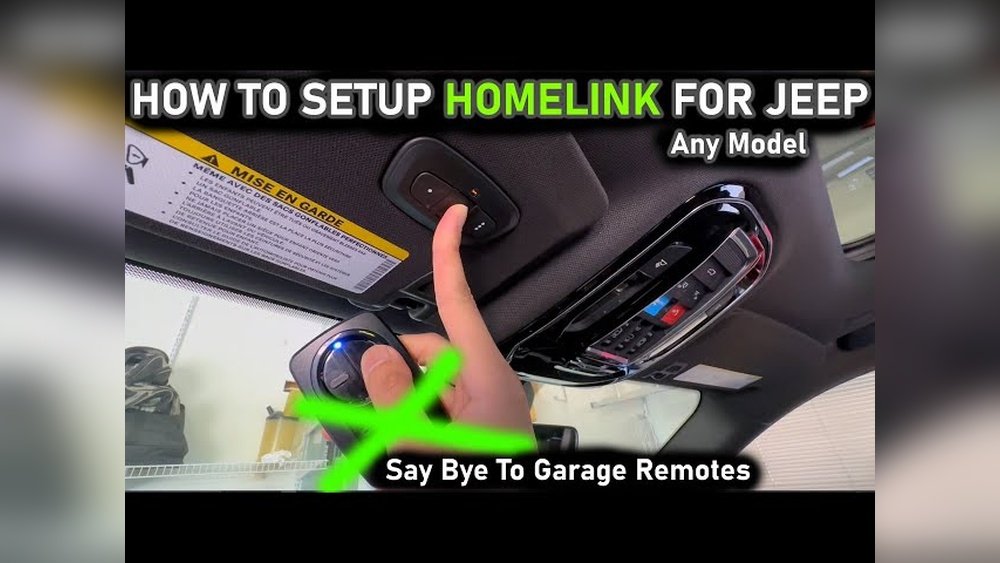
Most Jeep Grand Cherokee models have the garage door opener button in the overhead console. This console is above the rearview mirror. Look for small buttons labeled with numbers or symbols.
Look Near The Rearview Mirror
Some models place the button close to the rearview mirror. It may be integrated into the mirror frame or on a nearby panel. Scan the area carefully for small, easy-to-press buttons.
Inspect The Sun Visor
In some cases, the opener button is on the sun visor. Open the visor and check its surface. Buttons here are less common but still possible, especially in older models.
Consult The Owner’s Manual
The owner’s manual provides exact information on the button’s location. It also shows pictures and steps for programming. Keep the manual handy for quick reference.
Prepare The Garage Door Remote
Preparing the garage door remote is the first step to program your Jeep Grand Cherokee’s garage door opener. This step makes sure the remote is ready to connect with the vehicle’s system.
Having the remote ready saves time and avoids errors during programming. The process is simple and needs only a few actions.
Check The Remote’s Battery
Make sure the remote has fresh batteries. A weak battery can stop the programming from working. Replace old batteries with new ones to avoid problems.
Clear Previous Settings
Reset the remote to clear old codes. This step helps prevent conflicts with existing garage door systems. Press and hold the reset button until the light blinks.
Locate The Learn Button On The Remote
Find the learn or program button on your garage door remote. This button starts the connection process. It is usually small and may be inside the battery cover.
Enter Programming Mode In Your Jeep
Entering programming mode in your Jeep Grand Cherokee is the first step to set up your garage door opener. This mode allows your vehicle to communicate with the garage door system. The process is quick and straightforward. Follow the steps carefully to ensure successful programming.
Before starting, make sure your Jeep is turned on but in park. Keep your garage door remote nearby. The vehicle’s battery should have enough power for the process.
Locate The Garage Door Opener Buttons
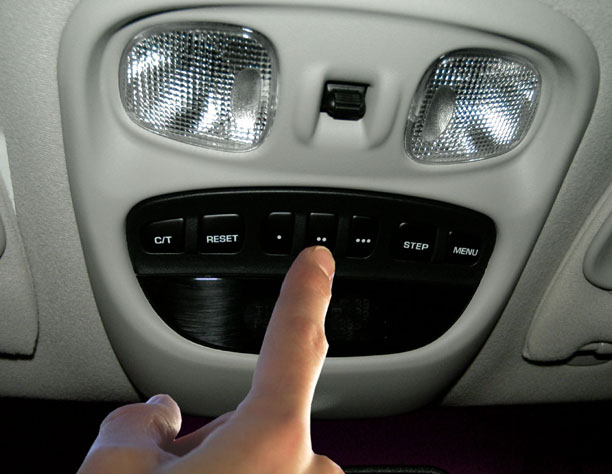
Find the three buttons usually located on the rearview mirror or overhead console. These buttons control your garage door opener. Identify the one you want to program.
Press And Hold The Desired Button
Press and hold the selected button for about 20 seconds. Watch for the indicator light to flash slowly. This light signals that the Jeep is ready to program.
Wait For The Indicator Light To Change
The light will change from slow flashing to rapid blinking. This means the vehicle entered programming mode. Release the button immediately after the change.
Prepare To Sync With The Garage Door Remote
Keep your garage door remote within reach. You will press it soon to sync it with your Jeep. This step must happen quickly after programming mode begins.
Credit: jeepspecs.com
Sync The Remote With Your Vehicle
Start by clearing the garage door opener’s memory in your Jeep Grand Cherokee. Next, hold the remote close to the vehicle’s built-in buttons and press both until the light blinks. This syncs the remote with your car for easy garage access.
Understanding The Sync Process
Syncing the garage door opener remote with your Jeep Grand Cherokee makes life easier. It lets you open and close your garage door from your vehicle. The process links the remote control to your car’s built-in system. This connection allows smooth communication between the two devices.
Before starting, make sure your vehicle is parked outside the garage. Keep the garage door closed during syncing. Also, have your garage door remote ready for programming.
Preparing Your Jeep For Syncing
Turn your Jeep’s ignition to the “On” position. Do not start the engine. Locate the HomeLink buttons on your rearview mirror or overhead console. These buttons control the garage door opener. Clear previous codes by pressing and holding two buttons until the indicator light blinks rapidly. This step prevents interference from old settings.
Programming The Remote To Your Jeep
Press and hold the desired HomeLink button in your Jeep. At the same time, press and hold the button on your garage door remote. Hold both buttons until the HomeLink indicator light changes from slow blinking to a steady light. This means the sync is successful.
Testing The Connection
Press the programmed HomeLink button in your Jeep. The garage door should respond by opening or closing. If it does not work, repeat the syncing steps carefully. Some models may need you to press the “Learn” or “Smart” button on the garage door motor before syncing. Check your garage door opener manual for details.
Test The Garage Door Opener
Testing the garage door opener after programming your Jeep Grand Cherokee is crucial. It confirms the setup works properly. This step ensures your door responds to the vehicle’s remote commands. It also helps catch any issues early.
Testing is simple and fast. It gives you confidence that your system is ready to use every day.
How To Perform The Initial Test
Start with your Jeep parked close to the garage door. Turn on the ignition without starting the engine. Press the programmed button on the visor control. Watch the garage door carefully. It should begin to open or close immediately.
What To Do If The Door Does Not Respond
Check if your vehicle is in range of the garage door sensor. Try pressing the button again. If there is no response, repeat the programming steps. Make sure you held the button long enough during setup. Sometimes, it takes a few tries to sync properly.
Testing Multiple Garage Doors
If you have more than one garage door, test each one. Program a different button for each door. Press each button to verify the correct door opens or closes. This prevents confusion and ensures smooth operation.
Final Safety Check
Confirm the door stops and reverses if it hits an obstacle. This protects people and property. Try pressing the button while the door is closing. It should stop and move back up. If not, adjust the safety sensors on the garage door.
Troubleshooting Common Issues
Troubleshooting common issues with your Jeep Grand Cherokee garage door opener can save time and frustration. Problems may occur during programming or later while using the system. Knowing simple fixes helps keep the opener working smoothly.
Many problems stem from basic mistakes or small technical glitches. Checking these first can often restore function quickly. Follow these steps to identify and solve frequent issues with your garage door opener.
Checking Battery And Remote Signal
Weak batteries often cause the remote to stop working. Replace the battery with a fresh one to test. Make sure the remote is within range of the garage door opener.
Resetting The Garage Door Opener
Resetting the opener clears previous errors. Find the reset button on the motor unit. Press and hold it for a few seconds, then try programming again.
Confirming The Programming Sequence
Programming requires following exact steps. Review the owner’s manual for your Jeep and the garage door opener. Repeat the programming process slowly and carefully.
Checking For Interference
Other wireless devices can interfere with signals. Move the remote away from other electronics. Turn off nearby devices to see if the signal improves.
Inspecting The Garage Door Opener Antenna
The antenna on the opener may be damaged or blocked. Ensure it hangs down freely and is not bent. A damaged antenna can weaken the signal.

Credit: www.youtube.com
Frequently Asked Questions
How Do I Program A Jeep Grand Cherokee Garage Door Opener?
Press and hold the garage door opener button in your Jeep. Then, press the remote control button until the indicator light blinks. Release both buttons, and your Jeep is programmed.
What Tools Are Needed To Program The Garage Door Opener?
No special tools are needed. Just your Jeep’s ignition key, the garage door remote, and the vehicle’s built-in garage door opener buttons.
How Long Does It Take To Program The Opener?
Programming usually takes about 5 minutes. The process is quick and simple, designed for easy use by drivers.
Can I Program Multiple Garage Doors In My Jeep?
Yes, you can program up to three different garage doors. Use the separate buttons inside the Jeep to control each door.
What If The Garage Door Opener Won’t Program?
Check if the remote battery is working. Also, make sure your garage door motor is compatible with your Jeep’s system.
Conclusion
Programming your Jeep Grand Cherokee garage door opener takes just a few easy steps. Follow the instructions carefully to avoid mistakes. Test the opener to ensure it works smoothly with your garage door. Keep the manual handy for future reference.
Regular checks help maintain proper function. This simple process saves time and adds convenience. Enjoy the ease of using your vehicle’s built-in garage door opener every day.